What should you look for when buying?
Directional dynamic USB or USB/XLR microphone
A good fit if: you mostly read alone, can stay close to the microphone and want to record directly via USB.
The trade-off: The short distance limits how much you can move, and won’t completely eliminate noise from the sides or rear.
Directional USB condenser microphone
A good fit if: you can quieten the room for a test recording and prefer controls that are easy to reach.
The trade-off: A test in your usual reading position is the best way to check whether the room sound and microphone direction work in your home.
XLR-only microphone
A good fit if: you already have a suitable audio interface or mixer for the analogue signal path.
The trade-off: An XLR connection alone isn’t enough for recording directly to a computer. You’ll need to plan for an interface or mixer and suitable cables.
The proportions below refer to consumers choosing a microphone for dramatic readings in a noisy home, grouped by their main reason for buying.
| Priority |
What to check when buying |
Who is it most relevant to? |
| Voice over household noise |
Check the microphone’s pickup direction and mount; record a quiet passage in your planned spot and listen back. |
If your main aim is to make your voice stand out against the usual sounds in the room, microphone direction is particularly important. Around 36% of consumers have this as their main priority. |
| Level control for changes in volume |
Check for an adjustable input level and a level meter or software monitoring; test your loudest exclamation. |
If you switch between quiet dialogue and powerful exclamations, you’ll want to avoid distortion without losing track of the quieter passages. Around 29% of consumers mainly want to control the level. |
| Simple setup |
Check the connection, computer compatibility, cable, mount and headphone output against the specific product listing. |
If you want to record on your computer without unexpected extra equipment, it’s important to have the right connection and a complete setup for your space. Around 21% of consumers have this as their main priority. |
| Freedom to move while reading |
Make a test recording in your usual reading position, including your head movements, then assess the microphone’s position and mount. |
For an expressive reading, you may want to move around rather than staying close to the microphone throughout. Around 14% of consumers prioritise this freedom of movement above all else. |
Joybuy products for voice recording
The products below range from wireless lavalier sets to USB and USB/XLR microphones, as well as a microphone kit for PC recording. Before choosing, check that the connection, mounting and microphone direction suit your reading position.
 No image available
DJI Mic Mini 2S (2 TX + 1 RX + Charging Case)
The product information describes a wireless transmitter system with clip or magnetic attachment for recording speech while on the move.
It lists two transmitters, one receiver, a charging case and internal 32-bit float recording. The stated two-level AI noise cancellation is a product feature, not proof of interference-free recordings in your own space.
View at Joybuy
 No image available
Moman M1CT Wireless Lavalier Microphone, USB-C, 1TX+1RX
According to the product description, this clip-on lavalier set is designed for voice recording and streaming. Before buying, check that the USB-C receiver is compatible with your device.
It lists one transmitter, one receiver, a stated range of 150 m in open areas and battery life of up to six hours. The description also mentions a noise reduction feature, but doesn’t specify how it will perform in a particular room.
View at Joybuy
 No image available
Yinkaer G10-P17 Podcast Microphone Kit
According to the product information, this kit pairs a condenser microphone with an audio mixer for voice recording on a computer or compatible mobile devices.
It lists a 3.5 mm microphone, an audio mixer and a sound card. The product description says it’s suitable for use with PCs, Macs and mobile devices. The noise reduction mentioned is also a product claim, not a guarantee of performance in a particular recording environment.
View at Joybuy
 No image available
FIFINE K688CT USB/XLR Dynamic Microphone Kit
This dynamic microphone has a unidirectional pickup pattern and is described as suitable for recording a single voice at close range. The included boom arm can make it easier to position on a desk.
According to the product description, the gain control and headphone monitoring are available in USB mode. The microphone controls aren’t active in XLR mode, and an XLR cable isn’t included. The desk clamp is designed for desks less than 2 inches thick.
View at Joybuy
 No image available
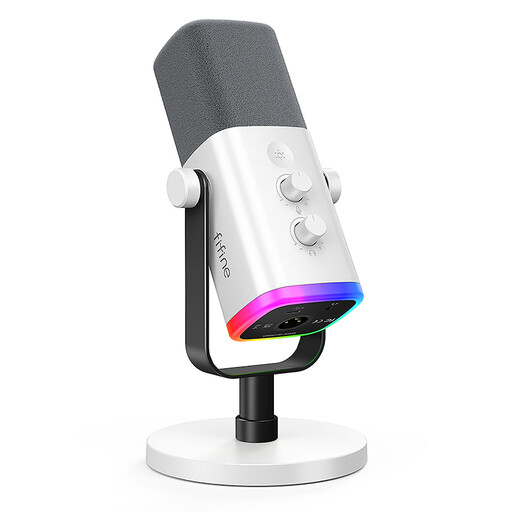
FIFINE AM8 White XLR/USB Dynamic Microphone
This dynamic microphone has a unidirectional pickup pattern and is described as suitable for voice recording on a computer. According to the product information, a desk stand and USB cable are included.
The description says the gain control and headphone monitoring are only available in USB mode. An XLR cable and microphone arm aren’t included.
View at Joybuy
Frequently asked questions
Will a dynamic microphone automatically block out neighbours, fans and echo?
No. Microphone direction, distance and the noise level where you’re recording still matter. Make a test recording of a quiet passage under your usual conditions and listen back.
How can I avoid distortion when I suddenly raise my voice?
Before recording a longer take, test the loudest passage you plan to read and keep an eye on the recording level. Audacity recommends lowering the recording level if it’s too high; its guide suggests aiming for a maximum peak level of around −6 dB when recording in Audacity.
Do I need an additional connection on my computer for XLR?
To record an analogue XLR signal on a computer, you’ll need a suitable audio interface or mixer with signal conversion. Alternatively, you can connect a hybrid microphone to a compatible device using its documented USB output; USB software features don’t automatically apply to the XLR signal path.
What should I bear in mind when setting up and looking after the microphone after several readings?
Mount the microphone according to its instructions, point the pickup side towards your mouth and check its position before recording. For plosive sounds, check the recommended pop filter, and store the cable and mount so you can set everything up securely again. The same microphone distance won’t suit every model.
Can I publish a recording of someone else’s text?
Not simply because you recorded the text yourself. German copyright law distinguishes, among other things, between private copies, the right to give a public performance and making a work available to the public. Under Section 53(6), private copies may not be used for public performance. Whether permission or an exception applies to the specific text and planned publication depends on the work and how it will be used.


