For sound in the room, you’ll need a headset whose microphone signal is compatible with the audio system you already have. If the meeting is mainly hosted online, a USB headset connected to a computer may be a better fit. A wireless set is worth considering if you want to move around while speaking. Check the receiver, frequency variant and local operating conditions, and test the speaker placement to avoid feedback.
Who is hosting the club meeting?
Hosting for an audience in the room
If you want everyone in the room to hear you through the speakers, the right connection and speaker placement matter more than computer features. Audio-Technica specifies separate microphone and headphone connectors for the BPHS2a.
Hosting while on the move
If you move around while speaking, a complete wireless set may be a better option than a cable. Sennheiser describes the XSW 1-ME3-E as a set with a bodypack transmitter and stationary receiver. Check the frequency variant and applicable conditions separately.
Hosting with online attendees
If you’re mainly hosting from a computer, the headset connection needs to work with your conference software. Jabra offers the Evolve2 40 SE in USB-A and USB-C, as well as mono and stereo versions.
What should you consider when choosing?
Wired connection to the audio system
A good fit if: you’ll stay close to the connection point and the system has an input that’s compatible with the microphone. The XLR connector on the Audio-Technica BPHS2a is for the microphone signal; the 6.3 mm connector is for the headphones.
Keep in mind: The cable limits how freely you can move, and the connectors need to match the system.
Wireless set with receiver
A good fit if: you move around while hosting and can connect the receiver to your existing audio system.
Keep in mind: The frequency variant, available channel and local conditions all need to suit your intended use. Germany’s Federal Network Agency allows use without registration when the parameters of the relevant general allocation are met. This doesn’t mean every channel will be free from interference.
USB headset connected to a computer
A good fit if: your voice is mainly intended for members joining online and you’re hosting from a computer.
Keep in mind: A USB port on a computer isn’t automatically a suitable microphone input for the room’s speakers. If you’re using the headset for a hybrid meeting, you’ll also need to check how the signal will reach the room.
| Priority |
What to check before buying |
Who is this important to? |
| Clear speech in the room |
Check that the microphone output matches the system input; test speaker placement during set-up. |
If I need everyone in a small room to hear me, having a microphone signal that works with the speaker system matters more than computer features. Around 42 % of consumers put room sound first. |
| Freedom to move |
For a wireless set, check everything included, the receiver output and the exact frequency variant. |
If I move around while hosting, I don’t want to be restricted by a cable. I need a set with a receiver that works with the audio system. Around 33 % of consumers prioritise freedom to move. |
| Online audio |
Check that the USB version matches your computer connection; for hybrid meetings, check the connection to the room speakers separately. |
If members joining online will mainly hear me through my computer, the headset needs to work with its connection and the conference software. Around 25 % of consumers put online audio first. |
Common mistakes when choosing
-
Looking only for a “wireless headset”
According to the manufacturer, the Sennheiser XSW 1-ME3-E and XSW 1-ME3-K have different frequency ranges. The product family name alone won’t tell you which version is right for your intended use.
Compare the full model suffix, transmitter and receiver, and check before use that the intended channel is available under the applicable local conditions.
-
Assuming a computer headset is the same as a room microphone
Jabra describes the Evolve2 40 SE as connecting to a computer via USB, while the Audio-Technica BPHS2a has a separate XLR microphone connector. Their signal paths aren’t automatically interchangeable.
First, work out whether you need to reach people in the room, online attendees or both. Then check that the required inputs and outputs match.
-
Overlooking speaker placement
Shure explains that sound from the speakers can be picked up by the microphone again and cause feedback if it’s amplified enough.
Before the meeting, test the microphone position and speaker placement with the system you’ll actually be using.
Key brands to consider
Sennheiser
The XS Wireless 1 Headmic sets may suit you if you need to move around while hosting and can connect a receiver to the audio system.
- Sennheiser says the XSW 1-ME3-E includes a headset, a bodypack transmitter and a stationary receiver.
- Sennheiser lists the frequency ranges for the E version as 821–832 and 863–865 MHz; the K version uses a different frequency range. Check the exact version and local operating conditions.
Shure
The BLX14/PGA31 is a wireless set to consider if you can connect a receiver to your existing audio system.
- Shure lists the PGA31 headset, BLX1 bodypack transmitter and an analogue BLX receiver as included components.
- Shure advises checking the specific wireless band variant against local requirements; this doesn’t mean every variant is automatically approved.
Audio-Technica
The BPHS2a is a wired headset that may suit a club audio system, provided the connections are compatible.
- Audio-Technica says the BPHS2a has a dynamic microphone with a hypercardioid polar pattern and a detachable 3.0 m cable.
- The XLR connector carries the microphone signal; the separate 6.3 mm stereo jack is for the headphones. Check that the connectors match your system.
Jabra
The Evolve2 40 SE may suit meetings hosted mainly from a computer, but it won’t automatically replace a wireless set connected to the room’s audio system.
- Jabra offers USB-A and USB-C, as well as mono and stereo versions; the connection needs to match the version you choose.
- Details about computer use don’t automatically mean the headset is suitable for playing sound through a club room’s speakers.
Joybuy products
The headsets below are designed for computer-based or online hosting. Check separately whether each one can connect to a room speaker system.
 No image available
Jabra Evolve2 75 wireless PC headset with charging stand, USB-C and Bluetooth adapter, Black
For hosting from a computer if you’re looking for a model specified as a PC headset.
The product name lists USB-C, a Bluetooth adapter and a charging stand.
Joybuy
 No image available
Jabra Engage 75 SE wireless stereo headset, DECT, with stand and cable, Black
For calls on a computer or desk phone, once you’ve checked how it connects to your existing system.
The product name lists DECT, USB-C to USB-A, a stand and a cable.
Joybuy
 No image available
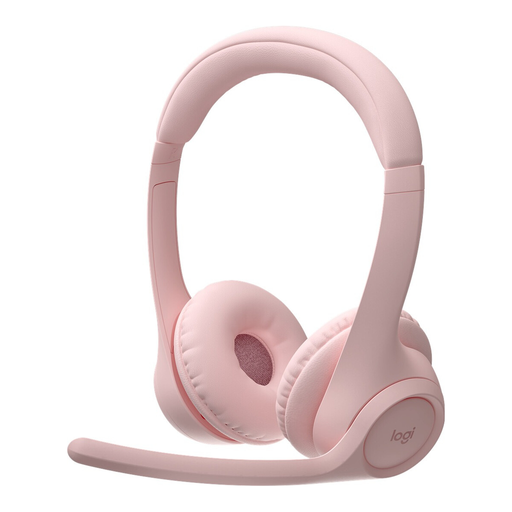
Logitech Zone 300 wireless Bluetooth headset with microphone, Pink
For online calls if you’re looking for a wireless Bluetooth headset to host from a computer.
The product name lists Bluetooth and a microphone.
Joybuy
 No image available
Logitech 960 stereo headset with USB connection and 2.4 m cable, Black
For hosting from a fixed position on a computer, if a wired headset suits your needs.
The product name lists a USB connection and a 2.4 m cable.
Joybuy
 No image available
Logitech H570e mono headset with USB connection, Black
For calls on a computer if you’re looking for a wired mono headset.
The product name lists a USB connection and a mono design.
Joybuy
Frequently asked questions
Do I need to register a wireless headset for a club meeting in Germany?
Not for every type of wireless use. According to Germany’s Federal Network Agency, use within a relevant general allocation is possible without registration or fees, provided its parameters are met. This doesn’t automatically apply to every frequency variant or channel; the conditions of the relevant allocation determine what’s permitted.
Can I connect a USB headset directly to the speaker system?
Not just because it has a USB connection. Jabra describes the Evolve2 40 SE as connecting to a computer via the USB connection that matches the version. The complete signal path to the room speakers needs to be suitable too.
How do I set up the headset to avoid feedback?
Position the microphone boom close to your mouth and start by testing the speaker placement at a low volume. Shure explains that sound from the speakers can be picked up again by the microphone and cause feedback. Testing with the system you’ll actually use helps you adjust the microphone position and orientation.
What ongoing considerations should the club keep in mind when choosing headsets?
If you choose a wireless set, include power for the bodypack transmitter in your planning. For the wired BPHS2a, Audio-Technica specifies a detachable 3.0 m cable. Check which replacement parts are available for the product you’re considering.


