Online class participants
If you’re joining a live class on your own device, make sure your voice comes through clearly to the other people on the call. A boom microphone can help you position the mic correctly.


If you’re joining an online class on your laptop, a headset with a boom microphone and a connector that fits your device is a sensible starting point. A wired model won’t need charging. If other people are taking part in the class in the same room, an open ear or an ambient mode available on the specific model can be useful. Strong noise isolation may not be the right choice in that situation. Check the connection, microphone and playback on your own device, and agree which devices in the room will transmit audio.
If you’re joining a live class on your own device, make sure your voice comes through clearly to the other people on the call. A boom microphone can help you position the mic correctly.
If you need to switch between voices in your headset and conversations around the table, an open ear or an explicitly available ambient mode may be important. A single-sided headset leaves one ear free.
If you use different seats or devices, check that the connector and what’s included are compatible with the available ports. If you’ll be carrying the headset around regularly, also consider its specific design and how it connects to each device.
First, work out whether you’ll hear the class through your headset or directly from the room as well. Then check the microphone, connection and fit on the device you’ll be using.
| What matters | What to check when buying | Who will find this especially important? |
|---|---|---|
| Clear speech from you | Boom microphone and mute function; test the microphone with the conferencing software you’ll use. | If I speak online regularly, I want my voice to come through clearly despite possible background noise. That’s why around 33% of consumers put clear voice transmission first. |
| Hearing conversations in the room | Check for a single-sided design or an ambient mode explicitly listed for the exact model. | If the teacher or other learners are sitting around the table with me, I want to hear what they’re saying as well as the online audio. Around 27% of consumers prioritise being able to hear conversations in the room. |
| Connection and setup | Check that USB-A, USB-C or the required wireless connection is compatible with your device; select the audio input and output before the class starts. | If I want to use the headset with a particular laptop or different devices, the connection needs to fit and the audio source should be easy to select. Around 20% of consumers pay particular attention to connectivity and setup. |
| Comfort | Consider the headband, ear cushions and single- or double-sided design; check the fit and pressure for yourself. | If I’m attending longer classes, I want a design that feels comfortable to wear. Around 20% of consumers put comfort first. |
Noise cancellation in the ear cups affects what the wearer hears. It doesn’t automatically tell you how clearly the microphone transmits speech. CHIP reported that the Jabra Evolve2 65 Flex microphone struggled with heavy background noise.
Assess the microphone and ear-cup ANC separately. If you expect background noise in the room, check the microphone performance of the exact model and, if possible, test it in similar conditions.
Highly isolating ear cups can make it harder to hear people speaking directly around the table.
Work out where the important voices in the class will come from. If you need to hear people in the room, consider leaving one ear free or choosing a model with an ambient mode.
Connections and features can vary between versions. According to HP, the 3.5 mm connection is only available on models 3315 and 3325 in the HP Poly Blackwire 3300 series.
Check the full model variant against your device’s port and the items included in the box.
If the available ports aren’t compatible, you may need a suitable adapter.
Several devices with active audio connections in the same room can cause echo. For this kind of setup, Zoom recommends disconnecting the computer audio connection on any additional devices.
Before the class starts, decide which device will handle the room audio and which other devices should disconnect their audio.
The Blackwire 3300 series offers wired UC headsets in single- and double-sided versions.
The wired IMPACT 100 series includes mono and stereo versions. The design is an important difference if you need to hear conversations in the room.
Zone Wired 2 for Business is a wired, double-sided option for classes where you’ll mostly be listening online.
The Evolve2 65 Flex is a foldable, wireless office headset that’s easy to carry around regularly.
The wired MMX 150 is a closed-back headset with an ambient mode specific to this model.
The selection below includes headsets for speaking in online classes, connecting to a computer and situations where it may also be important to hear people in the room.
 No image available
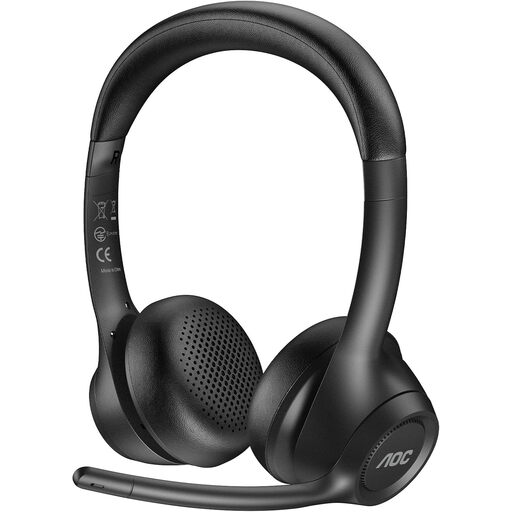
If you’d rather not be tethered by a cable while speaking, this wireless headset could be worth considering.
The product name specifies an ENC microphone.
 No image available
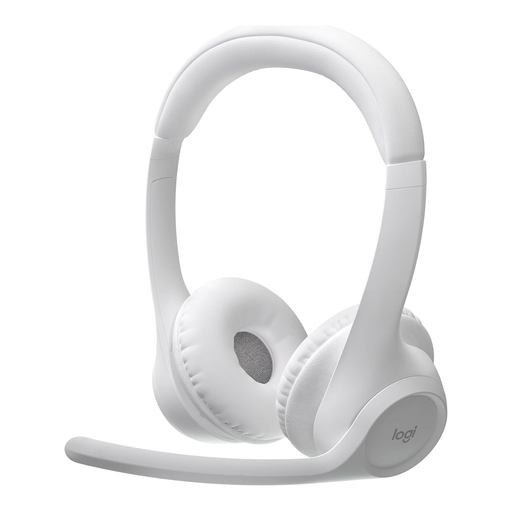
If you’d like to move around during class, a wireless headset could be a good fit. Check that it connects to your device.
The product name specifies Bluetooth, an over-ear design, multipoint connectivity, 20 hours of battery life and a noise-cancelling microphone.
 No image available
If you want to hear people speaking in the room as well as taking part in an online class, the mono design leaves one ear free.
The product name specifies a mono headset with a USB connection.
 No image available
If you want to hear online audio through both ear cups, this stereo headset is an option. It isn’t specifically designed to leave one ear free for conversations around the table.
The product name specifies USB and a noise-reducing microphone.
 No image available
If you’ll mostly be joining online classes from a fixed computer, a wired headset could be suitable. The stereo design isn’t specifically intended to leave one ear free for conversations in the room.
The product name specifies USB, a 2,4 m cable and a noise-reducing microphone.
No. Agree on the audio connections in advance. Zoom lists several devices with active audio connections in the same room as a possible source of echo and recommends disconnecting the computer audio connection on any additional devices.
Select your preferred audio source before joining. Microsoft Support explains that you can choose an audio source before joining a Teams meeting; the menu layout depends on the app and device.
No. ANC in the ear cups affects what the wearer hears; the microphone and voice transmission need to be assessed separately. CHIP reported that the Jabra Evolve2 65 Flex microphone struggled with heavy background noise.
Where the statutory requirements are met, § 437 BGB provides for remedies including repair or replacement and other rights relating to defects. Under § 438 BGB, the limitation period for claims relating to defects in such goods is generally two years from delivery. This is separate from a voluntary manufacturer’s warranty.
The Federal Network Agency explains that, by applying the CE marking, the manufacturer declares that it has carried out a conformity assessment procedure. The mark is not an independent assessment of microphone or sound quality.