Which microphone is right for you?

Solo speakers in echoey rooms

If you record meditations on your own, the key is how your voice is captured in relation to the sound of the room. Close, directional miking is a good place to start. Audio-Technica and Samson describe these features in some of their models.

Quiet speakers making long recordings

If you’re recording longer passages in a calm, quiet voice, monitoring your audio directly and keeping the microphone in a consistent position can help. Also watch out for plosives and the proximity effect. Audio-Technica and Shure list headphone outputs on some of their models.

Beginners planning for future connections

If you want to start recording straight to your computer but keep the option of adding an interface later, compare USB with USB/XLR models. Audio-Technica, Samson and Shure offer models with different connection options.

What should you look for when buying?

Dynamic USB or USB/XLR microphone

A good choice if: You want an easy way to record your voice up close on a computer.

Consider: You’ll need to speak into the correct side and keep your position consistent. For the dynamic USB microphones described here, Audio-Technica recommends speaking from within 200 mm.

Dynamic XLR microphone

A good choice if: You already have a suitable interface or want to build your recording setup around one.

Consider: The XLR signal needs to be converted using suitable equipment. For the SM7B, Shure recommends around +60 dB of clean preamp gain; this figure does not apply to all microphones.

Directional USB condenser microphone

A good choice if: You need more distance from the microphone and a test recording in your room sounds acceptable.

Consider: A cardioid polar pattern is no substitute for testing the microphone in your actual recording space. Room acoustics remain an important factor.

Priority What to check before buying Who is it important to?
Less room sound Check the polar pattern and the side you need to speak into; make a test recording in your chosen spot. If you want your voice to sound as clear as possible against the room sound in an untreated space, close, directional positioning matters. Around 36% of consumers put this first.
Monitor your voice Check whether the specific model has a headphone output and wind or pop protection. For long, quiet recordings, you may want to monitor your voice directly and keep an eye on plosives and the proximity effect. Around 29% of consumers prioritise this level of control.
Easy start on a computer Compare the USB connection, included cables and stand, and monitoring options for the exact model variant. If you want to get started without an additional interface, a direct computer connection and useful in-box accessories are key. Around 21% of consumers put ease of use first.
Room to expand later Check that the model actually has both USB and XLR, and that it works with the interface you plan to use. If you want to move to an interface later, having the right connection option matters more than the easiest possible start. Around 14% of consumers prioritise this flexibility.

Avoid common buying mistakes

  • “Dynamic” or noise processing is no substitute for testing in your room

    The distance from the microphone and reflections in your particular room affect the recording. Features such as a denoiser or voice isolation are claims made by the manufacturer, not proof that room echo will disappear.

    Speak from your intended recording position in your usual quiet voice, then listen back to your voice, pauses and background room noise.

    Allow time to find the right microphone position and, if needed, adjust your recording space.

  • Overlooking the rest of your setup with an XLR microphone

    An XLR connection alone won’t give you a direct digital connection to a computer. With the Shure SM7B, the available clean preamp gain is also important.

    Before you buy, check your interface, inputs and gain requirements, as well as what’s included with the specific model.

    A suitable setup may require an audio interface and, depending on the model, additional cables, a mount or enough preamp gain.

  • Ruling out or favouring condenser microphones across the board

    Being able to speak from further away can be practical, but it also makes the acoustics of an untreated room more important.

    If you need more distance, compare a recording made in your usual speaking voice in the space where you’ll actually be recording.

An overview of key microphone brands

Audio-Technica

The ATR2100x-USB and ATR2500x-USB differ in a number of ways, including their dynamic and condenser technologies.

  • For the ATR2100x-USB, Audio-Technica lists a cardioid pattern, USB/XLR, direct headphone monitoring, and an included cable and desktop stand.
  • The ATR2500x-USB is a condenser model. Its specifications can’t tell you for certain how it will sound in a particular room.

Samson

The Q2U combines USB/XLR connectivity with accessories to help you get started.

  • For the Q2U, Samson lists a cardioid polar pattern, headphone output, windscreen, desktop stand and cables.
  • Its suitability for untreated rooms is a manufacturer description, not the result of an independent comparative test. You should check the microphone position for yourself.

Shure

The MV7+ offers USB-C and XLR, while the SM7B is a separate dynamic XLR option.

  • Shure describes the MV7+ as having Auto Level, a denoiser and a headphone output.
  • These manufacturer claims don’t prove that room echo will disappear. For the SM7B, Shure recommends around +60 dB of clean preamp gain.

Logitech G / Blue

The Yeti is a USB alternative with several selectable pickup patterns.

  • For the Yeti, Logitech lists a headphone output, gain control and several polar patterns.
  • These options alone don’t prove that it’s suitable for reducing unwanted room echo. The Yeti GX and Yeti 2 are different models and should not be confused with the Yeti.

Joybuy products for voice recording

This selection includes dynamic USB/XLR microphones for close-up voice recording, USB condenser models and a wireless set. For quiet solo recordings, test the positioning in your room first.

FIFINE K688CTW dynamic USB-C/XLR microphone with boom arm, white

FIFINE K688CTW USB-C/XLR Dynamic Microphone, White

Described as a good option for close-up voice recording, with a direct computer connection and the added option of XLR.

USB-C and XLR; headphone volume control and mute. Recommended speaking distance: 2 to 6 inches. A boom arm and USB cable are included; an XLR cable is not.

View at Joybuy

FIFINE AM8 dynamic USB/XLR microphone with desktop stand

FIFINE AM8 USB/XLR Dynamic Microphone

Described as a good choice for voice recording on a computer, with a headphone output and an additional XLR signal path.

USB-C and XLR, monitoring control, mute and windscreen. Recommended speaking distance: 2 to 6 inches. A desktop stand is included; an XLR cable and boom arm are not.

View at Joybuy

Razer SEIRÉN V3 MINI White USB microphone

Razer SEIRÉN V3 MINI White

A USB condenser microphone for directional voice recording on a computer.

USB-C, supercardioid pattern, mute, adjustable stand and built-in shock absorption.

View at Joybuy

JBL Quantum Stream Studio USB condenser microphone

JBL Quantum Stream Studio USB Condenser Microphone

Described as a good choice for voice recording, with a USB connection and direct monitoring.

The product description lists a cardioid mode for solo recording, several selectable polar patterns and a mute function.

View at Joybuy
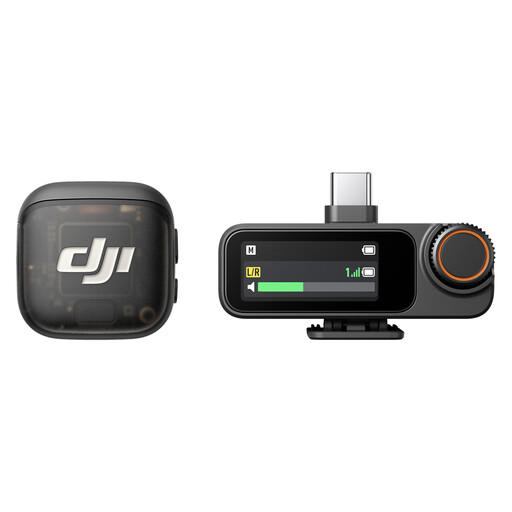
DJI Mic 3 set with two transmitters, one receiver and charging case

DJI Mic 3, 2 TX + 1 RX + Charging Case

A wireless set with two transmitters and one receiver for audio recording.

The product details list USB-C, 2.4 GHz wireless transmission and internal storage in the transmitters. A charging case is included.

View at Joybuy

Frequently asked questions

Does the microphone need to be directly in front of my mouth?

Not all models need to be positioned in the same way. For the dynamic USB microphones described here, Audio-Technica recommends speaking directly in front of the capsule and within 200 mm. At your usual speaking volume, check that the distance and angle sound clear without causing plosives or excessive bass.

Do I need additional equipment for an XLR microphone?

For computer recording, an analogue XLR signal needs to be converted using suitable equipment, usually an audio interface or a suitably equipped mixer. With the SM7B, you should also check the available clean preamp gain; Shure recommends around +60 dB.

What should I bear in mind after buying, and if there’s a fault?

Listen to a recording made in your planned recording space, at your usual speaking volume, using headphones. For consumer purchases in Germany, the statutory warranty against the seller is separate from any voluntary guarantee. Many online purchases of goods are generally covered by a 14-day withdrawal period from the date of receipt, although exceptions may apply. The Verbraucherzentrale explains these rights and the conditions that apply to each.

Can I simply record someone else during a meditation or test recording?

Not without considering the rules: Section 201 of the German Criminal Code covers the unauthorised recording of another person’s non-public speech. If other people will be audible or their non-public words could be recorded, check that you have permission to make the recording first. This provision is not a special licensing requirement for the microphone itself; the relevant source is the text of the law published by the Federal Ministry of Justice and the Federal Office of Justice.