Which approach is right for you?

Solo narrators dealing with household noise

For people who can speak close to the microphone from a fixed position and want to check that their voice remains clear above everyday household sounds. Audio-Technica describes the ATR2100x-USB as having a cardioid pickup pattern; RØDE recommends keeping your mouth around 5–10 cm from the PodMic USB.

People looking for a simple computer setup

For people who want to record directly on a computer, monitor their voice through headphones and keep their setup straightforward. Audio-Technica documents USB and headphone connections for the ATR2100x-USB; Sennheiser also lists this monitoring option for the Profile USB.

Storytelling sessions with several speakers

For people who want to record several participants in one session and are deciding between a shared track and separate microphone positions. Audio-Technica notes that using two USB microphones at the same time is not straightforward; CHERRY describes the UM 6.0 ADVANCED as having a mode that picks up sound from all directions.

What should you look for when buying?

Directional dynamic microphone for one voice

A good fit if: you mainly narrate alone and can position the microphone close to your mouth.

Consider: A close position limits your freedom to move and needs to stay as consistent as possible while you record.

USB condenser microphone for a more flexible speaking position

A good fit if: positioning the microphone close to you is impractical and a test recording from your chosen spot sounds good.

Consider: A greater distance can introduce more room ambience into your recording.

One shared microphone for several narrators

A good fit if: one shared track is enough and everyone sounds clear from their chosen seat.

Consider: A mode that picks up sound from all directions will also capture noise from other directions.

Priority What to check before buying Who is it important to?
Clear speech despite background noise Check the speaking side and pickup pattern of the specific model; make a test recording from your chosen spot. If I’m narrating alone, I want to record my voice clearly despite the usual household noise. Around 42% of people put controlling background noise first.
Easy connection Check that the USB connection and cable work with your recording device; for XLR, make sure you have a suitable input or an audio interface. People who want to record directly on a computer and keep their setup simple pay particular attention to choosing the right connection. Around 25% of people have this as their main priority.
Several speaking voices Decide in advance whether one shared track will be enough; test every seat with the usual background noise. For a storytelling session, it matters whether everyone sounds clear from their seat. Around 17% of people prioritise recording several voices.
Monitoring while recording Check the headphone connection and controls in your intended setup; record a short passage and listen back. People reading longer passages want to be able to monitor levels and their voice during the session. Recording controls are the top priority for around 16% of people.

Common assumptions to avoid

  • Assuming “noise cancellation” guarantees a noise-free recording

    A digital feature described by the manufacturer does not tell you how a recording will sound in your flat. In a review of the Shure MV6, COMPUTER BILD also notes audible background noise; that result cannot be applied to other models or rooms.

    Make a test recording with typical household sounds and from your intended speaking distance before relying on a particular feature.

  • Choosing one microphone for several voices without testing the seating positions

    According to CHERRY, the omnidirectional mode on the UM 6.0 ADVANCED picks up sound from all directions. This means unwanted noise can make its way into your recording too.

    Test all the planned speaking positions, then decide whether one shared track will work for your group.

    Separate microphone positions may take more effort to set up. Check that you also have the necessary inputs and recording setup.

  • Assuming similarly named models or variants are the same

    PodMic and PodMic USB are different model names. The Shure MV6 featured in the best-of list is also not the same as the MV7+; connections, features and included accessories can vary by model and variant.

    Before buying, check the full model name, connections and included accessories for the specific variant on offer.

An overview of leading microphone brands

Audio-Technica

According to Audio-Technica, the ATR2100x-USB is designed for close-up solo voice recording, with USB or XLR connections.

  • For this model, Audio-Technica lists a cardioid pickup pattern, headphone connection, USB and XLR outputs, cables and a desktop stand.
  • Directional recording requires the microphone to be positioned correctly; test it with the actual noise levels in your recording space.

RØDE

According to RØDE, the PodMic USB offers a USB-C connection as well as an XLR option for close-up voice recording.

  • RØDE recommends keeping your mouth around 5–10 cm from the PodMic USB; the model also has a headphone output and pop filter.
  • The instructions say the microphone needs a suitable stand or arm. Make sure a close-up position suits the way you plan to narrate.

Shure

According to Shure, the MV7+ combines USB-C, XLR, headphone monitoring and digital features for a single speaking position.

  • Shure describes the MV7+ as having Auto Level and a real-time denoiser.
  • These manufacturer claims do not independently show how the features perform with the noise in a particular flat. Stand options vary by variant.

Sennheiser

According to Sennheiser, the Profile USB is a condenser microphone for a USB recording setup, where it’s worth checking the room sound in advance.

  • Sennheiser lists a cardioid pickup pattern, gain and mix controls, a headphone control and a desktop stand.
  • With a greater speaking distance, room ambience may become more noticeable. Make a test recording from your chosen spot to see whether it’s suitable.

CHERRY

According to CHERRY, the UM 6.0 ADVANCED offers different pickup patterns for one speaking position or a shared recording session.

  • CHERRY lists directional and omnidirectional modes, as well as USB and a headphone connection.
  • Omnidirectional mode picks up sound from all directions, which can be a drawback when there’s background noise.

Microphones for recording narration at Joybuy

These product suggestions mainly include directional USB or USB/XLR microphones for a fixed narration position, along with a directional microphone for video recording.

FIFINE AM8 USB/XLR dynamic microphone

FIFINE AM8 USB/XLR dynamic microphone

This dynamic USB/XLR model is worth considering if you record from a fixed position at your computer.

The product title lists a headphone connection and mute button. The product description says a separate XLR cable is required for the XLR connection and is not included; the supplied C-clamp is designed for desks under 2 inches thick.

View at Joybuy

FIFINE K688CT USB/XLR dynamic microphone kit

FIFINE K688CT USB/XLR dynamic microphone kit

This dynamic USB/XLR model is an option if you want to record on a computer and use a microphone kit.

The product title lists a boom arm, mute button, headphone connection and gain control. The product description says a separate XLR cable is required for the XLR connection and is not included.

View at Joybuy

USB condenser microphone with cardioid pickup pattern

USB condenser microphone with cardioid pickup pattern

This USB condenser microphone may be worth considering for computer recording with a directional microphone position.

The product title lists a cardioid pickup pattern and headphone monitoring. Test your recording with typical household noise rather than assuming it will reduce noise by a specific amount.

View at Joybuy

Yinkaer G10-P15-XB podcast microphone kit

Yinkaer G10-P15-XB podcast microphone kit

This microphone kit is worth considering if you want extra audio controls for recording at a desk.

The product title lists an audio mixer, a 3.5 mm condenser microphone and a boom arm. Check that this setup works with your recording device and the space you have available.

View at Joybuy
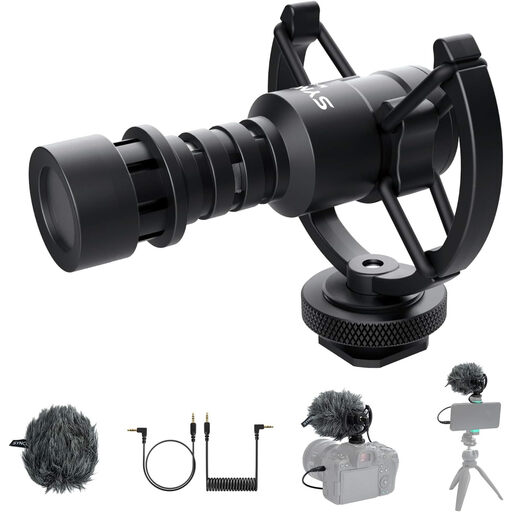
SYNCO M1S directional external video microphone

SYNCO M1S directional external video microphone

The product title says this directional external microphone is designed for video recording; check that the connection works with your recording device.

The product title lists a cardioid pickup pattern. The description also mentions a shock mount and TRS and TRRS cables.

View at Joybuy

Frequently asked questions

How should I set up a microphone for a single narrator?

Point the speaking side towards your voice and test the position with the noise you actually encounter. For the PodMic USB, RØDE recommends a distance of around 5–10 cm; don’t assume this measurement will work for other microphones without testing it first.

Can I plug an XLR microphone straight into a USB port?

No. An analogue XLR output is not a USB connection. To connect an XLR microphone to a computer, you need a suitable microphone input or an audio interface. If you have a USB/XLR model, you can use its USB connection instead.

What should I bear in mind before and during a longer recording?

Record a short passage from your planned position and listen back through headphones. Check that your distance from the microphone, recording level and microphone position stay consistent while you read. Headphone and level controls are listed for the ATR2100x-USB and Profile USB, among other models.

Can I record other people’s voices during a private storytelling session without asking?

Not without more ado: Section 201 of the German Criminal Code (StGB) makes it a criminal offence to record another person’s private spoken words without authorisation, as well as certain uses of such a recording. Check with everyone involved before recording. Whether other data protection obligations apply to your planned use or publication depends on the specific circumstances; the Federal Commissioner for Data Protection and Freedom of Information explains the requirements for consent.

Who should I contact if my microphone is faulty?

Your statutory rights are against the seller and are separate from any voluntary guarantee. According to the Verbraucherzentrale, if a product is faulty, you should first ask for it to be repaired or replaced.