What should you look for when buying?
First, check that you can speak close to the microphone and position it securely at your desk. Then compare the space it needs, its connections and monitoring options.
| What matters |
What to check before buying |
Who should pay particular attention? |
| Keeping your voice clear despite background noise |
Check the polar pattern, speaking direction and how close you can get to the microphone. Listen to a test recording made during normal use of the desk. |
If people are working or talking nearby, I want to hear how clearly my voice comes through at my actual workstation. Around 36% of consumers put voice clarity despite background noise first. |
| Limited desk space |
Check there’s room for a stand or clamp and that you can position the microphone where you sit. Check what’s included in the box. |
If I need to set up and pack away the microphone at a shared desk, I want an easy-to-use setup that fits the space. Around 29% of consumers prioritise the space it takes up and how easy it is to set up consistently. |
| Simple computer connection |
Check the USB port on your computer and which cables are included. For XLR, allow for a suitable audio interface or mixer to connect to your computer. |
If I want to record directly on my computer without an additional audio interface, a simple connection is key. Around 21% of consumers mainly look for an easy computer connection. |
| Monitoring and future upgrades |
Check the headphone socket and connection options on the specific model, then listen back to a short section of your script. |
If I want to check my recording before a longer session or might use an XLR setup later, I need suitable monitoring and connection options. Around 14% of consumers put these requirements first. |
Microphones at Joybuy
This selection includes microphones for recording a solo script at a shared desk, including desktop models and a lavalier microphone. For each model, check that its positioning and pickup pattern suit your space.
 No image available
FIFINE K688CTW USB/XLR microphone with boom arm
The adjustable arm lets you position the microphone to suit your seat when recording speech.
The product name lists USB and XLR connections, a headphone socket, mute function and volume control. The desk clamp is designed for surfaces less than 2 inches thick; an XLR cable isn’t included.
Joybuy
 No image available
FIFINE AM8 USB/XLR microphone
The listed desktop stand is a good choice if you want to place the microphone directly at your recording spot.
The product name lists USB/XLR, a mute function and a headphone socket. According to the product details, an XLR cable and boom arm aren’t included.
Joybuy
 No image available
Razer SEIRÉN V3 MINI White
This compact USB microphone has an adjustable tilt stand, so you can place it on a desk and angle it as needed.
The product details list USB-C, a supercardioid polar pattern and tap-to-mute. Test it at your actual workstation before recording longer passages.
Joybuy
 No image available
JBL Quantum Stream Studio
A cardioid polar pattern is useful when recording a solo script at a desk, and direct monitoring can help when listening back to a test recording.
The product name lists USB-C, a mute function and monitoring. The product details list a cardioid polar pattern as an option; set up the recording for your particular workstation.
Joybuy
 No image available
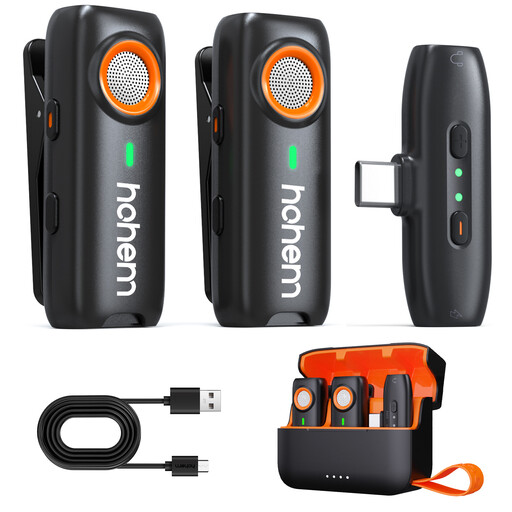
Hohem Wireless Lavalier Microphone
This body-worn lavalier microphone doesn’t need a desktop stand, making it an alternative if you have limited desk space.
According to the product details, its capsule picks up sound from every direction. At a shared workstation, take particular care not to record other people’s private conversations without permission.
Joybuy
Frequently asked questions
How should I position a microphone at a shared desk?
Point the front of a cardioid microphone towards your mouth, then listen to a test recording made at your chosen spot. RØDE recommends a distance of around 5–10 cm for the PodMic USB only; don’t assume the same distance will work for other models.
Can I connect an XLR microphone directly to my computer’s USB port?
Not with an XLR output alone: to record via XLR on a computer, you’ll need a suitable audio interface or mixer. Alternatively, a model with both types of connection and a USB output can be connected directly via USB.
What should I check before recording a longer script?
Record a representative passage and, using a headphone socket if available, listen for the level, popping sounds and voices in the background. For a quiet signal from the PodMic USB, RØDE specifically recommends checking the input level, distance and speaking direction.
Can I record other people’s conversations at a shared workstation?
Section 201(1) of the German Criminal Code (StGB) makes it a criminal offence to record another person’s non-public spoken words without authorisation. Don’t record your script in a way that captures such conversations without permission; if necessary, move elsewhere or record at a different time. Whether you’re authorised to do so in a particular case depends on the circumstances.
Does a CE mark prove that a microphone blocks out voices from the next desk?
No. For products that require CE marking, the manufacturer uses it to declare that the product meets the relevant EU requirements. The European Union points out that there’s no central EU body issuing general CE certificates; the mark doesn’t prove that a microphone is suitable for blocking out voices from the next desk.


