If you can hear room echo, a directional dynamic microphone positioned close to you is a sensible starting point, but it won’t eliminate the echo. With compatible microphones, USB lets you connect directly to your computer, while USB/XLR also gives you the option of using an XLR connection. A USB condenser microphone could also work if a test recording made at your actual speaking position sounds dry enough to you.
Who this microphone guide is for
Speakers recording in a room with noticeable echo
You’re recording the script on your own and can hear room reflections or background noise in your test recordings. Getting the microphone position right and recording directionally are your priorities.
First-time USB users
You want to record the script directly on your computer and keep your setup simple, without a separate audio interface.
Speakers planning to upgrade their setup
You want to start recording straight away, but would like to keep the option of using an XLR interface later on.
What to consider when it comes to echo and connections
First, check whether a test recording made at your intended recording position sounds clear. Then choose the connection and features you’ll actually need when recording your script.
| What to consider |
What to check before buying |
Who it matters most to |
| Room sound and clarity |
Check the polar pattern and maintain a close, consistent speaking distance; listen to a test recording made in the room where you’ll be speaking. |
When I’m speaking on my own in an untreated room, I want my voice to remain clear despite the room echo. Around 36% of consumers put minimising distracting room sound first. |
| Easy computer connection |
Check that the microphone connects to your computer via USB and find out which cable the specific model requires. |
For recording on my computer, I want an easy connection without a separate interface. Around 29% of consumers put a straightforward USB connection first. |
| Monitoring while recording |
Check for a headphone output and easy-to-use controls; listen to passages with lots of plosive sounds as a test. |
When recording longer passages, I want to catch pops and other audible issues as they happen. Around 21% of consumers prioritise being able to monitor their recording as they go. |
| Upgrading your setup later |
Check whether the specific model has USB and XLR connections, and whether you’ll need an interface for XLR. |
If I want to switch to an interface later without replacing my microphone, having an additional XLR option matters to me. Around 14% of consumers prioritise being able to upgrade their setup later. |
Avoid common buying mistakes
-
Assuming a directional microphone will eliminate room echo
Even a directional microphone will pick up your voice and the room sound at your actual speaking position. Its design doesn’t replace correct positioning or guarantee that the echo will disappear.
Before recording the whole script, record a short, representative passage where you plan to speak and listen back to it.
-
Choosing USB, XLR or USB/XLR based on the name alone
An XLR output won’t connect the microphone to your computer by itself. You’ll need a compatible interface for this recording setup; compatible USB microphones can connect directly to your computer.
First decide which recording device you’re using now and whether you plan to switch to XLR later. Then check the connections and what’s included with the specific model.
-
Expecting a pop filter or software processing to fix every problem
Features and test results vary by model. COMPUTER BILD reported audible popping with the RØDE NT-USB Mini it tested; a processing feature on another model doesn’t tell you anything about this.
When making a test recording, try some loud sentences and ones with lots of plosive sounds, then listen back straight away.
Suitable brands and product ranges
Audio-Technica
The ATR2100x-USB is a directional dynamic handheld microphone with USB and XLR connections, designed for voice-over and computer recording.
- Audio-Technica lists a headphone output, desktop tripod and USB and XLR cables as included in the package described.
- The cardioid pattern can reduce sound coming from the sides and rear, but it doesn’t guarantee an echo-free recording.
RØDE
The dynamic PodMic USB offers USB and XLR. The compact NT-USB Mini, by contrast, is a USB condenser microphone; the two models have different priorities.
- RØDE lists direct headphone monitoring and a pop filter for the PodMic USB, and a desktop stand and USB operation for the NT-USB Mini.
- COMPUTER BILD reported audible popping with the NT-USB Mini it tested. Manufacturer claims about sound aren’t independent comparative test results.
Shure
The MV6 is a dynamic USB microphone. The MV7+ offers USB-C and XLR, while the SM58 is an XLR-only option.
- Shure describes the MV6 as offering digital processing and headphone monitoring.
- COMPUTER BILD could still hear background noise and some harsh sibilance with the MV6 it tested. This observation applies to the model tested.
Samson
The dynamic Q2U offers USB and XLR, and could be a good option if you’re looking for a starter kit with accessories.
- Samson lists a desktop stand, windscreen, USB and XLR cables, and a headphone output.
- Check the connections and what’s included in the specific offer; manufacturer claims about suitability for untreated rooms don’t replace a test recording.
CHERRY
The UM 6.0 ADVANCED is a USB desktop microphone with switchable cardioid and omnidirectional patterns. For recording a single voice in an untreated room, the cardioid setting is the one to consider.
- CHERRY lists a gain control, headphone output and shock mount.
- COMPUTER BILD described the voice as sounding slightly muffled in its test; this observation shouldn’t be taken as a general comment about other models from the brand.
Microphones for voice recordings at Joybuy
The models below offer USB or USB/XLR connections, as well as USB condenser and wireless lavalier options for voice recording. If you’re recording in an untreated room, make a test recording to see how each model sounds in your intended position.
 No image available
FIFINE AM8 USB/XLR dynamic microphone
For close-mic voice-over recording on a computer; the product description recommends a speaking distance of 2 to 6 inches.
Unidirectional dynamic capsule; USB and XLR connections; desktop stand and headphone output. An appropriate audio interface or mixer is required to connect via XLR to a computer.
View at Joybuy
 No image available
FIFINE K688CT podcast microphone kit, USB/XLR
For close-mic voice-over recording using the adjustable microphone arm; the product description recommends a speaking distance of 2 to 6 inches.
Unidirectional dynamic capsule; USB and XLR connections; microphone arm and headphone output. An interface or mixer is required for XLR operation; the description states that an XLR cable isn’t included.
View at Joybuy
 No image available
JBL Quantum Stream Studio USB-C condenser microphone
This USB condenser microphone could be an option if a test recording made in your intended position sounds dry enough to you.
USB-C connection; selectable cardioid pattern alongside other recording patterns; direct monitoring and mute function listed.
View at Joybuy
 No image available
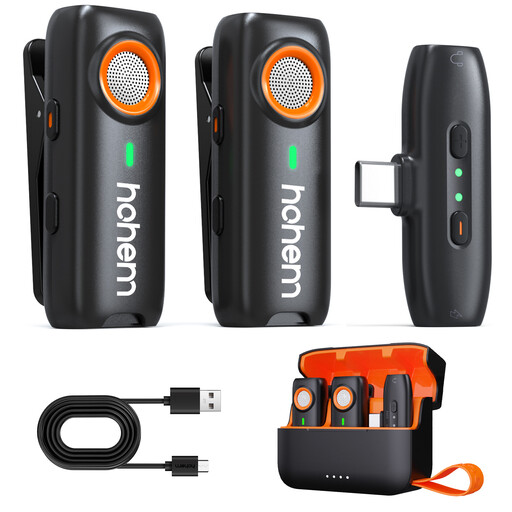
hohem wireless lavalier microphone with 3-level DSP
A wireless lavalier option for voice recording; make a test recording to check how it sounds in your untreated room.
The product details list three DSP noise reduction modes, 7.5 hours of battery life per transmitter and up to 20 hours with the charging case.
View at Joybuy
 No image available
Moman M1CXT wireless lavalier microphone, USB-C, 2TX+1RX
This set is described as having two transmitters and one receiver, making it suitable for recording two people. Its omnidirectional microphones are less suited to the preferred directional recording of a single voice in an untreated room.
USB-C and monitoring connections are listed; the product description states that it can be charged while in use.
View at Joybuy
Frequently asked questions
Do I need to buy a dynamic microphone to record a spoken tour script?
No. If you can hear room sound, a directional dynamic microphone is a sensible starting point, but speaking distance and the room also affect the result. A condenser microphone could work if a test recording made in your intended position sounds dry enough to you.
How can I check the microphone position before recording the whole script?
Record a short passage with the microphone in the position you intend to use, then listen with headphones for echo, background noise and popping. Keep your speaking distance as consistent as possible when comparing recordings; direct monitoring is only available on suitably equipped models.
Do I need any extra equipment to use XLR with a computer?
Yes. You’ll need a suitable device, such as an audio interface, to record via XLR on a computer. Audio-Technica describes USB as a direct way to send a microphone signal to a computer without a separate interface; the cable and stand included depend on the model and package.
Does a pop filter prevent room echo?
No. A pop filter and room echo relate to different audible problems; a pop filter won’t automatically make a recording echo-free. When making a test recording at your actual speaking position, try passages with lots of plosive sounds and listen to the room sound too.
Can I put an old electrical microphone in my household rubbish?
No. The German Environment Agency advises that waste electrical equipment must be collected separately. Take it to a designated collection point and check the site’s acceptance requirements for the device.


