What should you look for when buying?
First, check that you can position the microphone effectively from where you usually speak. Then choose a connection that works with your computer, recorder or mixer.
| What matters |
What to check before buying |
Who will find this especially important? |
| Clear speech |
Polar pattern and speaking side; make a short test recording from the intended position. |
If there’s other noise or echo in the rehearsal room, I want to record my introduction clearly and close to the microphone. Around 33% of consumers prioritise speech clarity in a lively room. |
| The right connection |
Microphone output and device input; any mixer, interface and cable you’ll need. |
I want to connect the microphone to my existing computer or XLR recording setup without making unnecessary changes to my workflow. Around 25% of consumers prioritise choosing a USB or XLR connection that suits their existing setup. |
| Flexible speaking positions |
Handheld microphone or suitable mounting; test the position and distance at every intended speaking location. |
If several people are speaking one after another, I want to be able to position the microphone for each voice. Around 25% of consumers prioritise flexible positioning. |
| Monitoring and levels |
Headphone socket and accessible controls; features that work with the connection you’ll actually use. |
When recording, I want to monitor my voice directly and keep an eye on the levels. Around 17% of consumers particularly value this control during recording. |
Joybuy products for voice recording
This selection includes microphones with USB and/or XLR connections for permanent speaking positions, as well as wireless lavalier systems for compatible USB-C devices. For each model, check that the connection, polar pattern and accessories suit your room and recording setup.
 No image available
FIFINE AM8 USB/XLR microphone
For a permanent speaking position with a direct USB recording setup or an existing XLR recording device.
Dynamic microphone with cardioid polar pattern, USB and XLR connections, desktop stand and headphone socket. Monitoring with a volume control is described for USB mode. An XLR cable is not included, according to the description.
View at Joybuy
 No image available
Dynamic USB/XLR microphone set with desktop stand
For a permanent recording position where USB and XLR connections and headphone monitoring are important.
The description lists a cardioid polar pattern, USB-C and XLR outputs, gain control, a headphone socket with real-time monitoring, and a desktop stand.
View at Joybuy
 No image available
USB condenser microphone for PC
For voice recording on a compatible PC when a USB connection and headphone monitoring suit your planned setup.
Condenser microphone with USB connection, mute button and headphone socket. A Type-C adapter is listed for this set.
View at Joybuy
 No image available
Moman MC1(C) wireless USB-C lavalier microphone
For voice recording with a compatible USB-C phone or computer, when a wireless lavalier system suits your recording setup.
2.4 GHz set with one transmitter and one receiver, plus a USB-C receiver. The description lists several recording modes, including a noise-reduction mode, and a charging case.
View at Joybuy
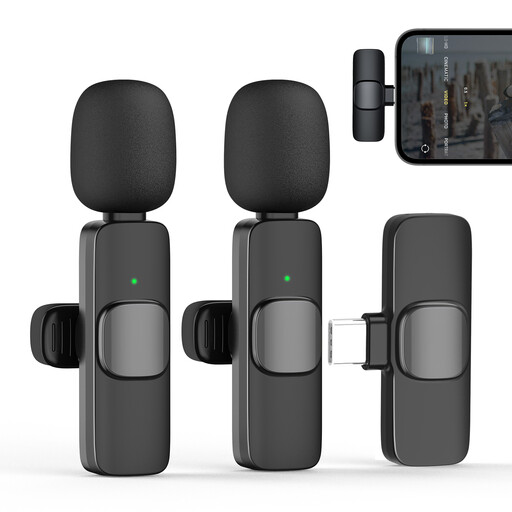 No image available
Moman CP1X(C) wireless USB-C lavalier microphone
For voice recording with a compatible USB-C device, provided the omnidirectional pickup suits your surroundings and the speaking position you want.
2.4 GHz set with one transmitter and one receiver, USB-C receiver and windscreen. Its stated 360° omnidirectional pickup isn’t focused on a single speaking direction.
View at Joybuy
Frequently asked questions
Can I record directly to my laptop via USB with an XLR-only microphone?
No, a standard USB port alone isn’t enough. For an XLR setup, you’ll need a recording device with a suitable microphone input, such as an audio interface or mixer. If you have a USB/XLR model, you can use its USB output instead. Audio-Technica Europe and Sennheiser, among others, list the relevant connections for their respective models.
How should I position the microphone for an introduction?
Point the speaking side towards your mouth, then test the distance, your usual speaking volume and the actual room noise with a short recording. RØDE recommends a distance of around 5–10 cm for the PodMic USB only; don’t assume the same distance will work for other models.
What extra accessories should I check before buying?
Check whether your setup uses an existing interface or mixer, and whether you already have suitable cables, a stand and headphones or whether they’re included in the specific package. Accessories vary by model, including those from Audio-Technica Europe, RØDE and Samson.
Can I simply record other people talking in the rehearsal room?
Recording another person’s non-public speech without their permission may be covered by § 201 StGB. The Federal Ministry of Justice and the Federal Office of Justice include this type of recording in the law. Before recording, check with anyone who might be audible what will be recorded and how it will be used.


