If you’ll be speaking from a fixed position and can place the microphone close to you, a directional speech microphone is a sensible starting point. If you’ll be moving in shot, a clip-on microphone worn close to the body is more practical. A camera-mounted shotgun microphone can stay out of shot, but it needs to point towards where you’ll be speaking. None of these microphone types will reliably eliminate fan noise, so check the connection and recording device, then listen to a test recording with both a quiet and a loud passage before submitting it.
Who are the different set-ups suitable for?
Performers recording from a fixed position
If you can deliver your lines close to a microphone, the key things to consider are positioning it correctly and listening to a test recording in your own room. Audio-Technica describes the ATR2100x-USB as having a cardioid polar pattern, while Spotlight’s advice also recommends taking sources of unwanted noise into account when recording a self-tape.
Performers who move in shot
If you change position or turn your head while performing, a microphone clipped close to your body can move with you, so you don’t have to maintain a set distance from a desk microphone. Sennheiser describes the Profile Wireless 2-Channel Set as coming with two clip-on microphones.
Self-tape performers recording with a camera
If you want the microphone to stay out of shot, it’s important to point it towards where you’ll be speaking and choose the right connection for your camera, smartphone or recorder. RØDE and Sennheiser list different connections and features for their respective camera microphones.
What should you look for when choosing?
Close-positioned speech microphone
A good fit if: you’ll mainly be speaking from a fixed position and can keep the microphone at a consistent distance.
Things to consider: When filming, a microphone placed close to you may appear in shot or obscure your face. For XLR recording on a computer, you’ll need a compatible input or an audio interface.
Clip-on microphone worn close to the body
A good fit if: you’ll be moving in shot and want the microphone attached to your body while you perform.
Things to consider: Test the clip and your clothing in advance. With a wireless model, you’ll also need a compatible receiver and to check the requirements for the specific frequency band.
Camera-mounted or separately mounted shotgun microphone
A good fit if: you want the microphone to stay out of shot and can point it towards your intended speaking position.
Things to consider: Connections, level controls and the cables you need vary by model and recording device, so test the microphone in its actual position.
| What you need |
What to check before buying |
Who it matters most to |
| Record a clear voice despite fan noise |
Check the polar pattern and microphone positioning, and make a test recording with the fan running. If possible, switch the fan off or choose a quieter location. |
If I’m speaking from a fixed position, I want my voice to remain clear against the background noise in the room; this is the top priority for around 36% of consumers. |
| Freedom of movement |
Check how the microphone attaches, whether clothing causes noise and, for wireless models, whether it connects to your recording device. |
If I move while auditioning, I want the microphone to move with me, so I don’t have to keep a set distance from a desk microphone; around 29% of consumers put freedom of movement first. |
| Monitor quiet and loud passages |
Check whether the specific model has a headphone output and level controls, then listen to a test recording of your loudest planned passage. |
If my script switches between quiet speech and strong projection, I want to check both before submitting it; around 21% of consumers prioritise level monitoring. |
| The right connection and recording set-up |
Compare the exact model’s connection, compatible devices, what’s included and any adapters or cables you may need. |
If I want to record using my existing computer, smartphone or camera, the connection needs to be compatible; around 14% of consumers prioritise a straightforward set-up that works with their equipment. |
Which mistakes should you avoid?
-
Assuming “directional” means “the fan disappears”
A microphone’s polar pattern affects how it picks up sound depending on where the voice and unwanted noise are coming from. It doesn’t guarantee a recording free from fan noise.
Make a test recording in your planned location with the actual background noise. If possible, switch off the fan or find a quieter place to record.
-
Choosing a close-positioned desk microphone when you’ll be moving in shot
A microphone directly in front of you may be visible in a self-tape and make it harder to maintain a consistent speaking distance as you move.
Decide on your framing and movements first, then choose whether a fixed, body-worn or out-of-shot set-up will work best for your recording.
Depending on your set-up, you may need an extra mount or find it more practical to switch to a microphone worn close to the body.
-
Overlooking the connection and the cables you actually need
USB, XLR and 3.5 mm connections are for different recording set-ups. If you’re recording over XLR on a computer, you may need a compatible microphone input or an audio interface. Some mobile device connections may also require extra cables.
Compare the exact microphone model with the input on your recording device, and check which cables and equipment you already have before buying.
An XLR set-up may need an extra audio interface or compatible cables. For the RØDE VideoMic GO II, the manufacturer lists additional connection cables for some devices.
Relevant brands and product ranges
Audio-Technica
The ATR2100x-USB is a dynamic USB/XLR option for close-miked speech.
- Audio-Technica lists a cardioid polar pattern, a direct headphone connection, and USB and XLR outputs for this model.
- Audio-Technica notes that a dynamic microphone positioned close to you may be visible when filming and could obscure your face.
RØDE
The VideoMic GO II is a camera or USB option, while the PodMic USB is a dynamic alternative for a fixed speaking position.
- RØDE lists a 3.5 mm camera output and a USB output for the VideoMic GO II.
- Some mobile devices may need additional compatible cables. The editing features available depend on the operating mode.
Sennheiser
The MKE 400 is a wired camera option, while the Profile Wireless 2-Channel Set offers a wireless, body-worn alternative.
- Sennheiser lists features for the MKE 400 including a supercardioid polar pattern, low-cut filter, adjustable level and headphone output.
- The Profile Wireless’s built-in clip-on microphones have an omnidirectional polar pattern. Clipping them on doesn’t make them directional microphones that eliminate fan noise.
Shure
The dynamic SM58 is an option for close-miked speech, while the MX185 is a wired lavalier solution.
- Shure describes the SM58 as having a cardioid polar pattern and an integrated pop filter.
- For connecting the SM58 to a computer, check whether your set-up includes a compatible microphone input or an audio interface. The MX185 needs to be positioned carefully.
Zoom
The ZSG-1 is a camera shotgun microphone that, according to the manufacturer, can also be mounted away from the camera.
- Zoom lists a supplied 3.5 mm cable for connecting to a camera.
- Test it in your actual set-up to check whether the distance and input work for your speaking position and recording device.
Microphones for fixed positions and movement
This selection includes dynamic USB/XLR microphones for a fixed speaking position, as well as wireless clip-on microphones for recording while on the move.
 No image available
FIFINE AM8 USB/XLR microphone
For a fixed speaking position if you want to place a dynamic microphone close to you and choose between a USB or XLR set-up.
USB/XLR connections, headphone socket, mute button and desk stand. Headphone monitoring is specified for USB mode; the function buttons are inactive in XLR mode. An XLR cable is not included.
View at Joybuy
 No image available
FIFINE K688CT USB/XLR microphone kit
For a fixed speaking position if you want to position the microphone using the included arm and monitor your recording through the USB connection.
USB/XLR, microphone arm, headphone socket, gain control and mute button. The controls are only active in USB mode; an XLR cable is not included. According to the product information, the clamp is designed for desks less than 2 inches thick.
View at Joybuy
 No image available
Dynamic USB/XLR microphone set with desk stand
For a fixed speaking position if you’re looking for a dynamic microphone with a desk stand and USB or XLR connection.
The set lists a cardioid polar pattern, gain control, mute function and headphone connection.
View at Joybuy
 No image available
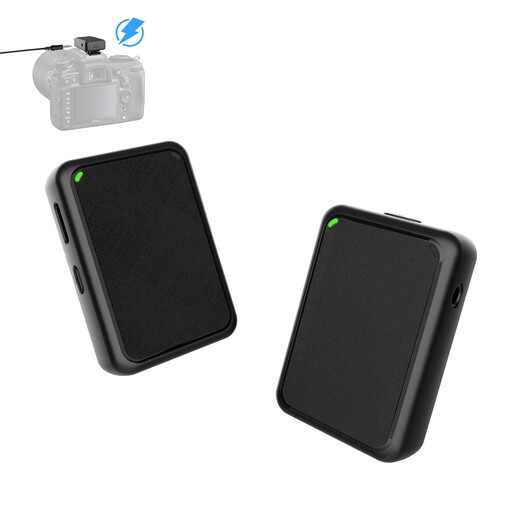
Moman MB1(M) wireless lavalier microphone
For a self-tape with movement if you want to wear a wireless clip-on microphone.
Described as a set with one transmitter and one receiver, it features a 3.5 mm camera connection and several noise-reduction modes. Check that the connection is compatible with your recording device.
View at Joybuy
 No image available
Verbex K31Pro-Black wireless dual microphone
For recording while on the move if you’d prefer a wireless clip-on microphone to a fixed desk microphone.
Described as a dual-microphone set with a magnetic charging case, it lists compatibility with iOS and Type-C interfaces. Check that the right interface is available on your recording device.
View at Joybuy
Frequently asked questions
Can a shotgun microphone block out fan noise?
No. A directional polar pattern mainly reduces sound from certain directions and doesn’t guarantee a recording free from unwanted noise. Point the microphone towards your voice and listen to a test recording made in the actual conditions. If possible, switch off the fan.
How can I check the sound before recording a longer audition script?
Record a short test in your planned location, including a quiet passage and a particularly loud one, then listen back to the recording. A headphone output can make monitoring easier; check which features are available with your chosen connection.
Do I need an extra device to use an XLR microphone with a computer?
It depends on the microphone input you already have. To record over XLR on a computer, you’ll need a compatible input or an audio interface. For USB or camera recording, check that the specific model and the cables you need are compatible with your device.
Do I need a licence to use a wireless clip-on microphone in Germany?
Not necessarily. According to the Federal Network Agency, certain frequencies can be used without registration and free of charge, subject to the technical conditions set out in the relevant general allocation; other frequency uses may require an allocation. The frequency band and technical specifications of the specific wireless set determine what applies. This frequency question does not apply to a wired microphone.


