What to consider when buying
Start by checking the room acoustics and speaking distance, then look at connections and monitoring. If guests regularly join in, also decide whether one shared recording will do or if separate tracks are important.
| Buying criterion |
What to look for |
Who is this most important for? |
| Room echo and background noise |
Check the polar pattern and required speaking distance; make a test recording from your usual seat. |
If I speak from a fixed spot in a room with noticeable echo, I want to capture my voice up close without bringing room noise unnecessarily to the fore. Around 36% of consumers put room acoustics first. |
| Connection and monitoring |
Check the computer connection, headphone socket, and which cables and stands you’ll need. |
If I want to record without a separate interface and monitor my voice as I go, I look for USB and headphone monitoring. Around 29% of consumers prioritise a straightforward setup. |
| A second voice |
Consider whether one shared recording will do or if you need separate microphones and suitable interface inputs. |
If a guest regularly joins my book discussion, I want to know in advance whether we can record our voices separately. Around 21% of consumers put the guest’s voice first. |
| Speaking distance |
Test the room acoustics and planned distance from your usual seat. |
If I don’t want to sit very close to the microphone in a quiet room, I consider how the greater distance will affect the recording. Around 14% of consumers prioritise distance and vocal detail. |
Microphones for seated voice recordings
This selection from Joybuy includes USB and USB/XLR microphones for recording speech from a fixed seating position.
 No image available
FIFINE AM8 USB/XLR microphone
This dynamic USB/XLR microphone could suit one person speaking from a fixed desk position.
The product name lists RGB lighting, mute function, headphone socket and desktop stand. For XLR use, you’ll need a suitable XLR cable and recording setup.
Joybuy
 No image available
Razer SEIRĒN V3 MINI White
This compact USB microphone could be an option for one person speaking from a fixed seating position.
The product name lists tap-to-mute and an ultra-compact design.
Joybuy
 No image available
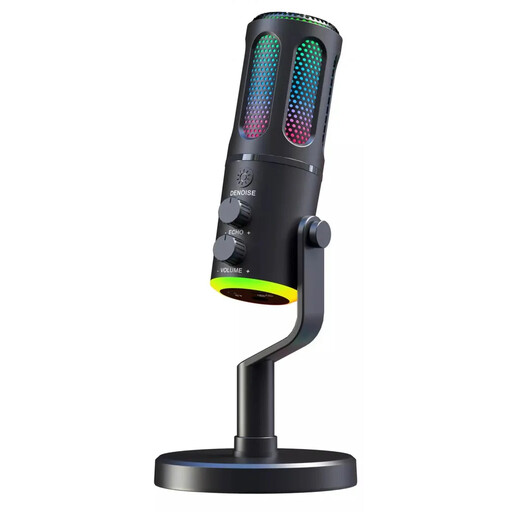
The G-Lab K-MIC-NEON
A wired USB microphone with a cardioid pattern could be an option for recording speech from a fixed position.
The product name lists RGB and ENC.
Joybuy
 No image available
Dynamic USB/XLR microphone set
This dynamic USB/XLR set could be an option for one person speaking at a desk.
The product name lists RGB, gain control, echo, mute function and desktop stand.
Joybuy
 No image available
JBL Quantum Stream Studio
As a USB condenser microphone, this model could suit one person speaking, provided the room and planned speaking distance are right for it.
The product name lists USB-C, a flexible design, mute function, LED indicator and monitoring mode.
Joybuy
Frequently asked questions
How should I position a microphone for someone who’s seated?
Point the recording side towards your usual speaking position and make a test recording from there. With dynamic models, it’s important to stay close and keep your position as consistent as possible. Check that the stand holds the microphone there without getting in the way when you turn pages or move the table.
Do I need any extra equipment for an XLR microphone?
To record on a computer, an analogue XLR microphone needs a suitable recording setup, such as an audio interface. Check that the available inputs and gain meet the microphone’s requirements; Shure recommends around 60 dB of clean gain for the SM7B. A USB microphone can connect directly to a computer via its USB connection.
What should I check before a longer book discussion?
Make a short recording from your planned seat, then listen back on headphones for levels, room echo, plosive sounds and table noise. Also check your cables, stand and the available storage space on your recording device. Models with a headphone output allow direct monitoring.
Can I simply record someone else during a book discussion?
No. Under § 201 para. 1 StGB, recording another person’s non-public speech without authorisation is a criminal offence. Get the other speaker’s agreement before recording begins. The Data Protection Conference has issued a resolution on telephone conversations; this is not a blanket rule for every type of conversation.
Can I quote from the book we’re discussing in the published recording?
§ 51 UrhG permits quotations from published works only to the extent justified by the specific purpose of the quotation. Whether a particular passage qualifies depends on how it is used; a book discussion does not give you blanket permission to read out longer sections of text.


