What should you consider when choosing?
The key factors are your actual recording space, how far you’ll be from the microphone and whether the connection suits your planned setup.
| Concern |
What to check before buying |
Who should pay particular attention? |
| Clear vocals despite room noise |
Pick-up direction and whether you can position the microphone close to your mouth; listen to a test recording made where you’ll be telling the story. |
If you’re recording alone in a room where noise is audible, keeping a consistent distance can help bring your voice to the fore. Around 45% of consumers cite room noise as their main purchasing concern. |
| Vocal nuances in a quiet room |
How quiet the room is and the microphone’s characteristics; record a test with both soft and louder passages. |
In a quiet room, you can focus on making sure soft, expressive passages remain audible. Around 33% of consumers prioritise vocal nuances in a quiet recording space. |
| Monitoring and suitable connections |
Headphone connection and features in the USB or XLR mode you’ve chosen; check which cables and other accessories are included. |
If you want to monitor your voice during longer storytelling sessions or use an existing interface, the connection needs to suit your current recording chain. Around 22% of consumers prioritise control and the ability to expand their setup. |
Microphones for voice recording at Joybuy
This selection includes dynamic and USB condenser microphones for voice recording, as well as a directional external microphone for compatible devices.
 Image unavailable
FIFINE K688CTW dynamic microphone with boom arm, white
For recording a soft solo voice on a computer, when you want to keep the microphone at a consistent distance using a boom arm.
Dynamic design with a cardioid pick-up pattern and USB and XLR connections. A headphone connection and controls are listed for USB mode; a separate cable is required for XLR.
View at Joybuy
 Image unavailable
FIFINE AM8 dynamic USB/XLR microphone
For recording a solo storytelling voice on a computer, when you want to record at your desk and monitor your voice as you speak.
Cardioid pick-up pattern, USB and XLR connections, and a desktop stand. The description recommends a speaking distance of 2 to 6 inches. Headphone features are listed for USB use; an XLR cable and microphone arm are not included.
View at Joybuy
 Image unavailable
USB condenser microphone with cardioid pick-up pattern
For a storytelling voice in a quiet recording space, when you want a computer connection and direct monitoring.
The product description lists a cardioid pick-up pattern, a headphone connection with latency-free monitoring, a gain control, mute function and scissor arm. Condenser microphones can also pick up quiet background noise.
View at Joybuy
 Image unavailable
USB condenser microphone with RGB lighting, 7-piece set
For voice recording on a computer, when a USB microphone with a headphone connection and mute function suits your recording space.
The product details list a cardioid pick-up pattern, headphone connection, mute function, USB cable and Type-C adapter. The advertised noise reduction is no guarantee of good room acoustics.
View at Joybuy
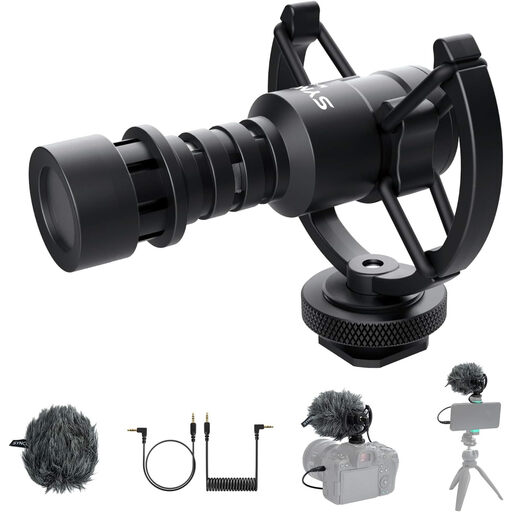 Image unavailable
SYNCO M1S directional external microphone
For recording with a compatible smartphone, laptop or camera, if an external microphone with a suitable 3.5 mm connection works with your setup.
The product details list a cardioid pick-up pattern, TRS and TRRS cables, and a shock mount.
View at Joybuy
Frequently asked questions
Should I simply set the recording level as high as possible for a soft voice?
No. First position the microphone to suit where you’ll be speaking, then listen to a test recording with both soft and louder passages. RØDE notes that moving further away can make room acoustics and background noise more noticeable; simply raising the level won’t fix that.
Do I need the same accessories for USB and XLR?
No. A suitable USB microphone can be connected directly to a compatible computer; to connect an XLR setup to a computer, you’ll need a compatible interface or mixer. Samson describes this additional signal conversion for XLR setups. Also check which cables are needed and what’s included with the specific model.
How can I monitor unwanted noise during a longer storytelling session?
If your microphone has a headphone output, you can listen to your voice directly during a test recording. While you’re testing, check for plosive sounds, a consistent distance from the microphone and quiet background noise in the actual recording space.
Can I record someone else telling a story without their knowledge?
Section 201 of the German Criminal Code (StGB) prohibits recording another person’s non-public spoken words on an audio medium without authorisation. If you want to record other people, check in advance that you’re entitled to do so; the provision does not apply simply because you’re recording yourself telling a story alone.
Can all regional folk tales be published freely?
No, you can’t assume that from the word ‘regional’ alone. Under Section 64 of the German Copyright Act (UrhG), copyright generally expires 70 years after the author’s death. If you’re planning to publish a story, check the rights to the specific version of the text separately.


