Solo storytellers in echoey rooms
If you can speak close to a fixed microphone, you can focus the recording on your voice. Samson promotes the Q2U for untreated rooms, but getting the positioning right still matters.


For a single storyteller in an untreated room, a dynamic microphone positioned close to the speaker and aimed correctly is a sensible place to start. USB makes it easier to connect to a computer, while USB/XLR offers more connection options. For several speakers, separate microphones with suitable inputs are often more important than one microphone in the middle of the table. A portable recorder may be a good choice if you want to capture the atmosphere of the group too. None of these options removes room echo on its own, so positioning and a quiet recording space remain key.
If you can speak close to a fixed microphone, you can focus the recording on your voice. Samson promotes the Q2U for untreated rooms, but getting the positioning right still matters.
If you want several voices to sound clear and be easier to edit separately, the number of microphones, available inputs and seating arrangement all need to work together. RØDE recommends pointing microphones away from one another when recording multiple people.
If you record without a dedicated computer setup, a portable recorder could be a good option. The Zoom H2essential offers different recording directions; a wider pickup can also capture more of the room.
First, decide whether you’ll be recording alone or with other people, and whether your setup will include a computer or a portable recorder. You can then compare microphone positioning, connections and the number of inputs you need more effectively.
| What you need | What to check before buying | Who it matters most to |
|---|---|---|
| Room echo and positioning | Polar pattern and speaking side; a stable microphone position close to the speaker, plus a test recording from the intended spot. | When I’m telling a story on my own, I want to speak close to a microphone that stays in place, so as little room sound as possible gets into the recording. Around 36% of consumers are likely to prioritise clear speech in an echoey room. |
| Easy connection | Check compatibility with your recording device and the connections you need; make sure it has a headphone socket and the accessories you want. | If I want to get started on my existing computer without a separate interface, the right connection is essential. Around 29% of consumers are likely to prioritise a straightforward connection. |
| Several voices | Number of speakers, seating arrangement, number of microphones and inputs, and whether you can record separate tracks. | For a storytelling session, I want to be able to edit individual voices more precisely. That means the microphones, inputs and seating arrangement need to work together. Around 21% of consumers are likely to prioritise capturing several voices. |
| Recording in different locations | Recording direction and storage medium; check whether you want to capture one voice or the atmosphere of the group. | If I record in different places without a dedicated computer setup, the recording direction needs to suit the seating arrangement. A wider pickup can also capture more room sound. Around 14% of consumers are likely to prioritise a setup they can use anywhere. |
Even with a directional microphone, distance and angle affect how much room sound makes it into the recording. Noise processing can’t make up for getting these basics right.
Plan where you’ll position the microphone before buying, then listen to a test recording made from the spot you intend to use.
A microphone’s two connection types don’t, by themselves, let you record several speakers separately.
Count how many people will be speaking at the same time, then decide how many microphones and inputs you need. RØDE notes that using several USB microphones together isn’t always straightforward.
A wider recording direction can capture the atmosphere of a group, but it can also pick up more sound from the untreated room.
Choose a recorder to suit the perspective you want and the seating arrangement, rather than relying on the number of built-in microphones alone.
The ATR2100x-USB combines USB and XLR connections for close-miked solo speech and includes a headphone socket.
The Q2U is a dynamic USB/XLR model. The package described includes a pop filter and desktop tripod stand.
The PodMic USB offers USB-C and XLR connections, as well as headphone monitoring for voice recordings.
The MV7+ combines USB-C and XLR with monitoring and adjustable features for a fixed setup.
The H2essential has built-in microphones with different recording directions. The H4essential also has two external XLR/TRS inputs.
This Joybuy selection includes microphones for solo recording on a computer, as well as sets and systems for recording with several people.
 No image available
For one voice, when you can position the microphone close by and keep it steady.
Dynamic microphone with USB-C and XLR, a headphone socket and a monitoring control. The recommended recording distance is listed as 2 to 6 inches. A desktop stand is included; an XLR cable and microphone arm are not.
 No image available
For one voice on a computer, when you can position the microphone suitably on your desk.
USB-C connection, supercardioid polar pattern, tap-to-mute and an adjustable tilt stand. Built-in shock absorption is also listed.
 No image available
For a setup with two microphones and an audio mixer, when several people each need their own microphone.
The set includes two 3.5 mm condenser microphones, desktop stands and an audio mixer. Before buying, check that the mixer is compatible with your recording device and the connections you need.
 No image available
For voice recordings where you want to choose a recording mode to suit the speaking situation.
USB-C microphone with monitoring and selectable polar patterns, including cardioid, bidirectional and omnidirectional, as well as a listed stereo mode. Before buying, check which mode suits your seating arrangement.
 No image available
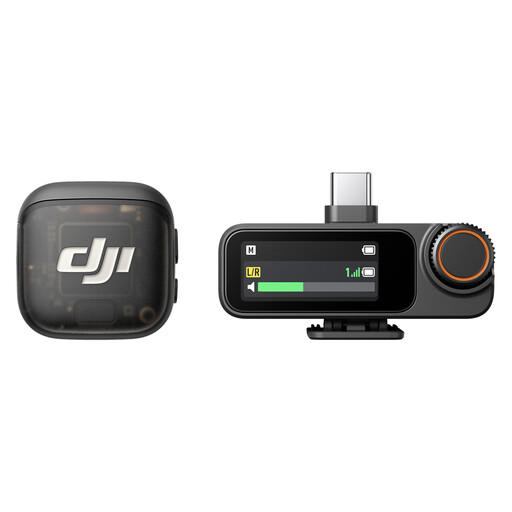
For a wireless setup with two transmitters and one receiver, when two people each need to use a transmitter.
The listed configuration includes two transmitters and one receiver. Each transmitter is listed with internal storage; connections include USB-C, Lightning and 3.5 mm TRS. Check compatibility with your recording device.
Point the speaking side towards the speaker and start with the microphone close by, rather than placing it in the middle of the table. For most of its own microphones, RØDE recommends starting at 6–10 cm, although the ideal distance depends on the specific microphone and the sound you want. Check the pop filter and sound with a test recording.
It can work if both people are within recording range, but in an untreated room you’ll need to compromise on distance and how much room sound gets picked up. If you want to edit the voices separately, plan your microphones and their positions, and make sure you have enough inputs for the number of people. RØDE notes that using several USB microphones together isn’t always straightforward.
Check what’s included with the specific product listing. A mount, pop filter, cable and headphones could all be useful for your setup; you may also need a suitable interface to connect an XLR microphone to a computer. USB can avoid this extra connection step when recording on a computer.
For a consumer purchase, the seller is initially responsible for your statutory rights. The Verbraucherzentrale distinguishes these statutory rights from a voluntary manufacturer’s guarantee; if a product is faulty, repair or replacement may be the first remedy.
No. Under § 201 StGB, recording another person’s non-public speech without their permission is a criminal offence. Make sure you discuss any recording with the people involved in advance. If you’re processing personal data or intend to publish a recording, you’ll need to check the purpose and the relevant legal basis for data protection separately; the Federal Commissioner for Data Protection and Freedom of Information explains the requirements for consent.