
Lieferung heute & morgen

Qualitätsgarantie

Willkommens-Angebote freischalten: KOSTENLOSE Lieferung | Bis zu 80 % RABATT | Kostenlose 30-Tage-JoyPlus-Testphase
App herunterladen
Choosing the right PC case is a foundational decision for any PC build. It not only defines the aesthetics of your setup but also dictates cooling performance, component compatibility, and ease of assembly. A Mid-Tower ATX case often represents the ideal balance of size, expandability, and desk footprint.
As your Joybuy Product Recommendation Officer, my mission is to provide you with clear, objective information. This article is designed to help you understand the technical specifications and design features of modern cases, enabling you to make an informed decision for your next project.
Before you buy a PC case, you should consider three core aspects that significantly impact your system's performance and longevity.
Modern processors and graphics cards generate significant heat. Efficient airflow is therefore essential to keep temperatures low and performance stable. Look for cases with perforated (mesh) front or side panels that allow for unrestricted air intake. Also, check the number and size of supported fan and radiator positions. A good gaming PC case offers flexible options for both air and liquid cooling.
Ensure the case is compatible with your chosen components. Key dimensions to check are:
A case with generous dimensions offers more flexibility for future upgrades.
A tidy interior not only looks better but also improves airflow. A case with cable management features dedicated channels, tie-down points, and a power supply shroud to neatly route cables behind the motherboard tray. A PC case with a glass front or a tempered glass side panel provides a clear view of your components and RGB lighting.
Here are three models that cater to different needs with their specific features and design approaches.
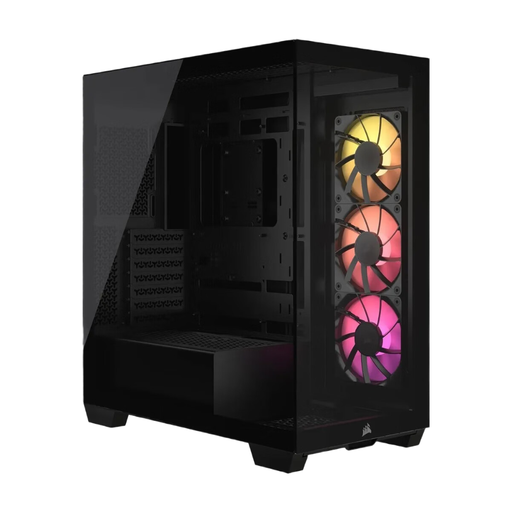
Why it stands out: The Corsair 3500X ARGB features a frameless panoramic aesthetic with two large tempered glass panels on the front and side. Its standout feature is compatibility with motherboards that have rear-facing connectors (e.g., ASUS BTF, MSI Project Zero). This allows the main cables to be hidden behind the motherboard tray, resulting in an exceptionally clean interior.
Pros:
Who is it for? For PC builders who prioritise a pristine, modern aesthetic and want to create a showpiece PC with minimal visible cabling.
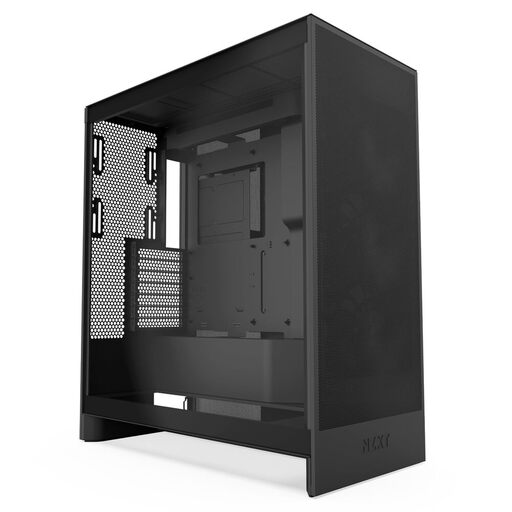
Why it stands out: The NZXT H7 Flow is engineered for maximum PC case airflow. Its perforated front and top panels maximise air intake and exhaust. A unique feature is the ability to mount three 120mm fans on the bottom, directing cool air straight to the graphics card—a critical component in any gaming PC case.
Pros:
Who is it for? For performance-focused users and gamers who prioritise low component temperatures and maximum airflow.
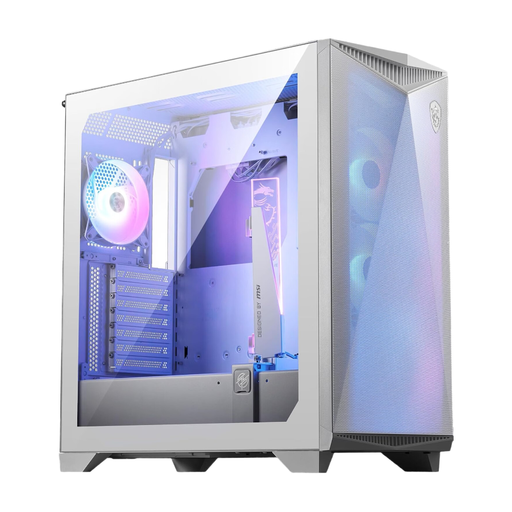
Why it stands out: The MSI MPG GUNGNIR 300R Airflow is a versatile case packed with thoughtful features for high-end builds. It not only accommodates E-ATX motherboards but also includes a unique, omnidirectional graphics card support bracket to prevent heavy GPUs from sagging. The swappable PCI-E brackets also allow for vertical GPU mounting.
Pros:
Who is it for? For enthusiasts who need a flexible and feature-rich case for complex builds with large components like heavy graphics cards and E-ATX motherboards.
The models featured here cover specific use cases. If you're looking for different designs, sizes, or price points, a wide range of alternatives are available.
Explore our full range of Gaming Cases and find the perfect model for your setup.
No, support for the E-ATX form factor is not a standard feature in mid-tower cases. It is a specific feature that must be explicitly listed in the case's technical specifications. Models like the MSI MPG GUNGNIR 300R are designed for it, but you should always verify compatibility before purchasing.
This is a trade-off between aesthetics and maximum cooling performance. A PC case with a glass front offers a clean, premium look, while a mesh front generally allows for better direct airflow. Modern cases with glass fronts, like the Corsair 3500X, often compensate for this with alternative air intakes on the sides or bottom. The choice depends on whether you prioritise looks or raw cooling performance.
There's no one-size-fits-all answer. A basic configuration with two or three intake fans at the front and one exhaust fan at the rear is a good starting point for most systems. For high-end components, additional fans at the top or bottom can further reduce temperatures. The quality, size, and placement of the fans are just as important as their quantity.