
Lieferung heute & morgen

Qualitätsgarantie

Willkommens-Angebote freischalten: KOSTENLOSE Lieferung | Bis zu 80 % RABATT | Kostenlose 30-Tage-JoyPlus-Testphase
App herunterladen
A mid-tower PC case represents the functional sweet spot for most PC builds. It offers a balanced ratio of space for high-performance components against a moderate physical footprint. Choosing the right case is a fundamental decision that significantly influences cooling performance, component compatibility, and the final aesthetics of the system. This article analyses the key technical criteria for selection and presents a curated list of models with specific features.
Your choice of a mid-tower case should be based on an analysis of objective parameters. The following criteria are crucial for the functionality and longevity of any PC build.
The physical dimensions of your components dictate the choice of case.
Effective airflow (PC case airflow) is crucial for the stability and longevity of your components.
Design is a subjective factor, but it can be evaluated through objective technical features.
Clean cable management not only improves aesthetics but also enhances airflow. Features like cable routing channels, Velcro straps, a power supply shroud (PSU shroud), and ample space behind the motherboard tray are crucial. Tool-less installation systems for drives and side panels simplify assembly and future upgrades.
Based on the technical criteria above, we have compiled a selection of cases that stand out for their specific design and functional features.
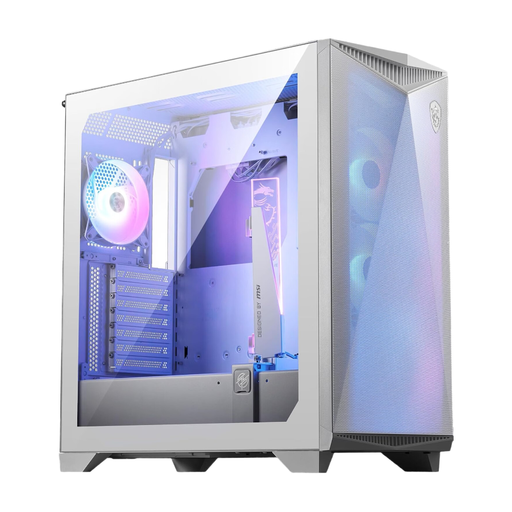
Why we recommend this product: The MSI MPG GUNGNIR 300R Airflow is engineered for maximum cooling performance. With a perforated front and support for up to ten 120 mm fans, it offers tremendous airflow potential. A standout feature is the included, adjustable graphics card holder, which stabilises heavy, high-end GPUs. Compatibility with E-ATX motherboards and the option for vertical GPU mounting provide high flexibility for demanding builds.
Pros:
Who it's for: For system builders and gamers who need uncompromising cooling for overclocked CPUs and high-performance graphics cards, and who value flexibility in component choice.
View Product: MSI MPG GUNGNIR 300R Airflow White
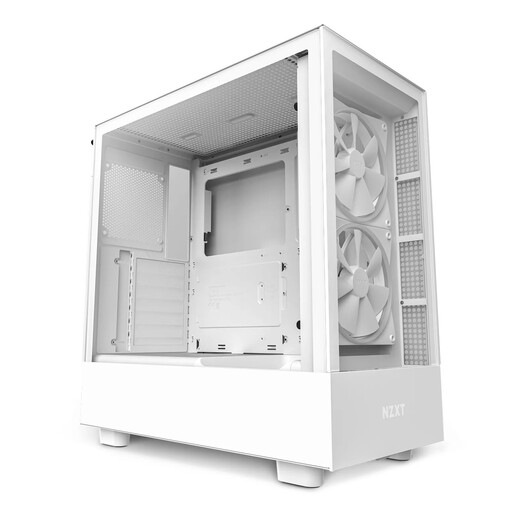
Why we recommend this product: The NZXT H5 Elite combines a clean, modern aesthetic with a thoughtful cooling design. Its distinguishing feature is a dedicated, angled fan at the bottom of the case that directs cool air specifically to the graphics card. Paired with pre-installed ARGB fans and an integrated controller, the case offers a cohesive look right out of the box. The cable management system, with its wide channels and Velcro straps, facilitates a pristine build.
Pros:
Who it's for: For users seeking an aesthetically pleasing gaming PC case with integrated RGB lighting and an innovative approach to GPU cooling.
View Product: NZXT H5 Elite White
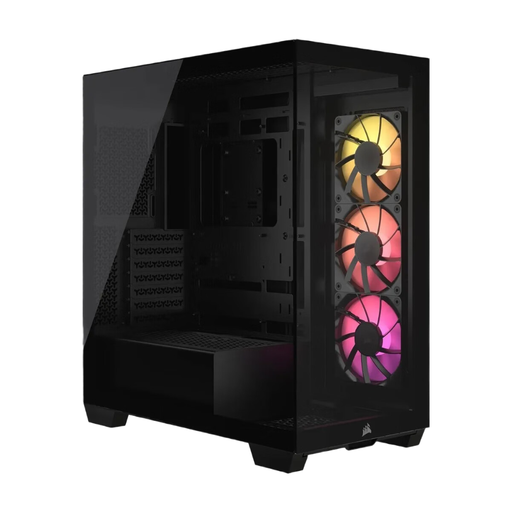
Why we recommend this product: The Corsair 3500X ARGB features a panoramic design with seamless glass panels on the front and side, offering an unobstructed view of your components. Its special feature is its compatibility with reverse-connection motherboards (e.g., ASUS BTF, MSI Project Zero), which place connectors on the back. This allows for an exceptionally clean interior with no visible primary cables. Despite its focus on aesthetics, it offers space for up to ten fans.
Pros:
Who it's for: For PC enthusiasts who strive for a flawless aesthetic and want to leverage the latest motherboard technologies for a cable-free look in the main chamber.
View Product: Corsair 3500X ARGB Black
The models featured here cover specific user profiles. If they don't fully meet your individual needs for size, design, or functionality, you can find a wider selection of cases for various builds and budgets in our main category.
Discover more models in the Desktop Computer Cases category.
1. What is the difference between a mid-tower and a full-tower? The main difference lies in size and component compatibility. Mid-towers are the common standard, offering space for ATX motherboards and multiple graphics cards. Full-towers are significantly larger and often support extended form factors like E-ATX or XL-ATX, as well as more elaborate custom water-cooling loops with multiple radiators and pumps.
2. How many fans are necessary for a good gaming PC case? A typical and effective configuration consists of at least two to three intake fans at the front or side and one exhaust fan at the rear. This creates positive or neutral air pressure, supplying components with fresh air and reducing dust buildup. For high-end systems, additional fans at the top or bottom can further enhance cooling performance.
3. Will any graphics card fit in a mid-tower case? No. The maximum graphics card length is one of the most important specifications to check. While most graphics cards will fit in most mid-towers, some high-end models (especially custom designs) can be very long. It is essential to cross-reference the case's length specification with that of your desired graphics card.