
Lieferung heute & morgen

Qualitätsgarantie

Willkommens-Angebote freischalten: KOSTENLOSE Lieferung | Bis zu 80 % RABATT | Kostenlose 30-Tage-JoyPlus-Testphase
App herunterladen
Choosing a new computer case is a fundamental decision when building or upgrading a PC. The mid-tower PC case represents a popular sweet spot, balancing size, expandability, and cooling performance. However, with the vast array of models on the market, making a choice can be complex. This guide is here to help you understand the key features and presents a selection of cases for various needs and budgets.
Before you buy a PC case, there are several technical aspects to consider to ensure compatibility with your components and achieve satisfactory performance.
Compatibility is the foundation of any PC build. Check the case specifications carefully:
A PC case with good airflow is crucial for the stability and longevity of your components. Look for the following features:
Beyond pure functionality, looks and convenience also play a role:
Here is a selection of three models that focus on different aspects of design, functionality, and budget.
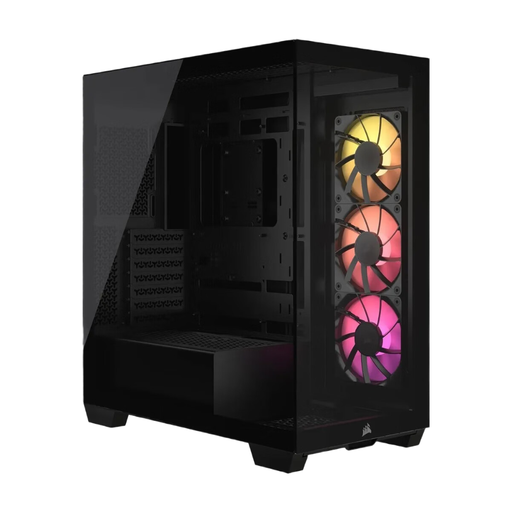
What makes it stand out: The Corsair 3500X ARGB features a modern design with a frameless panoramic glass window on the front and side. This provides an unobstructed view of your components, making it an excellent choice for aesthetically focused builds. A special feature is its compatibility with reverse-connection motherboards (like ASUS BTF and MSI Project Zero), which place cable connectors on the back. This allows for an exceptionally clean interior. Three pre-installed 120 mm ARGB fans provide solid baseline cooling and customisable lighting.
Benefits at a glance:
Who is it for?: This Corsair case is ideal for builders who prioritise maximum aesthetics and a tidy look. Its panoramic view and support for new motherboard standards make it a future-proof choice for showcase builds.
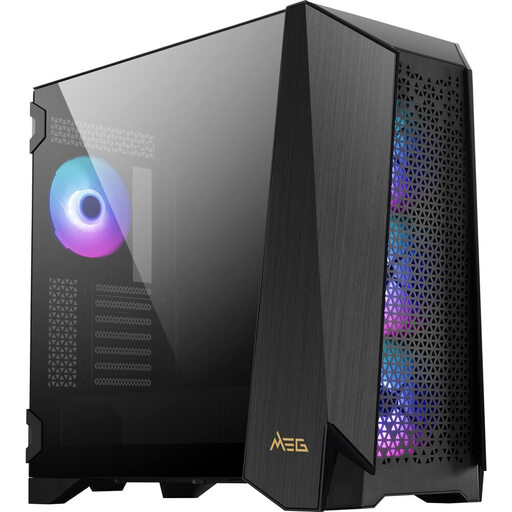
What makes it stand out: The MSI MEG PROSPECT 700R is a high-end gaming PC case that stands out with its integrated 4.3-inch IPS touchscreen panel. This display allows you to control and monitor fan speeds, ARGB effects, and system temperatures directly on the case, without extra software. Its high degree of modularity allows you to swap side panels to either maximise E-ATX compatibility, mount additional fans, or install a custom water-cooling distribution plate. Four pre-installed 140 mm ARGB fans and space for up to ten fans in total offer tremendous cooling potential.
Benefits at a glance:
Who is it for?: This MSI case is aimed at enthusiasts and high-end users seeking full control, maximum performance, and unique features. The touchscreen and modular options make it a platform for no-compromise builds.
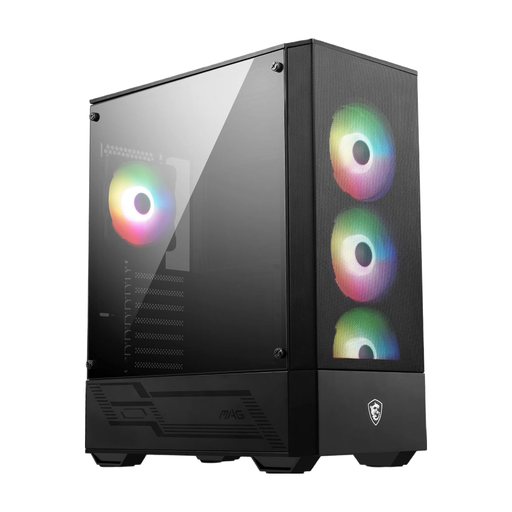
What makes it stand out: The MSI MAG FORGE 112R is a functional computer case that offers excellent value for money. It combines a mesh front for good airflow with four pre-installed 120 mm ARGB fans that can be controlled via an integrated hub. A tempered glass side panel allows you to see your hardware. Despite its accessible price point, it provides ample space for standard ATX systems, graphics cards up to 330 mm long, and standard CPU coolers.
Benefits at a glance:
Who is it for?: This case is an excellent choice for beginners and budget-conscious builders who don't want to sacrifice essential features like good airflow, ARGB lighting, and a glass window. It provides a solid foundation for reliable gaming PCs.
This selection covers a range of use cases, but the market offers many more models. If you're looking for specific designs, sizes, or brands, you can find a wider selection in our main category.
? Explore our full range of ATX PC Cases here
A mid-tower is the most common size for PC cases. It offers a good compromise between space for standard ATX motherboards and multiple expansion cards, and a moderate footprint that is smaller than a full tower's.
No. Mid-towers are primarily designed for the ATX form factor. They are also typically compatible with the smaller Micro-ATX and Mini-ITX formats. However, for larger E-ATX motherboards, you will need a mid-tower case that explicitly supports this size, as they are wider and require more space.
Good airflow is crucial for efficiently dissipating the heat generated by the CPU, GPU, and other components. Poor airflow can lead to higher temperatures, which can reduce performance through thermal throttling and shorten the lifespan of your hardware. Cases with mesh front panels and multiple fans generally offer better airflow than closed-off models.