A compact office mini PC may be all you need for browsing, research and text editing, provided its specific configuration suits the programmes you use. If you also run local previews or containers, compare their requirements with the RAM, SSD, operating system and upgrade options of the model you’re considering. In a student room, cooling matters too. If you’re buying a kit, check that everything you need is included. Individual specifications are no substitute for testing how a PC performs with your own workflow.
Who is a mini PC right for?
Browser and text editor users
If you mainly write API documentation in a browser and text editor, use the requirements of the programmes you actually run as your guide. Microsoft recommends 1 GB of RAM for Visual Studio Code’s editor alone; this doesn’t cover the whole computer or any other applications.
People working in a living or sleeping area
If your workspace is in a student room, check the cooling, space available and connections for your monitor and cables. MSI offers both a fanless and an actively cooled version of the Cubi N ADL; this feature doesn’t apply to every model from the brand.
Users of local development tools
If you run local previews, containers or several tools at once, compare the requirements of the specific software with the PC’s configuration. Docker lists its own operating system and backend requirements for installation on Windows.
What should you look for when buying?
Compact office mini PC
A good fit if: You mainly use a browser and text editor, without needing to run demanding local builds.
Consider: A fanless model can avoid fan noise, but that alone doesn’t tell you whether it’s suitable for local development tools.
A more fully equipped model
A good fit if: Your programmes demonstrably need more resources, or you use several local tools at the same time.
Consider: More memory or storage isn’t a proven minimum requirement for documentation work, nor does it guarantee that you’ll work faster.
| Buying priority |
What to check |
Who is it important to? |
| Suitable specifications |
Check the RAM, SSD, operating system and upgrade options against the specific programmes and versions you use. Microsoft’s recommendation for VS Code refers to the editor; Docker has its own installation requirements. |
When I use a browser, editor and local preview together, I want to match the configuration to my actual workflow. Around 29% of consumers put having the right specifications for their programmes first. |
| A quiet workspace |
Compare the cooling on the exact model. MSI describes the Cubi N ADL S as fanless and the Cubi N ADL as actively cooled. |
In a room that’s both my workspace and living space, I want as little fan noise as possible when I’m concentrating. Around 24% of consumers prioritise a quiet workspace. |
| Everything included |
For kits, check what’s in the box: ASUS says the NUC 14 Essential Kit doesn’t include RAM or an SSD, and has no pre-installed operating system. |
When I’m putting together a ready-to-use workspace, I want to know in advance which components I still need. Around 29% of consumers pay particular attention to what’s included and the resulting total cost. |
| Space and connections |
Check the dimensions, mounting options and video outputs against your desk and monitor. Make sure to check whether a USB-C port supports video output. |
When space is limited, I want to be able to fit the PC in and connect the monitors I already own. Around 18% of consumers put desk space and suitable connections first. |
Avoiding buying pitfalls
-
Assuming a kit is ready to use straight out of the box
The ASUS NUC 14 Essential Kit is listed without RAM or an SSD, and without a pre-installed operating system. So it won’t necessarily be set up for your day-to-day work as soon as you unpack it.
Check what’s included with the specific model and find out which components you’ll need to add and set up.
You may need to buy additional components and spend time setting them up.
-
Assuming every USB-C port can connect to a monitor
It depends on the specific port: ASUS says the NUC kit’s USB-C port supports DisplayPort, while GMKtec describes the USB-C port on the G5S with N5095 as a power input only.
Check the port specifications for the exact PC model and the inputs on your monitor.
Depending on the ports available, you may need to use a different connection.
-
Assuming a small or fanless PC suits every workflow
Cooling and upgrade options vary between models. GMKtec lists the G5S with N5095 as having 8 GB of soldered, non-upgradeable RAM; Docker publishes its own installation requirements.
First check what your programmes need, then decide whether low noise, a fixed configuration or the option to upgrade later matters most to you.
You may need to replace the PC later if the configuration you choose doesn’t support the tools you actually use.
Brands to consider
MSI
The Cubi N ADL range includes specific models with both fanless and actively cooled designs.
- MSI describes the Cubi N ADL S as fanless.
- Cooling details apply to the specific model, not all MSI mini PCs.
ASUS
The NUC 14 Essential Kit is an example of a compact mini PC that needs extra components before you can use it.
- ASUS lists several video outputs and a VESA mount for the kit.
- According to ASUS, RAM, an SSD and a pre-installed operating system aren’t included. Check the processor model and what’s supplied in your region too.
GMKtec
The G5S with Intel N5095 is an example of a pre-configured model for straightforward workflows.
- GMKtec lists 8 GB of RAM and two HDMI outputs for this model.
- The manufacturer says the RAM is soldered and can’t be upgraded; on this model, USB-C is for power only.
MEDION
The Picoworx T80 III is an example of a more fully equipped mini PC configuration for users with a specific need for extra performance.
- For the Core Ultra 7 model viewed, MEDION lists 32 GB of RAM, a 1 TB SSD and Windows 11 Pro.
- These manufacturer specifications describe one model and don’t establish a minimum requirement for documentation work; check other versions separately.
Joybuy product selection
The options below cover compact office setups for browsing and writing, as well as models for workflows that use additional local tools. Check the specifications of each individual model against the requirements of your programmes.
 No image available
Beelink Mini PC EQ7, 16 GB RAM, 512 GB SSD, Grey
For browsing and writing at a desk where space is at a premium; the configuration is listed with 16 GB of RAM and a 512 GB SSD.
The description lists two HDMI outputs and Windows 11 Home.
View at Joybuy
 No image available
BMAX B7A Plus, AMD Ryzen 5 6600H, 12 GB LPDDR5, 512 GB NVMe SSD
For a compact workspace with a browser and text editor; the listed configuration includes 12 GB of LPDDR5 and a 512 GB NVMe SSD.
The description lists two HDMI outputs and several USB ports.
View at Joybuy
 No image available
FIREBAT AM02L, AMD Ryzen 5 6600H, 16 GB LPDDR5, 512 GB NVMe SSD
For a workspace where you want to try local tools as well as using a browser and editor; the listed configuration includes 16 GB of LPDDR5 and a 512 GB NVMe SSD.
It’s listed with Windows 11 Home, plus HDMI 2.1 and DisplayPort 1.4 video outputs.
View at Joybuy
 No image available
SOYO S5Air Mini PC, AMD Ryzen 5 7535HS, 16 GB LPDDR5, 512 GB NVMe SSD
For a small desk where you need to allow for several local tools or files; this model is listed with 16 GB of LPDDR5 and a 512 GB NVMe SSD.
The description lists Windows 11 Pro, with HDMI, DisplayPort and Type-C video outputs.
View at Joybuy
 No image available
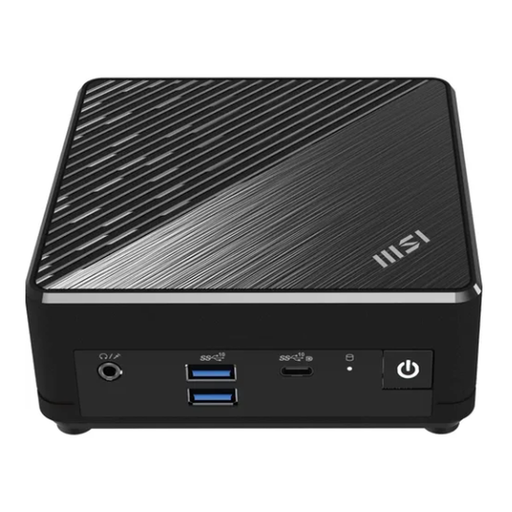
MSI Cubi N ADL S-217DE, N200, 8 GB RAM, 256 GB SSD, Windows 11 Pro
For browsing and writing if a fanless model is important for your workspace; MSI distinguishes this design from its actively cooled models.
The configuration is listed with 8 GB of RAM, a 256 GB SSD and Windows 11 Pro. Being fanless alone doesn’t prove that it’s suitable for demanding local builds.
View at Joybuy
Frequently asked questions
Is Visual Studio Code’s RAM recommendation enough for the whole mini PC?
No. Microsoft recommends 1 GB of RAM for the editor; this figure doesn’t include the operating system, browser or any additional tools you run. So check the requirements of your complete workflow.
What should I check before setting up a mini PC kit?
Check what’s included and which components the specific model supports. ASUS says that the NUC 14 Essential Kit doesn’t include RAM or an SSD and has no pre-installed operating system. The power cable may also vary by SKU.
Can any USB-C port connect to a monitor?
No. ASUS lists a USB-C port with DisplayPort functionality on the NUC 14 Essential Kit; GMKtec, on the other hand, describes the USB-C port on the G5S with N5095 as a power input only. Check what the port does on the exact model you’re considering.
What are my rights when buying online or if a product is faulty?
Your right to cancel and your rights if a product is faulty are separate. The Verbraucherzentrale explains that, for online orders, you generally have 14 days from delivery to notify the seller that you wish to cancel. Your statutory rights for faulty goods apply against the seller. A guarantee is a voluntary offer with its own terms and conditions.


