Which mini PC is right for you?

iOS and Android testers

If you work locally with Xcode and Android Studio, your iOS workflow will determine which computer platform you need. Apple Developer provides Xcode and iOS simulators for macOS, while Android Studio is also available for macOS.

Android emulator testers

If you mainly use Android Studio, choose your specs based on the number and size of the virtual devices you need to run at the same time. Google notes that running several AVDs in parallel requires additional storage.

Teams sharing a test station

If several people share the same computer or test phones, accessible ports, separate user accounts and a clear locking routine all matter. The German Federal Office for Information Security recommends locking your computer whenever you leave your workstation.

What should you look for when buying?

Mac mini for local iOS testing

A good fit if: Xcode, iOS simulators or iPhones connected locally are part of your testing workflow.

Things to consider: Check the supported macOS and Xcode versions, as well as the RAM, SSD capacity and ports on the specific configuration.

Windows or Linux mini PC for Android

A good fit if: Your local testing involves Android Studio, Android emulators and, where needed, physical Android devices, but doesn’t require local Xcode.

Things to consider: Running several virtual devices at once requires additional resources. Also check that your chosen configuration supports the required hardware acceleration.

What you need What to check before buying Who it matters most to
Platform for app testing List the operating systems you need and whether you require Xcode. For a Mac, the Xcode version you want to use must be compatible with the supported macOS version. If I need to test iOS and Android apps locally, I’ll first check whether Xcode is part of my workflow rather than just comparing performance. Around 36% of consumers put support for the app platforms they need first.
Resources for emulators Check the RAM, SSD capacity and upgrade options for the exact model. Google recommends around 4 GB of RAM for each AVD running at the same time. If you run several Android emulators in parallel, make sure there’s enough memory for your IDE, projects and virtual devices. Around 29% of consumers prioritise the resources needed for Android Studio and emulators.
Ports for physical devices Count the connections you need for monitors, peripherals and smartphones. Check where the ports are located and whether you’ll need adapters. If I regularly switch between phones or test features on real hardware, I need ports that are easy to reach at my desk. Around 21% of consumers prioritise connecting and testing physical smartphones.
Shared use Check whether the operating system you plan to use supports separate user accounts, and how your team’s IT department manages the workstation. If several people use the test station, I want to be able to hand it over neatly and lock the computer when I leave. Around 14% of consumers prioritise safe, practical sharing.

Common buying mistakes

  • Choosing a Windows mini PC for local iOS testing based on performance alone

    More CPU or GPU power won’t replace the Mac platform required for local Xcode and iOS Simulator testing.

    Before comparing models, check whether your workflow includes local Xcode or an iOS simulator.

  • Focusing only on the size of the case, not the whole test setup

    Your monitor, peripherals and test phones all need suitable ports. At a shared desk, those ports also need to be easy to reach.

    Plan the ports you’ll need for your specific setup and check the specs of the exact model variant.

  • Planning to run several virtual devices without enough resources

    AVDs running at the same time and additional system images use up storage. A lower-spec configuration could limit parallel testing.

    Work out what you need based on the number of AVDs you’ll use at once, and check whether the RAM or SSD can be upgraded on your chosen variant.

  • Taking a general mini PC ranking as a recommendation for app testing

    NETZWELT’s mini PC table, published on 4 July 2026, is a general comparison of models. It doesn’t assess whether a device is right for your Xcode or Android testing workflow.

    Use general comparisons to draw up a shortlist at most, then make your decision based on your testing platform, emulator requirements and device connections.

Key brands at a glance

Apple

The Mac mini is a compact macOS option for local Xcode and simulator workflows.

  • Apple lists Mac mini configurations with different RAM and SSD options, as well as ports on the front and back.
  • Configurations vary. Also check that your preferred Xcode version works with the supported macOS version.

ASUS

ExpertCenter and NUC mini PCs are Windows-focused options for Android testing environments.

  • ASUS lists six USB ports and a tool-free design for the ExpertCenter PN54.
  • These specs don’t automatically apply to other ASUS or NUC variants. A Windows PC can’t replace a Mac for local Xcode use.

Lenovo

ThinkCentre Tiny models are designed for teams looking for a compact Windows workstation with suitable management and service options.

  • The M75q Gen 5 configuration described by Lenovo Germany includes 16 GB RAM, a 512 GB SSD, Windows 11 Pro and three years of on-site service. Lenovo also describes the memory and SSD modules as accessible.
  • The specs and service details apply to the configuration listed and don’t automatically apply to other variants.

GEEKOM

The A8 Max and A9 Max are Windows mini PC ranges with different specifications for Android workflows.

  • GEEKOM lists A8 Max variants with 16 GB or 32 GB RAM. The manufacturer’s specs also mention USB4 and additional USB ports.
  • Specs vary by model and variant. Manufacturer performance claims aren’t independent evidence of how a device will handle a particular emulator workload.

Joybuy products for app testing

This selection includes Mac mini configurations for local Xcode and iOS Simulator testing, as well as mini PCs for Android workflows that don’t require local Xcode. The exact configuration and your test setup remain key.

Thunderobot Mini PC Workstation AI Max+ 395

Thunderobot Mini PC Workstation AI Max+ 395

Designed for Android testing without local Xcode. Check the exact configuration against the scope of your planned tests.

Specs included in the product name: 128 GB LPDDR5X at 8000 MT/s, 1 TB SSD and Wi-Fi 7. The description also lists one USB 2.0 port and one USB 3.0 port.

View at Joybuy

Apple Mac mini M6 with 16 GB memory and 512 GB SSD

Apple Mac mini M6, 16 GB, 512 GB SSD

Designed for local iOS testing with Xcode, as well as Android Studio on macOS. Before buying, check that your preferred Xcode version is compatible.

12-core CPU, 12-core GPU, 16 GB unified memory, 512 GB SSD, Thunderbolt 4, HDMI and macOS.

View at Joybuy

Apple Mac mini M6 with 24 GB memory and 512 GB SSD

Apple Mac mini M6, 24 GB, 512 GB SSD

Designed for local iOS testing with Xcode and Android Studio on macOS. Check the software versions you need against the exact configuration.

12-core CPU, 12-core GPU, 24 GB unified memory, 512 GB SSD, Thunderbolt 4, HDMI and macOS.

View at Joybuy

ACEMAGIC E3B Mini Desktop Computer with Ryzen 7 7735HS, 24 GB RAM and 512 GB SSD

ACEMAGIC E3B, Ryzen 7 7735HS, 24 GB, 512 GB SSD

Designed for Android testing without local Xcode. Check that the ports are suitable for your monitors and test devices.

24 GB LPDDR5, 512 GB NVMe SSD, Windows 11 Pro, HDMI, DisplayPort, USB-C and USB-A.

View at Joybuy
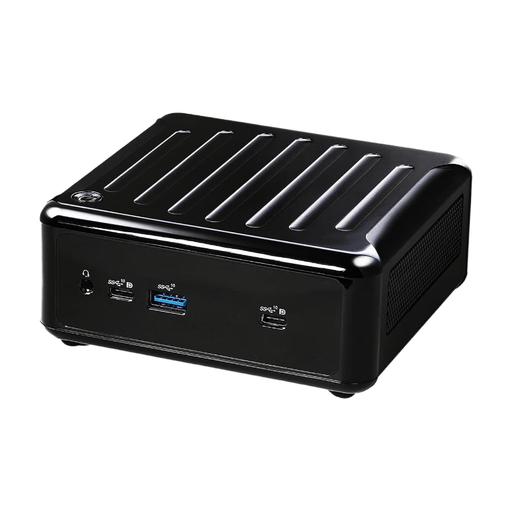
ASRock 4x4 BOX-4500U/EU/AI mini PC

ASRock 4x4 BOX-4500U/EU/AI

Designed for Android testing without local Xcode. Check the exact specs and port layout for your workstation.

The product name lists an AMD Ryzen 4500U. The description lists USB 2.0 and USB 3.0.

View at Joybuy

Frequently asked questions

Can I test iOS apps locally with Xcode on a Windows mini PC?

For local Xcode and iOS Simulator testing, you’ll need a compatible Mac with a supported macOS version. If you only test Android locally, this platform requirement won’t affect your choice of computer.

How should I plan storage for several Android emulators?

Allow for additional resources for each virtual device running at the same time, as well as for your IDE and projects. Google recommends around 4 GB of RAM per AVD and potentially up to 6 GB of additional storage per AVD. Actual requirements depend on the system and test devices.

Can simulators replace testing on real smartphones?

No. Simulators don’t fully replicate the performance and features of physical devices. If you need to check real-world performance or device-specific features, make sure you have the relevant test devices.

What should I bear in mind when sharing a test station?

Set up separate user accounts in line with your team’s policies, and lock the computer when you leave your workstation; the German Federal Office for Information Security recommends this routine. If you use an iPhone with Xcode, Developer Mode must be enabled on the device.

What does the CE marking on a mini PC mean in Germany?

Products covered by relevant EU harmonisation legislation must carry the required CE marking when placed on the EU market. The German Federal Network Agency points out that the marking isn’t a performance or quality seal, so it doesn’t replace checking port availability and software compatibility.