Which mini PC is right for you?

Spreadsheet users

If you tidy up sighting lists, summarise counts and put together reports, compare the requirements of your spreadsheet software and the files you actually use with the computer’s specifications. Microsoft Support notes that open workbooks are limited by available memory and system resources.

People mapping sightings

If you map observation locations or analyse spatial data, check compatibility with your GIS software, as well as the memory and upgrade options for the exact configuration. The QGIS documentation, for example, describes working with coordinates and spatial data.

Teams sharing a desk

If several people use the same computer, suitable ports, separate accounts and a shared backup routine all matter. Germany’s Federal Office for Information Security recommends individual, password-protected accounts with appropriate access rights, and explains how to keep backup media separate.

What should you look for when buying?

What you need What to check before buying Who is this important for?
Working with spreadsheets Check file sizes, formulas, the memory in the configuration on offer and the requirements of your spreadsheet software. If I work with observation lists and counts, I want a computer that can handle my workbooks. Around 28% of consumers put spreadsheet performance first.
Mapping observation locations Check whether you use QGIS or another GIS application, then match your project’s memory, storage and expandability needs to the computer. If I work with coordinates and spatial data, I need suitable software and enough processing power. Around 22% of consumers prioritise GIS analysis.
Sharing and backing up data Check whether you can set up separate user accounts and choose a backup destination that isn’t just the computer’s main drive. If several people share a desk, I want to keep accounts separate and back up shared files. Around 22% of consumers say secure sharing is their top priority.
Connecting screens and devices Check that the ports on the exact configuration match the inputs on your monitors and the peripherals you need. If I want to keep using my existing screens and devices, the ports and cables need to work together. Around 17% of consumers prioritise desk connectivity.
Checking what’s included Check whether memory, an SSD and an operating system are included, and whether you’ll need any extra components or adaptors. If I want to set up the computer without buying extra components, what’s included is essential. Around 11% of consumers focus on the cost of a ready-to-use workstation.

Avoid common buying mistakes

  • Assuming a barebone is a complete PC

    A barebone may be supplied without memory, an SSD or an operating system, so it won’t be ready to use without further setup.

    Before ordering, check the full product configuration and what’s included. If necessary, factor in buying and setting up the missing components.

    Extra components and setting them up may involve additional steps.

  • Assuming test results apply to an entire model range

    Processors, memory and SSDs can vary within the same model range. For example, the processor specifications listed for the available GEEKOM A5 Pro configurations differ.

    Check the exact model number and specifications against the device that was tested, rather than relying on the range name alone.

  • Confusing a large SSD with a backup

    More internal storage doesn’t provide a separate copy if your work files are lost.

    Set up a backup routine for spreadsheets and mapping projects, using a separate backup destination. Germany’s Federal Office for Information Security recommends disconnecting backup media from the computer when it isn’t being used for a backup.

  • Assuming the number of ports guarantees compatibility

    Mini PCs come with different types of ports. Having enough ports won’t help if they don’t match the inputs on your screens or devices.

    Make a note of the connections you need and check them against the exact configuration.

    Depending on the devices you already own, you may need suitable cables or adaptors.

Brands worth considering

GEEKOM

The A5 Pro is one option for spreadsheet work; the exact configuration is what matters.

  • For the 2026 A5 Pro, GEEKOM lists a Ryzen 5 7530U, 16 GB RAM and a 1 TB SSD.
  • The A5 Pro version with a Ryzen 5 7430U, which is also available, has a different processor configuration. Check the full model number before applying specifications from another version.

MSI

The Cubi NUC 1M range could suit a workstation with multiple devices; specifications vary by configuration.

  • MSI lists two SO-DIMM slots and a maximum memory capacity of 64 GB for the product range.
  • The processor and operating system vary by configuration. Check what’s included with the specific product on offer.

GMKtec

The NucBox M6 Ultra is an upgradeable option if you’re working on larger local projects as well as spreadsheets.

  • For the Ryzen 5 7640HS configuration, GMKtec lists two RAM slots and several display outputs.
  • Barebone versions without RAM, an SSD or an operating system are also available. Check the specifications of the specific product on offer.

HP

The Pro Mini 400 G9 range is another office PC option where the exact configuration matters.

  • HP notes that components and features vary by configuration.
  • Specifications for a particular version, such as model D6B240EA, shouldn’t be assumed to apply to every product in the same range without checking.

Mini PCs at Joybuy

The range includes mini PCs for spreadsheets and multiple screens, as well as compact workstations with substantial listed storage and memory. For each model, check that the exact configuration suits the software and files you use.

SOYO Y5Pro mini PC with Intel Core i5, 8 GB RAM and 256 GB SSD

SOYO Y5Pro mini PC, Intel Core i5-8250U/8350U, 8 GB DDR4, 256 GB SSD

Compare the listed specifications with your needs for local spreadsheets and files. The product is listed with an Intel Core i5-8250U/8350U, 8 GB DDR4, a 256 GB SATA SSD, Windows 11, Bluetooth 5.2 and Wi-Fi 5. It also has two HDMI ports, USB-C and Gigabit Ethernet. Check which of the two processors is included in the configuration on offer.

View at Joybuy

Beelink EQ7 mini PC with 16 GB RAM and 512 GB storage

Beelink EQ7 mini PC, 16 GB RAM, 512 GB

Compare the exact specifications with your needs for local observation files and a multi-screen workstation. The product is listed with 16 GB RAM, 512 GB storage and Windows 11 Home. The description also mentions two HDMI outputs, USB-C and 2.5 Gb Ethernet.

View at Joybuy
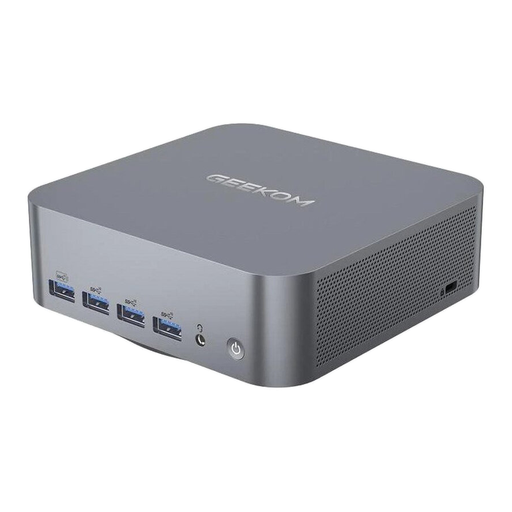
Beelink EQ5 mini PC with 16 GB RAM and 512 GB storage

Beelink EQ5 mini PC, 16 GB RAM, 512 GB

Compare the specifications with your needs for spreadsheets and project data on a multi-screen workstation. The product is listed with 16 GB RAM, 512 GB storage and Windows 11 Home. The description also lists two HDMI outputs, USB-C and Gigabit Ethernet.

View at Joybuy

HP Z2 Mini G1a Ryzen AI Max+ Pro 395 with 128 GB RAM and 2 TB storage

HP Z2 Mini G1a Ryzen AI Max+ Pro 395, 128 GB RAM, 2 TB

Check whether this compact workstation suits your software and connectivity needs for larger local datasets. The SKU lists 128 GB RAM and 2 TB storage. The description specifies Windows 11 Pro, Thunderbolt 4, USB-C and Mini DisplayPort outputs.

View at Joybuy

Thunderobot mini PC workstation with 128 GB LPDDR5X and 1 TB SSD

Thunderobot Mini PC Workstation AI Max+ 395, 128 GB, 1 TB SSD

Compare the listed specifications with your projects if you work with large local datasets. The title lists 128 GB LPDDR5X at 8000 MT/s and a 1 TB SSD. It also mentions Wi-Fi 7, a side-mounted SSD interface and a quick-release network card interface.

View at Joybuy

Frequently asked questions

Do I need a particularly powerful processor for birdwatching data?

Not simply because the subject is birdwatching. What matters is the software and files you use: Microsoft Support notes that Excel is limited by available resources, while the QGIS documentation describes spatial analysis. Check that the exact configuration suits the way you work.

How do I set up a mini PC for multiple users?

Create a separate, password-protected account for each person, with appropriate access rights. This is the advice of Germany’s Federal Office for Information Security. Also decide where shared project files will be stored and how they’ll be backed up.

How do I back up spreadsheets and mapping projects?

Set up regular backups to a separate destination. Germany’s Federal Office for Information Security recommends disconnecting backup media from the computer when it isn’t being used for a backup.

Are a guarantee and statutory consumer rights the same thing?

No. In Germany, when a consumer buys goods, their statutory rights against the seller if the goods are faulty are separate from any voluntary guarantee. Different contractual terms may apply when an organisation makes the purchase.

What should I check in a mini PC listing?

Check the details for the exact device and configuration. When monitoring electrical and electronic products, Germany’s Federal Network Agency checks, among other things, the CE marking, product identification, manufacturer details and any required German-language instructions.

Are birdwatching records automatically covered by the GDPR?

No, not just because they’re records of bird sightings. The GDPR applies to personal data relating to identifiable individuals. So check whether your specific files include names or other details that could identify the people making the observations.