For a browser extension project, a fully configured mini PC is a good fit if its operating system, installed RAM and SSD meet the needs of your tools and target browsers. If you’ll have several applications open at once, the exact configuration matters more than the model range. A barebone gives you the freedom to choose your RAM, SSD and operating system, but you’ll need to buy extra components and set everything up yourself. If the computer will be near where you sleep, check noise measurements taken under comparable workloads rather than assuming that a compact design means quiet operation.
Which mini PC is right for you?
Developers using several test browsers
If you have an editor, development tools and several browsers open at the same time, it’s worth checking the specifications of the exact variant you’re considering. Mozilla outlines differences between browser extension APIs, so it’s also important to test in your intended target browsers.
Students with a small desk
If space is limited, check that the case, monitor connections, power supply and cables will all fit your workspace. If the computer will be near your bed, noise measurements taken under a comparable workload will also tell you more than the size of the case.
Those who want to configure their own PC
A barebone could be right for you if you want to choose the components and operating system yourself. ASUS states explicitly that the NUC 14 Essential Kit doesn’t include RAM, storage or a pre-installed operating system; with GMKtec, what’s included depends on the M6 Ultra version you choose.
What should you look for when buying?
Fully configured Windows mini PC
A good fit if: you want to get started without installing RAM, an SSD and an operating system yourself, and your tools run on Windows.
Trade-off: Check the full specification of the version you’re buying. Processor, storage and operating system can vary within the same model range.
Barebone mini PC
A good fit if: you want to choose and install the RAM, SSD and operating system yourself.
Trade-off: According to ASUS, the NUC 14 Essential Kit doesn’t include RAM, storage or a pre-installed operating system. Depending on the version, the GMKtec M6 Ultra may be sold as a barebone or as a fully configured PC.
Mac mini
A good fit if: your specific development tools work with macOS, or you’d prefer to use macOS.
Trade-off: Apple lists at least 16 GB of unified memory and a 256 GB SSD for the Mac mini with M6. These specifications don’t confirm compatibility with every tool or browser extension.
| Buying priority |
What to check |
Who it matters most to |
| Development and testing at the same time |
Check the RAM, SSD and processor actually included in the specific version against the tools you use. |
If I have my editor, development tools and several browsers open at once, I compare the specifications of the exact version. Around 31% of consumers prioritise developing and testing in parallel. |
| Space and quiet operation |
Check the case, connections and space for the power supply and cables; only compare noise measurements taken under similar workloads. |
On a small desk, I need to know whether there’s room for the computer, monitor and cables. If it’s near my bed, I also consider noise. Around 25% of consumers prioritise saving space and, where relevant, keeping their workspace quiet. |
| Complete setup |
Check what’s included, whether an operating system is pre-installed, and how much RAM and storage are actually supplied. |
If I want a setup that’s ready to use, I factor in any missing components and the time needed to get everything set up. Around 25% of consumers focus on the total cost of buying and setting up their computer. |
| Browser and system compatibility |
Check which operating systems and tools are supported, and test the extension in your intended target browsers. |
For my project, my development tools need to run on the system I choose, and the extension needs to work in my target browsers. Around 19% of consumers prioritise this compatibility. |
Avoid common buying mistakes
-
Assuming a barebone is a complete PC that’s ready to use
Versions clearly labelled as barebone may not include RAM, an SSD or an operating system. The maximum supported capacity doesn’t tell you what’s included in the box.
Check the exact version and make a list of all the components included before you buy.
Depending on what’s included, you may need to buy extra components and spend time installing them.
-
Assuming test results apply to every version in a model range
The GEEKOM A5 Pro tested by COMPUTER BILD refers to a specific combination of processor, RAM and SSD. MSI also lists different model codes and operating system configurations within the Cubi NUC family.
Compare the full model code, processor, RAM, SSD and operating system of the product you’re considering with the version that was tested.
-
Assuming a compact design means quiet operation
The size of a mini PC doesn’t tell you how loud it will be under your workload. Test results apply to the specific configuration that was tested.
If a quiet workspace matters to you, look for independent noise measurements for the exact version under a comparable workload.
Brands to consider
GEEKOM
The German manufacturer website lists the A5 Pro 2026 in several configurations.
- GEEKOM lists one A5 Pro version with a Ryzen 5 7530U, 16 GB RAM and a 1 TB SSD.
- COMPUTER BILD describes the A5 Pro configuration it tested as compact, with upgradeable storage; a keyboard and mouse weren’t included. Manufacturer claims about quiet operation aren’t independent measurements for every version.
MSI
The Cubi NUC 1M family includes versions with different specifications.
- MSI lists configurations with Windows and versions that don’t specify an operating system.
- The name Cubi NUC 1M alone doesn’t identify the specifications of a specific product listing.
ASUS
The NUC 14 Essential Kit is for buyers who want to fit out their own mini PC.
- ASUS lists features including monitor connections and a VESA mount.
- For the kit documented, ASUS doesn’t list included RAM, storage or a pre-installed operating system. Specifications may vary by country and SKU.
GMKtec
According to the German manufacturer website, the M6 Ultra is available as a barebone or in fully configured versions.
- The different versions give you several ways to set up your PC.
- The barebone option doesn’t include RAM, an SSD or an operating system. The maximum supported capacities don’t indicate what’s included.
Apple
The Mac mini with M6 is a macOS option for buyers whose specific tools are compatible with the system.
- For the German M6 version, Apple lists at least 16 GB of unified memory and a 256 GB SSD.
- These specifications don’t confirm compatibility with specific development tools or support for an extension in every browser.
Joybuy mini PCs for development and browser testing
The following Joybuy product options are mini PCs for development tools and browser testing. If you’re buying a specific device in Germany, also check the applicable EU conformity requirements, including any mandatory CE marking. The mark isn’t a performance test.
 No image available
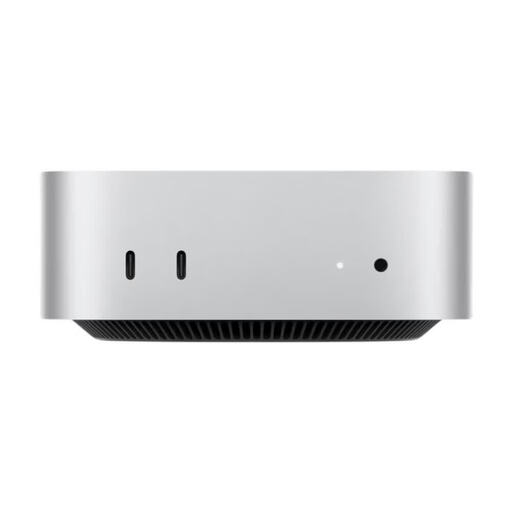
Apple Mac mini M6 MHQM4_CTO_8 A3534, 32 GB, 1 TB
A macOS option for development tools whose compatibility you’ve checked in advance.
Listed in the product title: M6, 12-Core CPU, 12-Core GPU, 32 GB Unified Memory and a 1 TB SSD; Silver finish.
Joybuy
 No image available
Ninkear M8 mini PC
A Windows mini PC option, provided you check that its specific system and tools are compatible before buying.
Listed in the product title: AMD Ryzen 7 8745HS, 16 GB DDR5, 1 TB SSD and Windows 10/11; also Wi-Fi 6.
Joybuy
 No image available
Ninkear L12 Pro mini PC
An option if the listed connections and support for your development tools suit your setup.
Listed in the product title: Intel i9-12900HK, 16 GB DDR4, 1 TB SSD and USB 4.0; also compatible with Windows and Ubuntu.
Joybuy
 No image available
SOYO S5Air mini PC
A Windows option for a project where the specific configuration needs to suit the tools you’ll use at the same time.
Listed in the product title: AMD Ryzen 5 7535HS, 16 GB LPDDR5, 512 GB NVMe SSD and Windows 11 Pro.
Joybuy
 No image available
FIREBAT F1 mini PC
An option if you want to compare the listed specifications with the requirements of your development and testing tools.
Listed in the product title: Ryzen 5 7640HS, 24 GB LPDDR5 RAM, 512 GB PCIe 4.0 SSD, plus USB 4.0 and HDMI 2.1.
Joybuy
Frequently asked questions
Do I need a particular mini PC for a Chrome extension?
No. Google’s introduction to extension development doesn’t specify a single mini PC configuration for every project. Choose specifications that suit your tools and the number of applications you use at the same time.
Can I use a Chrome extension in Firefox without testing it?
No. Test it in every browser you intend to support. Mozilla outlines differences in supported APIs and keys in the manifest.json file.
What do I need to set up before using a barebone for the first time?
First, check exactly what’s included. The documented ASUS NUC 14 Essential Kit doesn’t include RAM, storage or a pre-installed operating system; for the GMKtec M6 Ultra, this applies to the version specifically labelled as a barebone.
What should I check for a mini PC’s compliance in Germany?
For devices covered by relevant harmonised EU product legislation, mandatory CE marking is part of the conformity requirements. The Bundesnetzagentur also lists product identification, manufacturer details, instructions for use and safety warnings in German, and a correct declaration of conformity as points to check. The marking alone doesn’t replace checking the specific product listing.
Are a warranty and statutory consumer rights the same thing?
No. Verbraucherzentrale distinguishes statutory consumer rights against the seller from a voluntary guarantee; the terms of the guarantee apply to the latter.


