
Lieferung heute & morgen

Qualitätsgarantie

Willkommens-Angebote freischalten: KOSTENLOSE Lieferung | Bis zu 80 % RABATT | Kostenlose 30-Tage-JoyPlus-Testphase
App herunterladen
A Mini PC saves space, replaces a traditional desktop computer for many applications and can often be installed behind a monitor or next to the router. However, a small case alone is not enough to base your choice on. The processor, RAM, storage technology, connections and intended use are what really matter.
The name “Ryzen 7” or “Core i5” does not tell you everything about performance. The generation, clock-speed range, number of cores and power class also affect the result. An older Intel processor may be perfectly adequate for office tasks, while a newer processor with more cores may be better suited to photo editing, numerous browser tabs or virtual machines.
For a Mini PC for the office or a Mini PC for the home office, an efficient mid-range processor is often sufficient. If you regularly edit videos, programme or play less demanding games, you should also consider the integrated graphics and cooling system.
A Mini PC with 16 GB RAM offers more headroom for running several applications at once than a device with 8 GB. 8 GB may be enough for word processing and basic web use. However, 16 GB is a more practical starting point when using video conferencing, spreadsheets, browser tabs and cloud applications simultaneously.
For storage, a Mini PC with a 512 GB SSD is a well-balanced option for many home users. A 256 GB SSD can quickly become cramped once programmes, photos and local files are added. It is also important to check whether storage can be expanded later. SSD capacity says nothing about the quality of your data backup: important documents still require a separate backup.
A compact Mini PC can control several monitors, but it must have the right outputs. HDMI, DisplayPort and USB-C are not automatically equivalent. With USB-C, the technical specifications should explicitly state that it supports video output.
If you want to connect a 4K monitor, check the resolution and refresh rate. 4K monitor support can mean different limitations depending on the connection. For office work, studying and multimedia, 4K at 60 Hz is often sufficient. Higher refresh rates require the graphics output, cable and monitor to be compatible with one another.
An Intel Mini PC is often suitable for office work, administration, streaming and everyday programmes. Depending on the model, a Ryzen Mini PC may offer more powerful integrated Radeon graphics, making it more interesting for light gaming or more graphics-intensive applications. Dedicated graphics cards are rare in such a small form factor, so a Mini PC is not automatically suitable for modern, graphically demanding games.
Look out for:
16 GB RAM is a sensible benchmark for many modern workflows. With 8 GB, check whether the RAM can be upgraded. Soldered memory generally cannot be upgraded later.
An NVMe SSD operates via PCIe and can offer advantages over a SATA SSD when starting programmes and transferring files. However, actual speed depends on the controller, temperature and drive capacity. For purely office-based work, a SATA SSD is still perfectly functional if its capacity and system performance meet your needs.
A Mini PC with Windows 11 is ready for many common office and study programmes straight away. Windows 11 Pro can provide businesses with additional management and security features, while Windows 11 Home may be sufficient for private use.
For home offices and small businesses, the Wi-Fi standard, Bluetooth, Gigabit or 2.5-Gigabit LAN and TPM support are also important. For video conferencing, the webcam and microphone should either be integrated or connectable via suitable USB ports.

Why this product suits the profile: This compact model combines 16 GB LPDDR4 RAM with a 512 GB SATA SSD, making it suitable for office work, education and multimedia tasks.
The combination of 16 GB RAM and 512 GB of storage avoids an overly limited basic configuration. According to the product specifications, HDMI 2.0, DisplayPort 1.4 and USB-C support several display devices.
16 GB LPDDR4 RAM, a 512 GB SSD and six USB 3.0 ports in a case measuring 128 × 128 × 47,6 mm.
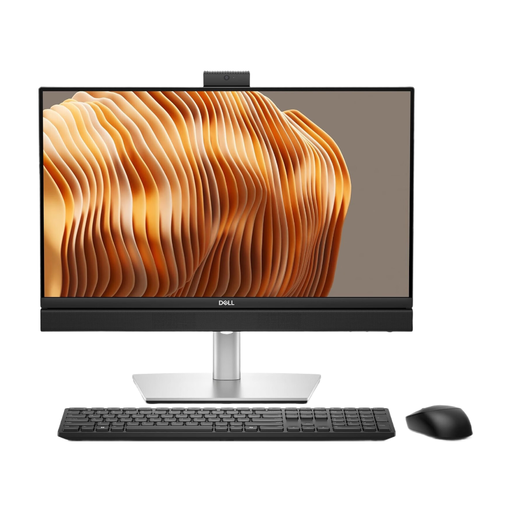
Why this product suits the profile: This all-in-one PC combines a 23.8-inch FHD display with Windows 11 Pro, 16 GB DDR5 RAM and a 512 GB NVMe SSD.
The technical specifications clearly state the RAM and SSD capacities. Wi-Fi 6E, Bluetooth 5.3, LAN and several USB ports reduce the need for additional adapters.
Integrated design, a 24-inch FHD display, Intel Core Ultra 7 265, 16 GB DDR5 and a 512 GB NVMe SSD according to the product data.

Why this product suits the profile: With a Ryzen 7 H 255, 24 GB LPDDR5 RAM and Radeon 780M, this Mini PC is aimed at users with greater multitasking and graphics demands.
The specification goes beyond a basic 8 GB configuration. HDMI 2.0, DisplayPort 1.4 and USB-C are designed for flexible monitor setups.
24 GB LPDDR5-6400 RAM, a 512 GB NVMe SSD, Radeon 780M and dimensions of 128 × 128 × 47,6 mm.

Why this product suits the profile: This model combines a Ryzen 5 7430U with 16 GB RAM, a 512 GB SSD and support for three 4K displays.
The stated specification of 16 GB RAM and 512 GB SSD provides headroom for several applications. The 4K triple-screen specification is aimed at workstations with multiple monitors.
Ryzen 5 7430U with six cores and twelve threads, Wi-Fi 6, Bluetooth 5.2 and a compact design according to the product name.
We have put together a complete, regularly updated list of products that fully meet these strict selection criteria and the safety regulations applicable in the EU.
An all-in-one PC integrates the computer and display into a single device. This reduces cable clutter and makes setting up your study or home office easier. Models such as the Acer Aspire C24-B, for example, combine 16 GB RAM and a 512 GB SSD with a 23.8-inch FHD display.
A Mini PC without an integrated display, on the other hand, gives you greater flexibility when it comes to monitor size, resolution and ergonomics. It is particularly suitable if you already have a display or plan to connect several monitors later. Before buying, check the available desk space, VESA mounting compatibility, noise level and how easily the ports can be accessed.
For word processing, browsing, video conferencing and spreadsheets, a suitable model is generally up to the job. Look for at least 8 GB RAM, an SSD, reliable networking options and enough USB ports for a webcam, headset and external drives.
Its service life depends on the cooling system, components, software maintenance and intensity of use. A device with expandable storage can be adapted to changing requirements for longer. Keep the ventilation openings clear and clean them regularly to remove dust.
Many Mini PCs are designed to consume less power than desktop systems with a separate graphics card. Actual consumption depends on the processor, monitor, power supply and workload. For a fair assessment, consider the power consumption of the entire workstation, not just the computer.