
Lieferung heute & morgen

Qualitätsgarantie

Willkommens-Angebote freischalten: KOSTENLOSE Lieferung | Bis zu 80 % RABATT | Kostenlose 30-Tage-JoyPlus-Testphase
App herunterladen
A mini PC can replace a traditional desktop in a home office, student accommodation or small office. However, when buying a mini PC, size is not the only consideration. Many offers promote high clock speeds, 4K support or particularly low prices, while important details about memory, cooling and connections are easily overlooked.
A current model name does not automatically mean that a device is suitable for every task. Important factors include the number of cores, threads, clock-speed range, cooling and integrated graphics. An affordable mini computer with four cores may be sufficient for word processing, but can quickly reach its limits with video editing or numerous applications running at the same time.
For office work, browsing and video calls, 8 to 16 GB of memory is usually a practical amount. If you use virtual machines, large spreadsheets, image-editing software or demanding applications, you should plan for 24 or 32 GB instead.
The term PC with 4K support primarily describes the possible video output. It does not automatically mean that modern games will run smoothly in 4K. A suitable graphics unit, sufficient cooling and the individual game settings are decisive here.
A mini PC with integrated Radeon or Intel graphics can drive several monitors for office work. For high frame rates in current games, however, a gaming PC with a dedicated graphics card is generally more suitable.
A compact desktop PC fits on small desks, but depending on its design, it may offer fewer expansion options. Check the following before buying:
Ventilation is particularly important for a quiet PC. A small case should not be placed in an enclosed compartment or directly next to a heat source.
A Ryzen mini PC with multiple cores and more powerful integrated Radeon graphics can offer a well-balanced solution for office work, multimedia and occasional gaming. An Intel mini PC with an efficient processor is often suitable for office applications, digital signage or basic media playback.
For professional CAD, 3D or simulation software, workstation certification and the right graphics card are more important than having the smallest possible case. A workstation PC with a dedicated professional GPU is therefore not directly comparable with an office PC.
Pay attention to the combination of capacity and memory type. DDR5 RAM uses a different platform from DDR4 or LPDDR4 memory. With soldered LPDDR memory, a later upgrade may not be possible. A 512 GB NVMe SSD generally offers more room for Windows 11, programmes and everyday files than a 128 GB SSD.
If you store lots of photos, games or video files, you should plan for 1 or 2 TB, or check whether there is space for a second storage drive.
A Windows 11 PC should come with sufficient storage and compatible drivers. For businesses, Windows 11 Pro, TPM 2.0, device management and security features may be important. Private users do not necessarily need these functions, but depending on how the device is used, they can benefit from a clear update and support structure.
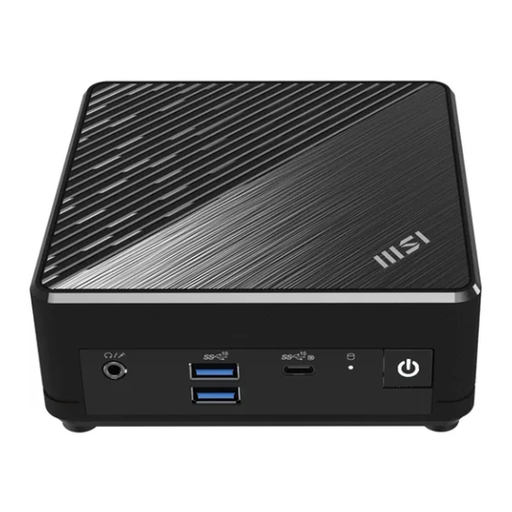
Why this product suits this profile: This compact office PC is designed for basic office and multimedia tasks and can be mounted behind a monitor using a VESA bracket.
The product details clearly list the processor, RAM, SSD capacity, connections and possible number of monitors. This makes it easier to assess the limitations of 4 GB RAM and 128 GB of storage before buying.
Intel N200, Windows 11 Pro, HDMI and DisplayPort, plus two Gigabit LAN ports in a case measuring 124 × 54 × 124 mm.

Why this product suits this profile: 24 GB LPDDR5, a 512 GB PCIe 4.0 SSD and several modern video outputs provide a solid foundation for home working, multimedia and selected games.
The specifications provide precise memory and connection details. 4K output and Radeon 760M graphics are not presented as a replacement for a dedicated gaming graphics card.
Ryzen 5 7640HS with 6 cores and 12 threads, USB 4.0, HDMI 2.1, 2.5G Ethernet and support for three displays.

Why this product suits this profile: This compact workstation is aimed at professional users with demanding requirements for memory, data processing and multiple high-speed interfaces.
With 128 GB DDR5 and a 2 TB SSD, the specification is clearly geared towards large projects and parallel applications. The integrated Radeon 8060S should nevertheless be distinguished from a separately installed graphics card.
16 cores and 32 threads, 2.5 GbE LAN, Wi-Fi 7, two Thunderbolt 4 ports and a case weighing 2.3 kg.
We have put together a complete, regularly updated list of products that fully meet these strict selection criteria and the safety regulations applicable in the EU.
A mini PC is a sensible choice when desk space, energy consumption and flexible positioning are the priorities. A slim desktop such as the Dell Pro Slim Essential, on the other hand, offers more traditional desktop connections and a design that is typical for office workspaces.
If you need a dedicated graphics card, more powerful cooling or future expansion options, you should consider a tower. In this case, buying a gaming PC generally means needing more space, but also getting higher graphics performance. For CAD, rendering or simulations, devices such as a ThinkStation or an HP Workstation may be worth considering.
For word processing, video calls, browsing, email and streaming, a mini PC with at least 8 GB RAM and an SSD is sufficient. With lots of browser tabs, large spreadsheets or multiple applications running at once, 16 GB or more is the more practical choice.
Its service life depends on cooling, workload, exposure to dust and upgrade options. Place the device in an open position, do not block the ventilation openings, and install security and driver updates. A model with replaceable storage can adapt to changing requirements for longer.
A compact office PC often uses a smaller power supply and may consume less energy than a powerful tower during everyday tasks. However, actual consumption depends on the processor, graphics unit, monitors and workload. Therefore, do not compare power-supply ratings alone; consider the intended use as well.