What should you look for when buying?
First measure the space available, including room for cables and airflow. Then let the most demanding game you actually want to play guide your choice of components.
Small PC with integrated graphics
A good fit if: you have very little desk space and mainly plan to play less demanding city-building games with suitable settings.
The trade-off: Integrated graphics do not prove that a PC can match the recommended graphics performance for more demanding games; some models also have soldered RAM.
Gaming mini PC with dedicated graphics
A good fit if: you have limited space but also want to play more demanding 3D city-building games; check tests of the exact configuration at the settings you want to use.
The trade-off: A mobile graphics card is not automatically equivalent to a desktop graphics card listed in a game’s recommendations. Fan noise under load and limited upgrade options may also be a consideration.
Compact, upgradeable desktop
A good fit if: the option to change components later matters more than having the smallest possible case, and you have enough desk space for the computer and clear airflow.
The trade-off: Check each component individually: even a compact desktop can have soldered RAM, despite other parts being accessible.
| Priority |
What to look for when buying |
Who is this particularly important to? |
| Desk space and positioning |
Check the dimensions and orientation of the specific model; allow space for the power supply, cables and unobstructed ventilation openings. |
If I have very little desk space, I still need room for plugs and airflow. Around 31% of consumers put available space first. |
| Demanding city-building games |
Match the most demanding game you plan to play, your target resolution and preferred settings to the exact CPU and graphics unit. For Cities: Skylines II, Paradox Interactive recommends, among other options, a GeForce RTX 3080 with 10 GB or a Radeon RX 6800 XT with 16 GB. |
If I want to play large 3D cities, performance at my chosen settings matters more to me than having an especially small case. Around 31% of consumers put demanding games first. |
| Specifications to suit your needs |
Check the minimum and recommended requirements for the titles you actually play separately; for Minecraft: Java Edition, also check whether integrated or dedicated graphics are being used. |
If I mainly play less demanding city-building games, I want to choose specifications to suit those titles rather than pay extra for requirements that don’t apply. Around 23% of consumers put choosing a suitably specified computer first. |
| Noise levels and future upgrades |
Look for tests of the specific model’s noise levels under load and check whether the RAM is soldered or replaceable; assess SSD slots separately. |
If the computer is right next to me or I might want to change components later, I need to weigh up noise and upgrade options. Around 15% of consumers put quiet operation or future upgrades first. |
Joybuy products for a small desk
This selection of Joybuy mini PCs gives you options to compare with your city-building games and available space. The components listed alone don’t show how a particular game will run at your preferred settings.
 No image available
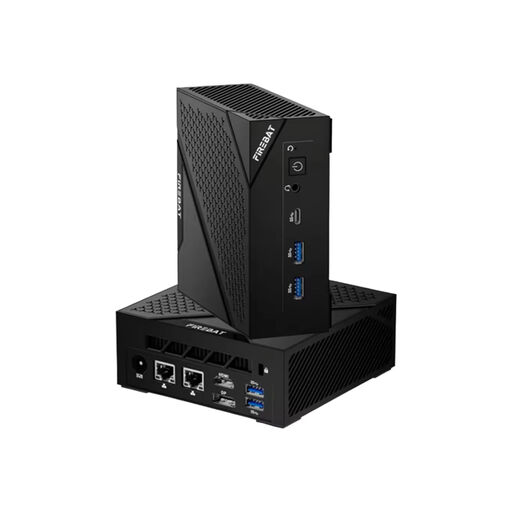
FIREBAT AM02 mini PC, Ryzen 5 6600H, 16 GB LPDDR5, 512 GB SSD
A mini PC could be a good option if desk space is limited; compare the processor and memory with the requirements of your games.
Specifications include 16 GB LPDDR5, a 512 GB SSD, Wi-Fi 6 and Bluetooth 5.2. The product description says to ensure sufficient ventilation and keep the vents clear.
View at Joybuy
 No image available
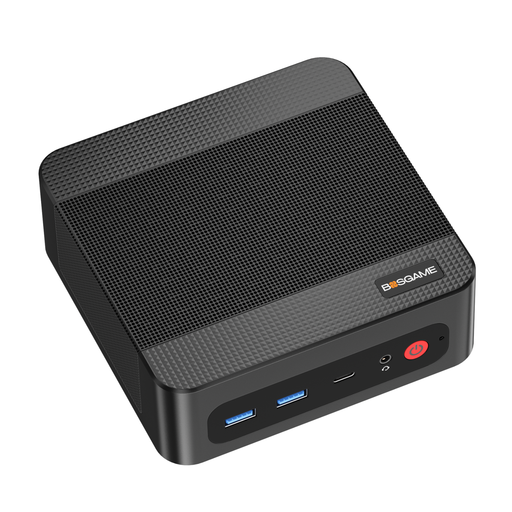
BOSGAME P4 Ultra mini PC, Ryzen 7 7730U, 16 GB DDR4, 512 GB PCIe SSD
If you’re looking for a compact computer, compare this configuration with the requirements of the most demanding game you plan to play.
The product name lists a Ryzen 7 7730U, 16 GB DDR4 and a 512 GB PCIe SSD. These specifications alone don’t confirm how it will perform in a particular game.
View at Joybuy
 No image available
FIREBAT mini PC, Ryzen 7 7735HS, Radeon 680M, 16 GB RAM, 512 GB SSD
The compact design could work well on a small desk; check the graphics unit against the requirements of the specific games you play.
Specifications include 16 GB RAM, a 512 GB NVMe SSD and two M.2 slots. The product details are no substitute for checking performance at your preferred game settings.
View at Joybuy
 No image available
FIREBAT A8 mini PC, Ryzen AI 9 365, 24 GB DDR5, 1 TB SSD
If you’re considering a mini PC with the components listed in the title, compare the exact configuration with your games and preferred settings.
The product name lists 24 GB DDR5, a 1 TB PCIe 4.0 SSD and Radeon 880M graphics. The listed connections include USB4, HDMI 2.1 and Oculink.
View at Joybuy
 No image available
BMAX B7A Plus mini PC, Ryzen 5 6600H, 12 GB LPDDR5, 512 GB NVMe SSD
If desk space is very limited, a mini PC could be worth considering; check that the configuration suits your games before you buy.
The product name lists 12 GB LPDDR5 and a 512 GB NVMe SSD. The recommendations for Cities: Skylines II and Factorio: Space Age each list 16 GB RAM; Minecraft: Java Edition has different minimum RAM requirements for integrated and dedicated graphics.
View at Joybuy
Frequently asked questions
Is a mini PC with integrated graphics enough for all city-building games?
No – you can’t tell from the form factor alone. Compare the specific game and your preferred settings with the graphics unit in the exact model. Factorio and Cities: Skylines II have different requirements; Minecraft: Java Edition also has different minimum RAM requirements for integrated and dedicated graphics.
What should I consider when setting up on a small desk?
As well as the case, allow room for plugs, cables and, where applicable, an external power supply, and keep the ventilation openings clear. Joybuy’s mini PC listing advises ensuring sufficient ventilation and keeping the vents unobstructed; always follow the instructions for your specific device.
Can I upgrade a mini PC’s RAM later?
Not with every model. Framework says the RAM in the Framework Desktop is soldered, while GMKtec describes the EVO-X2’s memory as non-upgradeable. Check the details for the exact configuration and assess RAM and SSD upgrades separately.
What are my rights when buying online from a business seller?
For a typical distance purchase in the EU, you generally have a 14-day right to cancel, starting from delivery; exceptions apply to certain goods, such as products made to the customer’s specifications. You’re also entitled to a legal guarantee of at least two years from the seller if the goods are faulty. Your Europe explains these EU rules; if you’re buying a custom-configured PC, check the specific terms of the contract and distinguish the legal guarantee from a voluntary warranty.
Can an old PC go in household rubbish in Germany?
No. Electrical and electronic waste must be collected separately; the German Environment Agency lists local recycling centres as a return option. Whether a retailer has to take back larger old appliances depends, among other things, on whether a corresponding new appliance is being bought; the Federal Ministry for the Environment explains these conditions.


