For managing a club website in your browser, a fully equipped mini PC is usually the easiest place to start. Compare the footprint, ports, operating system and what’s included with the specific model. More powerful specifications may be useful if you do a lot of media work locally; a barebone is better suited to you if you want to choose and set up the RAM, SSD and operating system yourself.
Who is a compact PC suitable for?
Website managers with limited space
You publish club content from a fixed, compact workspace and want a computer that fits neatly there. Compact ranges such as the Lenovo ThinkCentre Tiny and Apple Mac mini are worth considering for this kind of setup.
Club teams working with media
As well as website copy, you work with images or other files, so the precise storage and port configuration matters. Specifications vary across ranges from Lenovo, HP and MSI, so check the particular model you’re considering.
Club IT coordinators
You set up the computer and look after it over the longer term. If maintenance or future upgrades matter, check the details for the specific model. Lenovo says that its ThinkCentre range allows tool-free access to the memory and storage.
What should you look for when buying?
For managing a website in a browser, start by considering the PC’s footprint, suitable ports and what’s included. If you work with media locally, also think about the software and files you need to use. For relevant electrical and electronic equipment, Germany’s Federal Network Agency checks matters including CE marking and manufacturer details. Check this information on the specific device: the CE mark is not a performance test.
| Consideration |
What to check before buying |
Who it matters most to |
| Footprint and placement |
Check the case dimensions against the space available; check separately whether you need a mounting bracket. |
If desk space is tight, the computer, power supply and cables all need to fit. Around 33% of consumers prioritise the footprint. |
| Specifications for your workflow |
Check which programmes you use and the size of your files; compare the RAM, SSD and operating system for the specific model. |
If you work with text and locally stored media, you’ll want to match the specifications to the applications you actually use. Around 27% of consumers put their workflow first. |
| Compatibility with your workspace |
Match your monitor’s inputs to the PC’s outputs; check the other ports and what’s included. |
If you want to keep using your existing monitor and input devices, the right connection is essential. Around 20% of consumers prioritise compatibility with their workspace. |
| Overall costs and ongoing support |
Compare what’s included and upgrade options; make a note of the seller and applicable service terms. |
If you’re planning a club workspace that’s ready to use and easy to look after over time, remember to factor in any extras you’ll need. Around 20% of consumers prioritise overall costs and ongoing support. |
Avoid common buying mistakes
-
Comparing only the price of the case
A barebone isn’t ready to use without additional components. Even fully equipped business mini PCs may require a separate monitor or input devices.
Before comparing deals, make the same checklist for each specific model: operating system, RAM, SSD, monitor and input devices.
Depending on the model, you may need to buy and set up a monitor, input devices, memory, an SSD or an operating system separately.
-
Applying a review result to a different model number
COMPUTER BILD tested the HP Pro Mini 400 G9 D6B240EA. The German HP listing with model number 938A5EA#ABD has different specifications; being part of the same range doesn’t make the two models identical.
Compare the full model number and specifications rather than relying on a review of a different version.
-
Confusing web-host requirements with PC requirements
WordPress.org lists PHP, a database and HTTPS as requirements or recommendations for the host. These are not automatically requirements for the computer you use to manage the website in a browser.
First, establish whether you’ll manage the website in your browser through your host, or whether you also want to set up a local installation.
Key brands at a glance
GEEKOM
The A5 Pro 2026 Edition is a compact mini PC range for a space-saving Windows workspace.
- For the model described here, GEEKOM lists a Ryzen 5 7530U, 16 GB RAM and a 1 TB SSD.
- These specifications don’t apply to every A5 Pro processor option.
MSI
The Cubi NUC 1M is a compact range for small workspaces where multiple monitor or peripheral connections may be useful.
- MSI’s specifications include HDMI, Thunderbolt and VESA 100 × 100 mm.
- The range includes models with different processors and operating systems, so check the specifications for the version you’re considering.
HP
The Pro Mini 400 G9 range is designed for compact business workspaces.
- HP describes the range as offering flexible connectivity options.
- The German listing with model number 938A5EA#ABD specifies 8 GB RAM and a 256 GB SSD; it isn’t the D6B240EA model reviewed.
Lenovo
The ThinkCentre M70q Gen 5 Tiny is an option for a fixed workspace where placement and maintenance are important.
- Lenovo lists different placement options and tool-free access to the memory and storage.
- According to Lenovo, the monitor, wireless keyboard and mouse are sold separately; specifications vary by configuration.
Apple
The latest Mac mini could suit a small workspace if the club software you need runs on macOS or in a browser.
- Apple gives the Mac mini a footprint of 12,7 × 12,7 cm and lists ports including HDMI and Thunderbolt.
- Memory and SSD options vary, so check the configuration you want and the peripherals you’ll need.
Joybuy products for a small workspace
The following Joybuy PCs are designed for compact desktop workspaces. Compare the operating system, storage, ports and accessories for the specific model.
 No image available
SOYO Y5Pro mini PC, Intel Core i5 8250U/8350U
A compact Windows option for a small desktop workspace. Check which of the two listed processors is included in the model you choose.
Windows 11, 8 GB DDR4 RAM and a 256 GB SATA SSD. The title also lists two HDMI ports, Wi-Fi 5 and BT 5.2.
View at Joybuy
 No image available
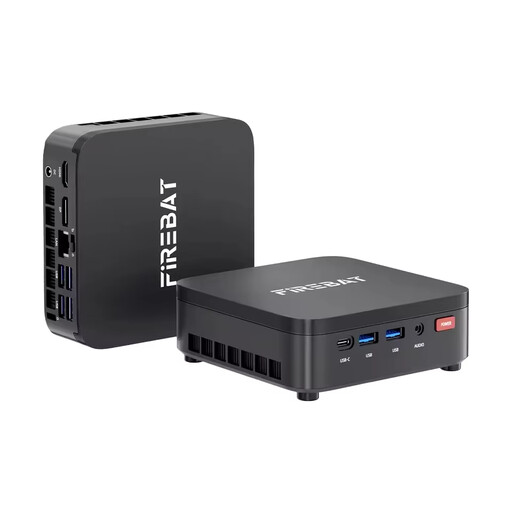
FIREBAT R3 mini PC, Ryzen 3 4300U
A compact Windows workspace option if the listed memory and operating system suit the programmes you use.
Windows 11 Pro, 16 GB LPDDR4 RAM and a 512 GB M.2 SATA SSD. The title also lists Wi-Fi 6 and BT 5.2.
View at Joybuy
 No image available
Apple Mac mini M6, 24 GB, 512 GB SSD
A compact macOS option, provided the club software you need runs on macOS or in a browser and your existing monitor is compatible with the ports.
The title lists a 12-core CPU, a 12-core GPU, 24 GB Unified Memory and a 512 GB SSD. It also lists Thunderbolt 4, HDMI, 2,5-GbE, Wi-Fi 7 and Bluetooth 6.
According to the product description, the keyboard and mouse are sold separately.
View at Joybuy
 No image available
ACEMAGIC AK1PLUS mini PC, Intel Celeron N5095
A mini PC with Windows 11 Pro and two HDMI outputs according to the description. Check that these match the inputs on your existing monitor.
16 GB LPDDR4X RAM and a 256 GB M.2 2280 SATA SSD. The title lists HDMI 2.0, 4K/60Hz and Wi-Fi 5.
The product description recommends not opening the device or blocking its ventilation openings.
View at Joybuy
 No image available
MaxMini B3 mini PC, Intel N4100
For a compact desktop workspace with two HDMI ports according to the product title. Check that the rest of the specifications and the network connection suit your needs.
8 GB LPDDR4 RAM and a 256 GB SSD. It also lists Gigabit LAN, 2.4G/5G Wi-Fi and BT 5.0.
According to the product description, this device is for indoor use only.
View at Joybuy
Frequently asked questions
Does the club PC need the PHP and database versions specified by WordPress?
Not simply because you edit WordPress in a browser. WordPress.org lists these versions as requirements or recommendations for the host running the website. If you install WordPress locally, you’ll also need to set up the environment you use for it.
What should I check before setting up and connecting the PC?
Compare your monitor’s inputs with the outputs on the specific PC model, and allow room for the power supply and cables. Also check whether you need a mounting bracket and what accessories are included; Lenovo notes that monitors and input devices are sold separately for its ThinkCentre Tiny range.
Who is responsible if the club PC is faulty?
The Verbraucherzentrale distinguishes between statutory rights against the seller and a voluntary guarantee. Check the specific contract to establish which purchase terms apply to your club.
Which marking should I check on a PC for the German market?
For relevant electrical and electronic products, Germany’s Federal Network Agency checks matters including CE marking, manufacturer details and conformity. Check the information on the specific device; a CE mark alone doesn’t tell you whether the PC is suitable for your website work.
Does the club website need a legal notice?
That depends on how the website is set up. The Landesanstalt für Medien NRW explains that websites serving purely personal or family purposes may be treated differently from other sites. Assess the specific website in light of its content and who runs it before publishing it.


