If desk space is limited, a gaming mini PC’s smaller footprint may be the better fit. If you have more room and place greater value on future upgrades, a compact tower could work for you. Measure the space available, including room for cables and airflow, then check the exact model’s specifications against your games, monitor resolution and preferred graphics settings.
Which form factor is right for you?
Role-playing game fans with limited desk space
If your monitor and peripherals already take up space on your desk, start by comparing the full PC’s dimensions and allowing extra room for ports and airflow. ASUS Deutschland and MSI offer a range of mini PC and tower designs, so check the exact dimensions of each model.
Gamers with specific graphics goals
If you want to play particular role-playing games at a set resolution and graphics quality, compare the exact PC’s specifications with each game’s requirements. For Baldur’s Gate 3, Larian Studios recommends 16 GB RAM and a graphics card with at least 8 GB of video memory, among other specifications, for the listed Windows configuration.
Gamers with a growing game library
If you install several large games or might want to add more storage later, check the SSD space actually available and the upgrade options for the configuration you’ve chosen. Larian Studios lists 150 GB of available SSD space for Baldur’s Gate 3; slots and free capacity vary between PCs.
What should you consider when buying?
First, work out how much space is actually available where you plan to put the PC. Then compare its specifications with your games and upgrade plans.
Gaming mini PC
A good fit if: Desk space is very limited and the specific configuration suits your games and preferred settings.
Consider: A small case doesn’t, by itself, tell you anything about cooling, performance or upgrade options.
Slim or compact tower
A good fit if: You have enough room and prioritise accessible components or extra storage.
Consider: Measure the depth and allow room for cables and airflow, too; a compact tower takes up more space than a mini PC.
| What matters |
What to check before buying |
Who should consider it? |
| Space and placement |
Check the dimensions of the exact configuration, the position of its ports, space for cables and clear areas for ventilation. MSI lists case dimensions of 396,57 × 137,06 × 410,39 mm for the MPG Trident AS 14th; this doesn’t include extra room for cables. |
If I need to fit my monitor and peripherals on a small desk, every spare centimetre counts; around 29 % of consumers put desk space first. |
| Performance for your role-playing games |
Make a note of the games you play, your monitor resolution and preferred settings. Then compare the processor, graphics card, video memory and RAM with each game’s requirements. |
If I want to play a particular RPG with my preferred graphics settings, I compare the requirements with the exact PC configuration; around 23 % of consumers prioritise gaming performance. |
| Noise and cooling |
Check the model’s ventilation openings and placement guidance. If noise matters to you, look for reliable tests of the exact configuration under gaming workloads. |
If my PC is right next to where I sit, I want to consider its placement and operating noise; around 18 % of consumers look at noise and cooling first. |
| Storage and upgrades |
Check the available SSD space, occupied slots and upgrade options for the exact configuration. Larian Studios lists 150 GB of available SSD space for Baldur’s Gate 3; MSI lists two M.2 SSD slots for the MPG Trident AS 14th. |
If I want to keep several games installed or add more storage later, I need enough free space and suitable upgrade options; around 18 % of consumers prioritise storage and upgrades. |
| Complete setup |
Check what’s included against what you still need, and budget for all the equipment required for your gaming setup. Lenovo explicitly lists no keyboard or mouse for the German configuration 90YACTO1WWDE1. |
If I’m planning a complete setup, I want to factor in any peripherals and monitor I still need, as well as the PC; around 12 % of consumers prioritise the total cost of their setup. |
Common buying misconceptions
-
Assuming “Orion 3000” identifies one specific product
Two PCs sharing a series name doesn’t mean they have the same specifications. For the Acer Predator Orion 3000 PO3-650, the RTX 4060 and dimensions listed apply to item number DG.BK4EG.00F.
Compare the full model or item number and the key components before assuming the dimensions or performance apply to another listing.
-
Measuring only the case
Case dimensions don’t automatically include space for cables or clear ventilation openings. So even if a PC appears to fit on paper, there may not be enough room for it where you plan to put it.
Measure the usable space, including room at the port side, and follow the placement guidance for the specific PC.
-
Assuming minimum requirements match your graphics goals
Requirements vary depending on the game, resolution and graphics settings. CD Projekt Red lists different profiles for Cyberpunk 2077 and notes that performance can vary depending on hardware, software, settings and output resolution.
Before comparing PCs, decide which games you’ll play and what resolution and graphics quality you’re aiming for.
-
Assuming the PC comes with everything for a complete setup
A PC doesn’t necessarily come with all the peripherals you need. The German Lenovo configuration 90YACTO1WWDE1 doesn’t include a keyboard or mouse, according to its listing.
Check what’s included with the exact configuration and only factor in the components you still need.
Brands to consider
These product ranges offer different form factors and configurations. Check the full model identifier and specifications for each listing.
ASUS ROG
The ROG NUC range includes gaming mini PCs designed for spaces where room is limited.
- ASUS Deutschland lists several ROG NUC generations and configurations.
- Check the specifications and upgrade options against the full model identifier.
MSI
The MPG Trident AS 14th is a slim gaming desktop and an alternative to a mini PC.
- MSI lists two M.2 slots and case dimensions of 396,57 × 137,06 × 410,39 mm for the MPG Trident AS 14th.
- The range specifications don’t confirm which processor and graphics card are included in an individual configuration.
Acer Predator
The Predator Orion 3000 PO3-650 is a compact tower for a spot with more room than a mini PC needs.
- For configuration DG.BK4EG.00F, Acer lists a width of 175 mm, a depth of 377 mm, a height of 385 mm and an RTX 4060.
- These dimensions and specifications apply to the item number listed and shouldn’t be assumed to apply to other Orion 3000 variants.
HP OMEN
The OMEN 16L range includes compact gaming desktops; the exact TG03 configuration is what matters.
- HP lists 32 GB RAM, a 1-TB SSD and an RTX 5060 for the TG03-0772ng.
- This configuration doesn’t represent the specifications of the entire range.
Lenovo Legion
The Legion Tower 5i Gen 10 is a tower alternative if you have room for a larger footprint.
- For the German configuration 90YACTO1WWDE1, Lenovo lists an RTX 5060, 16 GB RAM and a 512-GB SSD.
- A keyboard and mouse aren’t listed for this configuration; check what’s included with the specific listing.
Mini PCs at Joybuy
This selection features gaming mini PCs for tight spaces. Compare the listed components with the requirements of your role-playing games and monitor.
 No image available
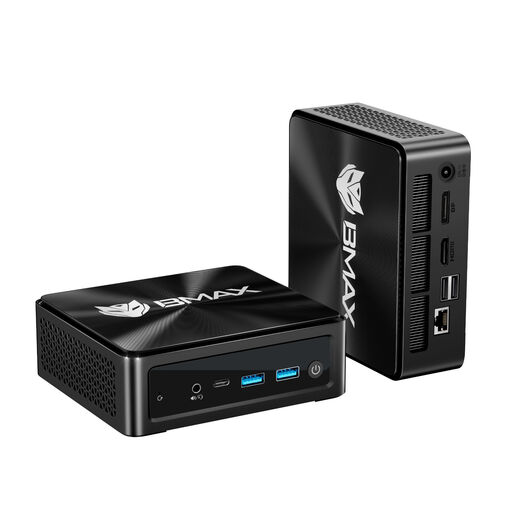
BMAX B8A Pro mini PC
The mini PC form factor is worth considering if space is limited; compare the listed specifications with your games’ requirements.
AMD Ryzen 7 8745HS, Radeon 780M, 16 GB DDR5 RAM and 512 GB SSD.
View at Joybuy
 No image available
FIREBAT AM02L mini PC
The compact design can be useful when space is limited; check that the components meet the requirements of the RPGs you play.
AMD Ryzen 5 6600H, Radeon 660M, 16 GB LPDDR5 RAM and 512 GB NVMe SSD.
View at Joybuy
 No image available
FIREBAT mini PC with AMD Ryzen 7 7735HS
The mini PC form factor is designed for a small space; if you’re planning an upgrade, check which slots are actually free.
Radeon 680M, 16 GB RAM, 512 GB SSD and two M.2 slots.
View at Joybuy
 No image available
FIREBAT F1 mini PC
The mini PC form factor saves desk space; compare the processor and graphics specifications with your games’ requirements and preferred settings.
AMD Ryzen 5 7640HS, Radeon 760M, 24 GB LPDDR5 RAM and 512 GB PCIe-4.0 SSD.
View at Joybuy
 No image available
FIREBAT A8 mini PC
The compact design could suit a small desk; compare the exact specifications with your games and planned storage needs.
AMD Ryzen AI 9 365, Radeon 880M, 24 GB DDR5 RAM and 1 TB PCIe-4.0 SSD.
View at Joybuy
Frequently asked questions
Will the same mini PC work for every role-playing game?
No. Compare the requirements of the specific games you play with the PC’s full specifications and your preferred settings. Larian Studios lists different requirements for Baldur’s Gate 3 than CD Projekt Red does for the various graphics profiles in Cyberpunk 2077.
How should I position a compact PC?
Measure the space, allowing room for cables and keeping ventilation openings clear. Follow the placement guidance for the exact configuration you buy; case dimensions alone don’t establish a general clearance requirement.
What should I check if I have several RPGs installed or plan to upgrade later?
Check the available SSD space and the slots actually included in the specific configuration. Larian Studios lists 150 GB of available SSD space for Baldur’s Gate 3; if you’re planning an upgrade, also check which slots are already occupied.
Are the manufacturer’s warranty and statutory rights the same thing?
No. For a consumer purchase from a trader in the EU, you generally have at least a two-year legal guarantee against the seller, starting from the date you receive the goods. A manufacturer’s warranty is an additional voluntary promise with its own terms and conditions.
Can I return a PC bought online?
For a standard online consumer purchase from a trader, you generally have 14 days from delivery to cancel. Exceptions may apply, for example to made-to-measure or clearly personalised goods. Check the information about any return costs for your specific purchase.


