What should you look for when buying a mini PC?
Rank your requirements by the biggest potential bottleneck: editing and exporting, audio synchronisation, storage, what’s included or the space available at your workstation. The percentages refer to consumers choosing a mini PC for this use case; each person is assigned to exactly one row, based on their top priority.
Fully equipped Windows mini PC
A good fit if: you want to get started without assembling a PC and use editing software that runs on Windows.
The trade-off: The specific CPU, RAM, SSD and operating system configuration doesn’t guarantee a particular performance level with your files.
Configurable mini PC or barebone
A good fit if: you want to choose the RAM and storage to suit your needs, and are happy to set everything up yourself.
The trade-off: The barebone version of the GMKtec NucBox M6 Ultra explicitly comes without RAM, an SSD or an operating system.
Mac mini
A good fit if: your editing software runs on macOS and you can connect your monitor, drives and audio equipment.
The trade-off: Apple’s information about supported formats is no substitute for testing your own footage with the configuration you’ve chosen.
| Priority |
What to look for when buying |
Who it matters most to |
| Playback and export |
Compare your editing software and its version, recording codec, and support for the specific CPU and graphics configuration. |
If I want to edit and export my own clips smoothly, support for my format is key. Around 28% of consumers say editing and export performance is their top priority. |
| Synchronising separate audio |
Check that your editing software supports separate recordings and that you can connect your recorder, card reader and audio equipment. |
If my video and audio come from different devices, I need a suitable way to import and sync them. Audio synchronisation is the top priority for around 22% of consumers. |
| Storage for media and cache |
Check the installed SSD capacity, upgrade options and connections for fast external drives. |
If I edit larger projects locally, I need room not only for the original files but also for project media and cache. Around 22% of consumers prioritise suitable storage. |
| Complete setup |
Check what’s included: RAM, SSD, operating system, power supply and any input devices you need. |
If I want to get started without assembling hardware, I need to know exactly what’s included before buying. Around 17% of consumers prioritise a complete setup. |
| Compact editing workstation |
Check the exact model’s dimensions and connections for a monitor, external SSD, card reader and audio equipment. |
If I have limited desk space, the mini PC needs to fit alongside my monitor and connected devices. A compact, practical editing workstation is the top priority for around 11% of consumers. |
Joybuy products for video editing
This Joybuy selection includes fully equipped Windows mini PCs for a compact workstation. Their processor, memory and SSD specifications can help you plan your setup, but don’t guarantee a particular editing speed with your files.
 No image available
Dell Pro Max Micro FCM2250 MFF mini PC
An option if you’re looking for a compact, fully equipped Windows PC and want to check that the listed configuration suits your editing software.
Intel Core Ultra 7 265 vPro, 32 GB DDR5 RAM, 1 TB PCIe NVMe SSD and Windows 11 Pro.
Joybuy
 No image available
Firebat Mini PC F1 P
A compact Windows option if you want to check whether the listed memory and storage capacity leave enough room for your project media and cache.
AMD Ryzen 7 H 255, 16 GB DDR5 RAM, 512 GB SSD and Windows 11 Pro.
Joybuy
 No image available
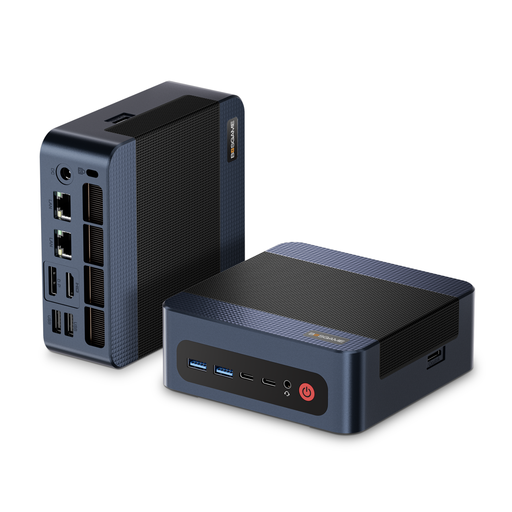
BOSGAME M4 Plus mini PC
Check this Windows configuration against your editing software’s requirements and the storage space your projects need.
AMD Ryzen 9 7940HS, 32 GB DDR5 RAM, 1 TB PCIe 4.0 SSD and Windows 11 Pro.
Joybuy
 No image available
Ninkear M8 mini PC
A compact option if you want to check that its listed connections and exact Windows version work with your current editing setup.
AMD Ryzen 7 8745HS, 16 GB DDR5 RAM, 1 TB SSD and Windows 10/11 according to the product name.
Joybuy
 No image available
Ninkear L12 Pro mini PC
Consider this version if USB 4.0 is important for your planned setup; check the connections on the exact model.
Intel i9-12900HK, 16 GB DDR4 RAM, 1 TB SSD, USB 4.0 and Windows 10/11 according to the product name.
Joybuy
Frequently asked questions about mini PCs for costume videos
Do I need a special mini PC for separately recorded audio?
Not just because the files are separate: what matters is your software workflow and the connections available for your recording equipment. Adobe documents the “Merge Clips” feature in Premiere. If you want to record directly on your PC, also check its audio input and device support.
How should I plan storage for media and cache?
Allow space not only for your original files but also for project media and cache. Adobe recommends fast SSD or NVMe drives for Premiere and explains that its media cache also includes audio files. If internal storage is limited, suitable external drives may be an option.
What should I do if something goes wrong, and is a warranty the same as a statutory guarantee?
No. For consumer purchases in Germany, statutory rights relating to defects are against the seller; for new goods, these can generally be exercised within two years of delivery. The Verbraucherzentrale points out that an additional warranty is voluntary and subject to its own terms.
Which markings should I check on a mini PC?
For devices covered by its checks, the German Federal Network Agency looks at whether the CE mark is present and correct, and whether the product and manufacturer can be identified. Compare the details with the specific device on offer.
Can I freely publish footage showing identifiable people at a public festival?
There is no blanket permission. Under § 22 KunstUrhG, distributing or publicly displaying images of people generally requires the consent of the person shown. Whether an exception applies to footage from a particular event, or other data protection rules are relevant, depends on the circumstances; your choice of hardware won’t answer that question.


