When choosing a mini PC, first check that its operating system and editing software are compatible with your archived files. Then consider having enough RAM, space for projects and a separate backup of your originals. A fully configured Windows mini PC saves you from having to choose missing components, while a configurable model gives you more scope to upgrade later. A Mac mini may suit you if your editing software and devices are compatible with macOS.
Who is a mini PC suitable for?
Families with a mix of video formats
If you’re combining older and newer clips into one film, check that the editing software and hardware are suitable for your files. For Premiere on Windows, Adobe recommends at least 32 GB of RAM and 8 GB of GPU memory for 4K and higher. This isn’t a blanket requirement for other programmes or every family project.
Families with a growing archive
If you want to keep your original files and current projects, plan for storage and an additional backup together. Germany’s Federal Office for Information Security recommends backing up data regularly.
Families sharing a PC
Several people can share a workspace while still using their own files and settings. Microsoft describes this option for separate Windows user accounts.
What should you look for when buying?
First check your editing software and source material. Then plan storage for both your current work and archive, and decide how different people will share files or keep them separate.
| Priority |
What to check before buying |
Who is this important for? |
| Editing software and preview |
Check that the operating system and the requirements of your chosen programme match your source files. For Premiere on Windows, Adobe recommends at least 32 GB of RAM and 8 GB of GPU memory for 4K and higher. |
If I’m combining older and newer clips, I want to know whether my programme can handle them reliably with the chosen hardware. Around 36% of consumers put smooth previews first. |
| Archive and project storage |
Work out the size of your archive and planned projects. Consider the internal SSD, possible upgrades and a separate backup drive together. The manufacturer lists two M.2 SSD slots for the GMKtec M6 Ultra. |
If I want to keep my originals and projects, the internal working SSD shouldn’t be my only copy. Around 29% of consumers prioritise archive storage and data backups. |
| Shared use |
Check that the operating system and software suit the way you plan to manage accounts and files. Windows supports multiple accounts with their own files and settings. |
If several people use the same computer, I want to keep personal files separate and make shared projects accessible by choice. Around 21% of consumers say organising multiple users is their top priority. |
| Complete configuration |
Check whether RAM, an SSD and an operating system are included in the specific configuration. The GMKtec M6 Ultra is also available as a barebone version without these components. |
If I want to get started without additional assembly, I need to know exactly which components come with the configuration I’ve chosen. Around 14% of consumers put a complete configuration first. |
Common buying and usage pitfalls
-
Assuming a 4K specification guarantees smooth editing
A display or output specification doesn’t show how your chosen programme will handle your own clips and effects in preview.
Check your editing software, source format and specific configuration. Don’t apply Adobe’s recommendation for Premiere on Windows at 4K and higher to other workflows as a general rule.
-
Keeping your only family archive on the internal project SSD
If you lose your originals, the editing PC’s hardware can’t replace the missing files.
Back up your originals and finished edits regularly to a separate drive, and check that you can restore the files.
A separate backup drive needs space and regular maintenance.
-
Assuming a barebone version is the same as a fully configured one
The GMKtec M6 Ultra version labelled as barebone doesn’t include RAM, an SSD or an operating system.
Before choosing, check what’s included with the exact configuration and consider which components and operating system you’ll still need.
Key brands at a glance
GEEKOM
Windows mini PCs. The A5 Pro 2026, in the configuration described, comes with a Ryzen 5 7530U, 16 GB of RAM and a 1 TB SSD.
- GEEKOM describes the storage in this configuration as upgradeable.
- This configuration doesn’t demonstrate a particular preview performance with your archived files. Adobe’s recommendation for Premiere on Windows at 4K isn’t general proof of this model’s performance.
GMKtec
The M6 Ultra is available as a barebone model and in configurations with components installed.
- GMKtec lists two RAM slots and two M.2 SSD slots for the M6 Ultra.
- The barebone version doesn’t include RAM, an SSD or an operating system. These details apply to the M6 Ultra and don’t automatically apply to other models from the brand.
Apple
A Mac mini running macOS may be a good fit if your editing software and shared devices are compatible with that operating system.
- Apple lists hardware support for H.264, HEVC and ProRes on the Mac mini M6, along with a choice of memory and SSD configurations.
- Codec support isn’t independent evidence of a performance advantage with your archived files.
MSI
The Cubi NUC 1M range includes compact Windows PCs with different processors, depending on the configuration.
- MSI lists two RAM slots, drive bays and card readers for the range.
- Specifications and what’s included vary by configuration; details for the range don’t prove a general video-editing result.
HP
The Pro Mini 400 G9 range offers compact Windows workstations with different RAM and SSD configurations.
- One specific German configuration is listed with 8 GB of RAM and a 256 GB SSD.
- These specifications don’t apply to other configurations; the model name alone doesn’t prove it’s suitable for video editing.
Joybuy products for a shared workspace
The Joybuy mini PCs below are intended for work and project files in a shared family workspace. Check that each model’s operating system is compatible with your editing software.
 No image available
HP EliteDesk AI Mini 8 G1i, Core Ultra 9 285T, 64 GB DDR5, 1 TB SSD, Windows 11 Pro
For a shared Windows workspace. As Microsoft explains, Windows supports multiple user accounts, each with their own files and settings.
Intel Core Ultra 9 285T, 64 GB DDR5, 1 TB M.2 SSD and Windows 11 Pro.
View at Joybuy
 No image available
Firebat F1 P Mini PC, AMD Ryzen 7 H 255, 16 GB DDR5, 512 GB SSD, Windows 11 Pro
A Windows 11 Pro configuration for a shared workspace. Windows supports separate user accounts.
AMD Ryzen 7 H 255, 16 GB DDR5, 512 GB SSD and Windows 11 Pro.
View at Joybuy
 No image available
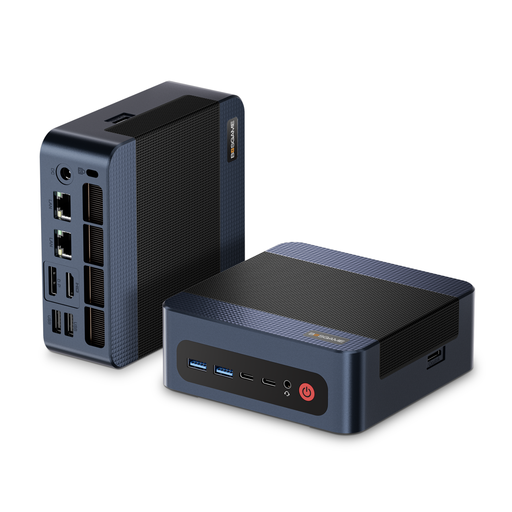
BOSGAME M4 Plus Mini PC, AMD Ryzen 9 7940HS, 32 GB DDR5, 1 TB PCIe 4.0 SSD, Windows 11 Pro
For work and project files on a Windows workstation. Windows supports multiple user accounts.
AMD Ryzen 9 7940HS, 32 GB DDR5, 1 TB PCIe 4.0 SSD and Windows 11 Pro. According to the product description, you can install a second PCIe SSD.
View at Joybuy
 No image available
BMAX B6 Mini PC, Intel Core i3-8109U, 12 GB RAM, 256 GB SSD
A compact mini PC for a shared workspace. Check that the operating system is compatible with your chosen editing software.
Intel Core i3-8109U, 12 GB RAM and 256 GB SSD.
View at Joybuy
 No image available
Ninkear M8 Mini PC, AMD Ryzen 7 8745HS, 16 GB DDR5, 1 TB SSD, Windows 10/11
For a shared workspace with project files. Before buying, check which version of Windows comes with the configuration on offer and whether it works with your editing software.
AMD Ryzen 7 8745HS, 16 GB DDR5 and 1 TB SSD.
View at Joybuy
Frequently asked questions
Does every mini PC for family videos need to meet Adobe’s 4K recommendation?
No. For Premiere on Windows, Adobe recommends at least 32 GB of RAM and 8 GB of GPU memory for 4K and higher. This isn’t a general threshold for other programmes or older HD clips. Start by checking your editing software and source files.
How can several family members share a Windows PC?
Set up separate user accounts and decide where projects you’re working on together will be saved. Microsoft explains that each account can have its own files and settings; it’s still important to back up your archive separately.
How much storage should you plan for a family archive?
Base your plans on the archive you already have and your current projects. As well as the internal SSD, make room for a separate backup drive. A larger internal SSD doesn’t replace an additional copy of your originals.
What can help if preview playback stutters with demanding footage?
If your editing software supports proxies, these working copies can make editing easier. Adobe describes the proxy workflow for Premiere, particularly for 4K or higher footage on less powerful hardware.


