
Lieferung heute & morgen

Qualitätsgarantie

Willkommens-Angebote freischalten: KOSTENLOSE Lieferung | Bis zu 80 % RABATT | Kostenlose 30-Tage-JoyPlus-Testphase
App herunterladen
The appeal of a mini PC is obvious: full desktop performance in a book-sized footprint. But the market is filled with models whose specifications look impressive at first glance, only to lead to disappointment in practice. As your Joybuy Product Recommendation Officer, I'm here to help you identify the common pitfalls and make an informed decision based on objective criteria.
Before we dive into the technical details, it's crucial to understand two common problems that often only become apparent after the purchase.
To avoid these traps, you should carefully examine three core areas. These will determine if a Mini PC is right for your needs.
The sheer number of processor cores is no longer the sole measure of performance. Modern processors like the Intel Core Ultra series or AMD Ryzen AI integrate a dedicated NPU (Neural Processing Unit). These specialised units accelerate AI-powered tasks that are becoming increasingly common in operating systems like Windows 11 Pro and office applications. If you want to buy a future-proof AI PC, an integrated NPU is a key feature. It offloads tasks from the main CPU, ensuring a smoother system response for things like video conferences with background effects or using AI assistants.
For smooth multitasking in a business PC or office PC, 16 GB of RAM is the recommended minimum. Pay attention to the standard: DDR5 offers higher clock speeds and more bandwidth than the older DDR4 standard. The speed of the storage drive is just as crucial. A PCIe 4.0 NVMe SSD ensures extremely fast loading times for programs and the operating system.
Some mini PCs are sold with soldered RAM, making future upgrades impossible. Models with accessible SO-DIMM slots offer more flexibility. Upgrading the memory, for example with a Crucial RAM 32GB Kit (2x16GB) DDR4, can significantly extend the lifespan and performance of a system if your needs grow.
The term small desktop PC covers various designs. Ultra-compact models (often under 0.7 litres in volume) are extremely space-saving but usually offer fewer ports and little to no room for expansion. So-called slim desktops are slightly larger but often feature better cooling, more USB ports, and sometimes even PCIe slots for expansion cards. Weigh what's more important for your workspace: the smallest possible size or maximum connectivity and flexibility.
Here are some configurations tailored to specific user profiles that are designed to avoid the pitfalls mentioned.

Why This Fits Their Persona: This model offers a balanced combination of an efficient 6-core processor, 16 GB of RAM, and a fast SSD. It's a solid foundation for all common office applications, research, and media consumption, without putting a major strain on the budget.
Support for three monitors and the inclusion of Wi-Fi 6 bypass the "connectivity dead-end," providing the necessary ports for a modern workspace.
Efficient 6-core AMD Ryzen 5 processor. Compact and quiet design, ideal for quiet study or work environments.
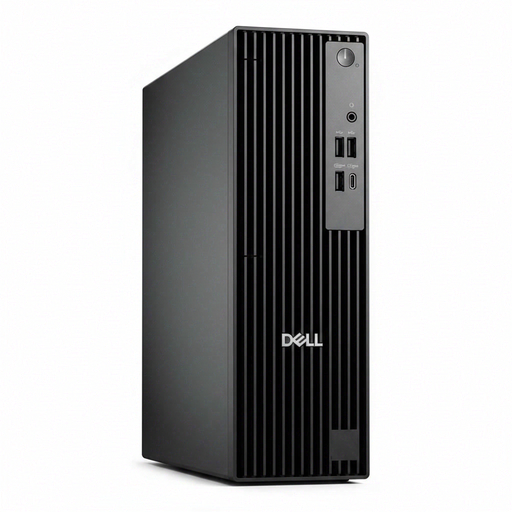
Why This Fits Their Persona: For businesses and professional users where reliability, security, and manageability are top priorities. This business PC is designed for continuous operation and offers key enterprise features with Windows 11 Pro and TPM 2.0.
Dell's well-designed slim chassis ensures adequate cooling for the Intel Core Ultra 7 processor, thus avoiding the thermal throttling trap even under sustained load.
Integrated "Intel AI Boost" NPU for AI applications. Comprehensive port selection and PCIe expansion slots for maximum flexibility.

Why This Fits Their Persona: For users who need maximum performance for content creation, demanding multitasking, or as a gaming mini PC. The 10-core AMD Ryzen AI 9 processor and Radeon 880M graphics provide a huge performance reserve.
With USB4, HDMI 2.1, dual 2.5G Ethernet, and even an Oculink port for external graphics cards, this model offers future-proof connectivity that goes far beyond the standard, avoiding the "connectivity dead-end."
AMD Ryzen AI 9 processor with powerful integrated Radeon 880M graphics. Support for four 4K displays and state-of-the-art ports.
Some components, like RAM, are crucial for performance and can often be easily upgraded. We've compiled a list of products that meet strict selection criteria.
Yes, especially models with modern integrated graphics units like the AMD Radeon 780M/880M or powerful Intel graphics solutions are suitable for many current games at 1080p resolution with adjusted settings. For demanding gaming at high resolutions, a dedicated gaming mini PC with advanced cooling or ports like Oculink/USB4 for external GPUs is the better choice.
A key advantage of mini PCs is their low power consumption. While a typical office desktop often consumes 30-50 watts at idle and over 150 watts under load, many mini PCs use less than 10 watts at idle and rarely more than 60-90 watts at full load. This leads to a significant reduction in operating costs.
For basic video editing (e.g., 1080p projects), mini PCs with modern 6- or 8-core processors and at least 16 GB of RAM are well-suited. For professional 4K video editing or complex effects, a model with a high-end processor (e.g., Ryzen 9 or Core Ultra 7/9), 32 GB of RAM or more, and a fast PCIe 4.0 SSD is recommended. The integrated NPU in newer processors can also accelerate performance for AI-powered video features.