First, decide on your test setup, then check whether the specific Mini PC configuration can connect your keyboard, monitor and any other devices you need at the same time. For straightforward manual testing, a ready-to-use Windows PC is often the easiest place to start; for virtual test environments, the Windows edition, memory and upgrade options matter more. Choosing a suitable computer does not replace checking keyboard accessibility and visible focus in the application you are testing, as explained by W3C WAI.
Who is a Mini PC suitable for?
Manual keyboard testers
You check accessibility, focus order and visible focus directly on screen. A suitable test setup and reliable input devices matter more here than maximum processing power. W3C WAI identifies keyboard accessibility and visible focus as important points to check.
Testers working across multiple environments
You want to use different applications or virtual test systems side by side. So pay particular attention to the Windows edition, memory and upgrade options. Microsoft Learn lists Windows 11 Pro, Enterprise and Education as editions that include Hyper-V.
Testers with a small desk
You’re setting up a permanent workstation with an external monitor and keyboard. Check the ports and what’s included with the specific configuration; Lenovo, for example, notes that a keyboard is not included with one ThinkCentre Neo 50q Gen 5 configuration.
What should you look for when buying?
First, decide what kind of test setup you need, then check that the ports work with your keyboard, monitor and other devices. W3C WAI sets out requirements for keyboard accessibility and visible focus; Microsoft Learn also covers accessibility testing and the Windows editions that include Hyper-V.
| What matters |
What to check before buying |
Who it matters most to |
| Ports for test devices |
Check the USB ports and display outputs you need, and make sure they match your monitor and cables. |
If I want to connect a keyboard, other input devices and a monitor at the same time, every suitable port counts. Around 33% of consumers put ports for their test devices first. |
| The right test setup |
Check the pre-installed operating system and the exact Windows edition included with the model. |
If I want to start testing without installing an operating system myself, having the right setup pre-installed is important. Around 27% of consumers prioritise their test setup and getting started straight away. |
| Running tests in parallel |
Check the installed RAM, SSD capacity and upgrade options for the specific model. |
If I want to run applications or virtual environments side by side, I need a configuration that suits my test plan. Around 20% of consumers prioritise running test environments in parallel. |
| Space and what’s included |
Check the footprint and whether a keyboard, monitor, RAM, SSD and operating system are included. |
If my desk is short on space and I want to get started with as little extra equipment as possible, both the form factor and what’s included matter. Around 20% of consumers prioritise a compact workstation that’s fully planned out. |
Avoiding buying pitfalls
-
Assuming similar model names mean identical specifications
A similar model name doesn’t guarantee that the processor, memory or storage is the same. Acer lists part number DT.BMCEG.002 as a separate configuration; its specifications cannot automatically be applied to DT.BP5EG.002.
Before buying, compare the full part number and key specifications of the exact model.
-
Budgeting for a Mini PC kit as if it were a complete, ready-to-use PC
The ASUS NUC 14 Pro+ kit version described by ASUS does not include RAM, storage or a pre-installed operating system. Sourcing and setting these up are therefore part of the overall cost and effort.
Check what’s included with the exact version, and factor in any components and setup you’ll need.
You may need to take additional steps to install the operating system, RAM and storage.
-
Assuming Windows 11 Home will work for a planned Hyper-V test environment
Microsoft Learn lists Hyper-V for Windows 11 Pro, Enterprise and Education. However, a Pro edition is not generally required for straightforward keyboard navigation testing.
If Hyper-V is part of your test plan, check the Windows edition and hardware requirements before buying.
Key brands at a glance
Lenovo
ThinkCentre Neo 50q Gen 5 for a compact, permanent workstation with peripherals.
- Lenovo lists six USB ports and three display connections for the range. Configuration 13B9CTO1WWDE1 is listed with Windows 11 Home and 24 GB DDR5-5600MT/s.
- The configuration listed does not include a keyboard. Check that the Windows edition is suitable if you plan to use Hyper-V.
HP
Pro Mini 400 G9, a well-equipped Windows option for a compact workstation.
- HP lists Windows 11 Pro, 16 GB RAM and a 512 GB SSD for configuration 6D3E9EA#ABD.
- Don’t assume that the Flex ports described for the product range are included with this specific configuration without checking first.
ASUS
NUC 14 Pro+, with the choice of a fully equipped Mini PC or a kit.
- ASUS lists HDMI and Thunderbolt ports that support DisplayPort.
- The kit does not include an operating system, RAM or storage. Specifications and power cables may vary by version or country.
MSI
Cubi NUC AI+ 2MG for a Mini PC workstation where the full model suffix matters.
- MSI lists several versions, including 2MG-030AT and 2MG-039AT, with different processor and storage specifications.
- A similarly named version is not a verified substitute for another model with a different suffix.
Acer
Revo Box RB102, a Windows Pro Mini PC for use with an external keyboard, mouse and monitor.
- Acer lists Windows 11 Pro, 16 GB RAM, HDMI and DisplayPort for DT.BMCEG.002.
- These specifications do not apply to DT.BP5EG.002. Check the part number and specifications of the exact version.
Joybuy products for your test setup
The models below are Windows Mini PCs for a permanent test workstation. Before buying, check that the ports on the specific version match your keyboard, monitor and other devices.
 No image available
Firebat Mini PC F1 P, AMD Ryzen 7 H 255, 16 GB DDR5, 512 GB SSD
For a permanent Windows test workstation if you’re looking for a configuration with USB4.0.
Windows 11 Pro, 16 GB DDR5 RAM, 512 GB SSD and USB4.0.
View at Joybuy
 No image available
ACEMAGIC AK1PLUS, Intel Celeron N5095, 16 GB LPDDR4X, 256 GB SSD
An option for a permanent test workstation if your monitor has a compatible HDMI input.
Windows 11 Pro, 16 GB LPDDR4X, 256 GB M.2 2280 SATA SSD and HDMI 2.0.
View at Joybuy
 No image available
ACEMAGIC E3B, AMD Ryzen 7 7735HS, 24 GB LPDDR5, 512 GB NVMe SSD
If you’re planning to use multiple monitors, check that the ports match your devices’ inputs.
Windows 11 Pro, HDMI, DisplayPort, USB-C, 24 GB LPDDR5 and 512 GB NVMe SSD.
View at Joybuy
 No image available
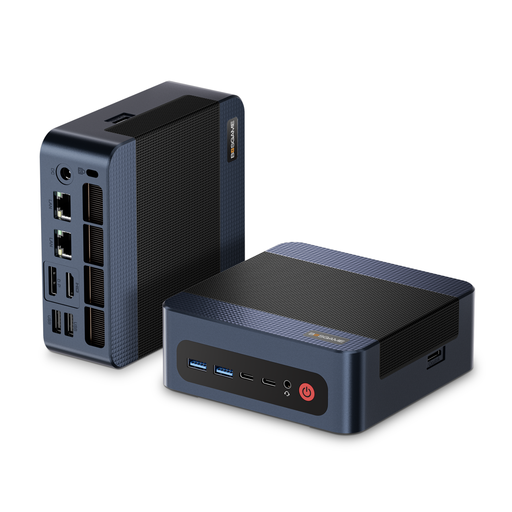
BOSGAME M4 Plus, AMD Ryzen 9 7940HS, 32 GB DDR5, 1 TB SSD
For a Windows test workstation if the listed RAM and SSD specifications suit the environments you plan to use.
Windows 11 Pro, 32 GB DDR5 RAM and 1 TB PCIe 4.0 SSD.
View at Joybuy
 No image available
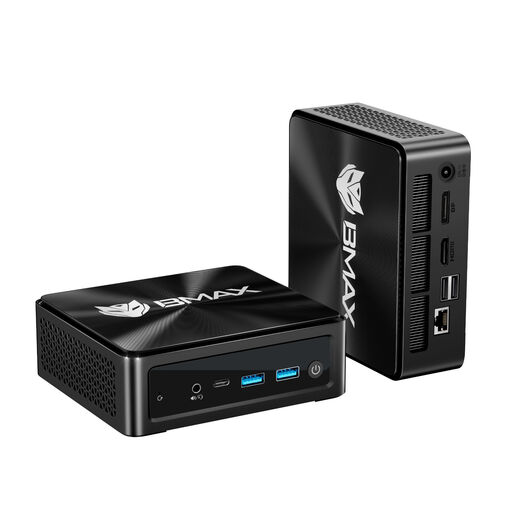
BMAX B8A Pro, AMD Ryzen 7 8745HS, 16 GB DDR5, 512 GB SSD
For a compact test workstation if you want to use the listed Windows configuration and multi-screen output.
Windows 11, 16 GB DDR5 RAM, 512 GB SSD and triple-screen 4K, according to the product name.
View at Joybuy
Frequently asked questions
How do I check keyboard navigation after setup?
Use the keyboard to check whether the features are accessible and operable, and whether the focus remains visible without being completely obscured. W3C WAI sets out these checks in success criteria 2.1.1, 2.4.7 and 2.4.11. The Mini PC itself cannot confirm whether the application you’re testing meets these criteria.
Do I need Windows 11 Pro for keyboard testing?
No, not for keyboard navigation testing alone. If you want to use Microsoft Hyper-V, Microsoft Learn lists Windows 11 Pro, Enterprise or Education; check the hardware requirements too.
What should I plan for when setting up a Mini PC kit?
First, check what’s included with the exact version. The ASUS NUC 14 Pro+ kit version described by ASUS does not include RAM, storage or a pre-installed operating system; a fully equipped version may include different items.
What time limit applies if a product is faulty in Germany?
For an ordinary purchased item, § 438 BGB generally sets a two-year limitation period from delivery for the defect claims specified there; statutory exceptions may apply. This is separate from a voluntary manufacturer’s warranty. The relevant text is the legislation published on Gesetze im Internet.


