What should you look for when buying?
First, check the exact specification against the requirements of your software and files. Then look at the connections and what’s included; if the computer will be shared, plan for user permissions and data backups too.
| Consideration |
What to check when buying |
Who it matters most to |
| Performance for analysis |
Check the operating system, the RAM actually installed and the SSD against your software requirements and a typical workbook. |
If I analyse larger files locally or keep several workbooks open, I first check the resources available in the exact model. Around 33% of consumers put performance for analysis first. |
| Space and connections |
Check the video outputs against your monitor and measure the available space, including room for the power supply and cables. |
At a small desk, I need room for my monitor and work materials, and I need to be able to connect my existing devices. Around 25% of consumers prioritise space and suitable connections. |
| Ready-to-use specification |
Check the full model number to see whether the operating system, RAM, SSD and any required input devices are included. |
If I want the computer to start up without extra components or setup, the exact contents of the box matter. Around 25% of consumers prioritise a ready-to-use PC. |
| Shared use and backups |
Ask your IT team how access, updates and restorable backups will be managed. |
For a shared workspace, I need to clarify who can access files and how analysis work can be restored. Around 17% of consumers prioritise shared use and data backups. |
Mini PCs for this workspace
These Joybuy products are listed as fully equipped mini PCs for local analysis and compact workspaces. Before buying, check that each model’s specification suits your software, files and required monitor connections.
 No image available
SOYO Y5Pro mini PC
If your analysis software is compatible with the listed specification, you can compare the specific processor option and memory with its requirements.
Listed in the product name: Intel Core i5-8250U/8350U, 8 GB DDR4, 256 GB SATA SSD and Windows 11. Check which processor option is on offer.
View at Joybuy
 No image available
ACEMAGIC AK1PLUS mini PC
If you want to connect two monitors, check that the outputs match your monitors’ inputs.
Listed in the product name: Intel Celeron N5095, 16 GB LPDDR4X, 256 GB M.2 2280 SATA SSD, HDMI 2.0, 4K/60Hz, Wi-Fi 5 and Windows 11 Pro.
View at Joybuy
 No image available
ACEMAGIC E3B mini desktop computer
If your applications and monitors are compatible with the listed components and connections, you can check how the specification fits your particular workspace.
Listed in the product name: AMD Ryzen 7 7735HS, 24 GB LPDDR5, 512 GB NVMe SSD, two M.2-2280 slots, HDMI, DP and USB-C, plus Windows 11 Pro. The title lists Triple Display 4K@60Hz.
View at Joybuy
 No image available
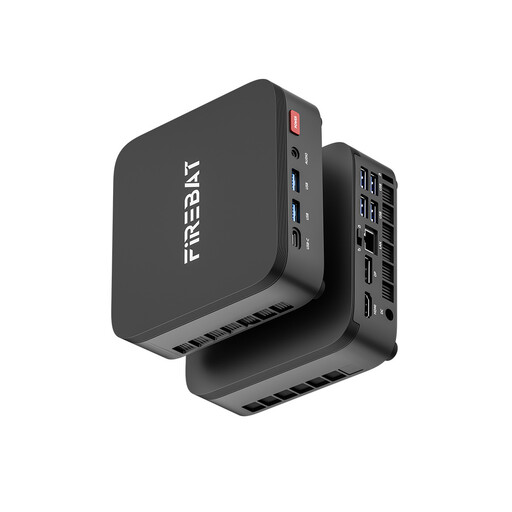
FIREBAT R3 mini PC
If you analyse files locally, check that your software requirements match the listed specification.
Listed in the product name: AMD Ryzen 5 7430U, 16 GB LPDDR4 and 512 GB NVMe SSD.
View at Joybuy
 No image available
MaxMini B3 mini PC
If your analysis software can run on the listed processor and memory, you can compare this specification with the workbooks you typically use.
Listed in the product name: Intel N4100, 8 GB LPDDR4, 256 GB SSD and Dual HDMI.
View at Joybuy
Frequently asked questions
How can I check whether a mini PC can analyse my library loan data?
First, note down the programme and version, file format, typical file size and the applications you need to use at the same time. Check the requirements against the operating system and the memory actually installed in the exact model; Microsoft Support notes that the number of Excel workbooks you can have open depends, among other things, on available memory and system resources.
Can I mount the mini PC behind my monitor?
Only if the PC version, mount and monitor are compatible. MSI lists VESA 100 × 100 mm for the Cubi NUC 1M series; also check there’s room for connections and cables at your particular desk.
Is the internal SSD enough to back up analysis files?
No. The internal SSD isn’t a separate backup. The Federal Office for Information Security describes backups as a way to restore files after a fault or data loss; ask your IT team to agree a backup process for library data.
What should I check about what’s included and any problems that arise later?
Check whether the operating system, memory and any required input devices are actually included. For a consumer purchase, statutory rights against the seller are separate from a voluntary guarantee; if a library is making the purchase, don’t assume consumer rights apply without checking.
Can I analyse personal library loan data on a mini PC?
You can’t decide that based on the technical specification alone. If loan data can be linked to individuals, the responsible organisation must check that there is a legal basis for processing it and determine what safeguards are required.


