Students working with loan spreadsheets
If you analyse loan figures in spreadsheets or with small scripts, your software requirements and file sizes are what matter. Excel has its own worksheet limits, as detailed by Microsoft Support.


Choose a mini PC based first on the size of your loan data files and the software you need to use. A fully equipped configuration may suit spreadsheets and smaller scripts, while larger local data models make memory and upgrade options more important. Also check the ports, noise levels and total space required for your workspace. Microsoft describes Power BI Desktop as a Windows application. If your loan data could identify individuals, you’ll need to check whether you’re allowed to process it and how to protect the files, regardless of which device you choose.
If you analyse loan figures in spreadsheets or with small scripts, your software requirements and file sizes are what matter. Excel has its own worksheet limits, as detailed by Microsoft Support.
If you process larger amounts of data locally or may want to add more memory later, compare the RAM and SSD actually installed with the upgrade options available for the specific configuration.
If your computer, monitor and study materials all need to fit into a small space, ports, placement and possible fan noise are important things to consider. Check the specifications of the exact model variant.
First, note your file sizes and the software you need. Then check the exact specifications and make sure the computer, monitor and accessories will fit into your study space.
| What matters | What to check before buying | Who should pay particular attention? |
|---|---|---|
| Performance for analysis | Compare typical file sizes with the RAM and SSD installed in the exact variant; Microsoft Support gives a limit of 1,048,576 rows for an Excel worksheet. | If you use larger files or several analysis programmes at once, choose a computer that suits the work you plan to do. Performance for analysis is the main concern for around 29% of consumers. |
| Complete workspace | Compare what’s included with any extras you’ll need, such as a monitor, keyboard, mouse, RAM, SSD and, if applicable, an operating system. | If you want to know what else you need for a fully functional workspace before you buy, consider the complete equipment requirements. Around 22% of consumers focus on the total cost of setting up a workspace. |
| Space and quiet | Check the dimensions, ventilation clearance and possible VESA mounting options; for fanless models, check the exact model name. | If your small desk also needs to accommodate study materials and a monitor, and you work in a quiet environment, placement matters. Around 21% of consumers prioritise space and quiet operation. |
| Software and ports | Compare the software you need, the operating system and monitor connections with the exact configuration; Microsoft describes Power BI Desktop as a Windows application. | If your course requires specific software or your existing peripherals need particular ports, make sure the configuration is compatible. Around 14% of consumers say software and port compatibility is their main concern. |
| Data protection and backup | If the data may include personal information, check that you’re authorised to use it and how it should be protected; also plan how to back up your project files. | If loan data could identify individuals or you need to be able to restore your work reliably, check the rules on processing and backup in advance. Around 14% of consumers prioritise data protection and backup. |
A barebone version may not include RAM, an SSD or an operating system.
Check what’s included with your chosen version before putting together the workspace you need.
Depending on the configuration, you may need to buy RAM, an SSD or an operating system separately.
Components can vary within a model family. For example, MSI distinguishes between fanless and ventilated Cubi N ADL models; HP also notes that components vary by configuration.
Check the full model number, installed memory, operating system and ports against the specific product listing.
Buying a powerful computer doesn’t establish whether you’re allowed to process personal data.
If the data could identify individuals, discuss the legal basis, authorisation and safeguards with the responsible organisation before analysing it.
The A5 Pro is a compact option for a small workspace; specifications depend on the version you choose.
The Cubi range includes space-saving models with different processors and upgrade options.
The NucBox M6 Ultra is worth considering if you want to compare the exact specifications and potential memory upgrades.
The Pro Mini 400 G9 family includes office PCs with specifications that vary by configuration, making it an option if upgrade potential or existing workspace equipment matters to you.
The S13 is an example of a compact mini PC with specifications listed in the product offer.
The following Joybuy products cover different needs, from Windows PCs for spreadsheet work to configurations with more listed memory or multiple display outputs. In each case, compare the exact specifications with the software you use and the files you work with.
 No image available
The Windows 11 specification mentioned in the title could suit spreadsheet work and smaller analyses, provided your specific software is compatible.
The title lists 8 GB RAM, a 256 GB SATA SSD, HDMI and Type-C video outputs. The processor listed is 8250U/8350U.
 No image available
If you’re comparing a configuration with a large amount of listed memory, check whether your specific software and data volumes require these specifications.
The title lists 128 GB LPDDR5X RAM at 8000 MT/s, a 1 TB SSD and a side-mounted SSD interface.
 No image available
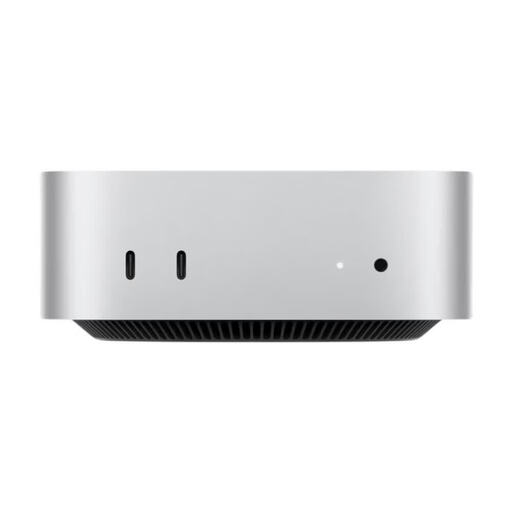
This configuration may suit you if your analysis software is compatible with the operating system and you use multiple monitors in your workspace.
The product description lists a 12-core CPU, a 12-core GPU, 32 GB Unified Memory, a 1 TB SSD and support for up to three external displays.
 No image available
If you want to connect two monitors, compare the listed outputs with the ports on your displays.
The title lists 8 GB LPDDR4 RAM and a 256 GB SSD; the product description specifies two HDMI outputs and two M.2 slots.
 No image available
If you want to use two monitors, compare the video connections listed in the title with your existing monitor setup.
The title lists HDMI, DisplayPort, 12 GB RAM and a 256 GB SSD; the product description gives the dimensions as 125 × 112 × 34 mm.
If you specifically need to use the Power BI Desktop application locally, you’ll need a compatible Windows configuration: Microsoft describes Power BI Desktop as a Windows application. Other analysis programmes have their own system requirements.
First, check that the video outputs match your monitor, then check the mounting options before planning to attach the PC behind the screen. MSI lists VESA 100 × 100 mm support for the Cubi NUC 1M; you’ll need to check separately whether the mount and monitor will work with your setup.
Choose a backup method for your project files and test that you can restore them. Encryption can be one way to protect personal data; according to the Federal Commissioner for Data Protection and Freedom of Information, full-disk encryption won’t protect against access while the device is unlocked.
Buying a mini PC doesn’t give you permission to process personal data. If the data could identify individuals, check the legal basis, purpose, authorisation and safeguards with the responsible organisation; whether a particular dataset has been sufficiently anonymised depends on the data and how it’s processed.
Check whether your chosen version is missing RAM, an SSD or an operating system, and whether you’ll need a monitor and input devices. If there’s a fault, your statutory rights against the seller are separate from any voluntary guarantee; the consumer advice centre describes repair or replacement as ways of bringing a product into conformity.