Choose a mini PC for local databases based on the requirements of your specific database software and all the services running at the same time. Compare the RAM actually installed, the available SSD space and the ports on each configuration. A complete system makes setup easier, while a kit requires more planning on your part. A larger internal SSD is no substitute for a separate backup, and you should also check that the mounting, cable routing and ventilation openings work for your standing desk setup.
Who is a mini PC for local databases suitable for?
Developers running multiple services
If you run containers or development tools alongside your local database, consider the memory requirements of your entire setup. The PostgreSQL Global Development Group documents the memory requirements for database buffers, while Docker provides its own system requirements for Docker Desktop.
Users with growing test data
Allow space for database files and write-ahead logs, and remember to keep a separate backup that you can restore. The PostgreSQL Global Development Group covers both backup methods and storage requirements for WAL files.
Users with limited desk space
If you want to keep your standing desk clear, check the mounting options, ports and cable routing for your specific setup. Lenovo Support Germany describes a compatible VESA mount for ThinkCentre Tiny PCs; check that the accessories and compatibility match the device you choose.
What should you look for when buying?
Your priorities will depend mainly on which services run at the same time, how quickly your data is growing and how you plan to position the mini PC at your standing desk.
Fully configured mini PC
A good fit if: You want to set up your database and development environment without sourcing RAM, an SSD and an operating system separately.
Bear in mind: Specifications and operating systems vary by configuration; the same chassis name does not guarantee an identical model.
Mini PC kit or barebone
A good fit if: You want to choose and install the RAM, SSD and operating system yourself.
Bear in mind: Check the contents of the exact kit version and allow for any missing components and the time needed to set them up.
| What matters |
What to check before buying |
Who needs to consider this? |
| RAM for running multiple workloads |
Compare the RAM installed, its type and upgrade options on the specific model with the requirements of the software you use. |
If I’m running containers or development tools alongside the database, I need to consider the memory requirements of the whole setup. Around 33% of consumers prioritise having enough RAM for multiple workloads. |
| SSD space and backups |
Check there’s room for data and write-ahead logs, look at expansion options and plan for a separate backup. |
As test data grows, I want enough space for files and logs, and somewhere separate to keep backups. Around 27% of consumers focus primarily on growing data volumes. |
| Desk space and ports for a standing desk |
Check the mount and compatibility, the monitor and network ports you need, cable routing and clear ventilation openings. |
If I want to keep my desk clear, I need a suitable place for the PC and accessible ports, even when I adjust the desk. Around 20% of consumers prioritise desk space and connectivity. |
| Setup and software |
Check that the operating system and processor architecture match the requirements of the specific database and container versions. |
If I want to set up the PC without buying additional components, a complete configuration that works with my software is essential. Around 20% of consumers prioritise easy setup and software compatibility. |
Common buying and usage mistakes
-
Treating the internal SSD as a backup
Extra storage in your mini PC doesn’t give you an independent copy of your database. The PostgreSQL Global Development Group describes dedicated backup and recovery methods.
Set up a separate backup and test that you can restore your data from it.
A separate backup requires its own storage device or another backup destination.
-
Assuming a kit and a complete system are the same because they share a chassis name
In the ASUS NUC 14 Pro family, complete systems and kits differ in areas such as the pre-installed operating system and included RAM.
Before buying, check the full model number and the list of components included.
With a kit, you may need to source and set up the RAM, SSD and operating system separately.
-
Assuming similar product names mean identical configurations
Different versions of a mini PC can vary in processor, RAM, SSD or operating system. The product name alone isn’t enough to compare configurations.
Check the model number against the technical details for the specific version, and clarify any conflicting information before ordering.
Brands to consider
Lenovo
The ThinkCentre M75q Gen 5 Tiny is an example of a compact, fully configured desktop PC.
- For model 12RQ003QEZ, Lenovo Germany lists 16 GB of SO-DIMM RAM, a 512-GB M.2 SSD and Windows 11 Pro. Lenovo also describes tool-free access to the Tiny PC’s SSD and memory modules.
- These details apply to the specified configuration and don’t necessarily apply to other models in the range.
HP
The EliteDesk 8 Mini G1a is a business mini PC option with clearly specified RAM, SSD and Windows configurations.
- HP lists 32 GB of RAM, a 1-TB SSD and Windows 11 Pro for CP9G8EA#ABD.
- Other models may differ, and the specification alone doesn’t guarantee a particular level of database performance.
ASUS
The NUC 14 Pro is available in a range of configurations, including complete systems and kits.
- ASUS specifications distinguish between systems with Windows 11 Home and kits without a pre-installed operating system or included RAM.
- Check the model number and contents of the specific version; a general specification doesn’t automatically confirm what’s included in an individual listing.
GEEKOM
The A5 Pro 2026 Edition is a compact, factory-configured option with documented upgrade information.
- For the Ryzen-5-7530U version, GEEKOM lists 16 GB of RAM and a 1-TB SSD, and says the RAM can be upgraded.
- Manufacturer claims about noise levels or continuous operation don’t, on their own, provide independent evidence of suitability for local database workloads.
Dell
The OptiPlex Micro range is a configurable business alternative, with operating system and memory options varying by model.
- Dell Germany lists different RAM, SSD and operating system options for the range, including Ubuntu Linux.
- Options for the range don’t automatically reflect the specification of a particular device; check the configuration and availability of the individual listing.
Mini PCs at Joybuy
This selection includes fully configured mini and micro PCs for local databases and development environments in compact workspaces.
 No image available
HP Z2 Mini G1a Ryzen AI Max+ Pro 395, 128 GB, 2 TB
An option if you’re looking for a generously specified system for local database files and tools running at the same time.
128 GB DDR5 RAM and a 2 TB M.2 SSD; Windows 11 Professional, 2.5-GbE LAN and Thunderbolt 4 are also listed.
View at Joybuy
 No image available
Dell Pro Max Micro FCM2250 TPM, Core Ultra 7, 16 GB, 512 GB
A compact configuration if you’re looking for a mini PC with Windows 11 Pro and a wired network connection.
16 GB DDR5 RAM and a 512 GB M.2 PCIe SSD; Gigabit LAN and USB ports are also listed.
View at Joybuy
 No image available
MaxMini B3 mini PC, Intel N4100, 8 GB, 256 GB
A compact option if the specified configuration meets the needs of your intended database setup and you want to connect multiple displays.
8 GB LPDDR4 RAM, a 256-GB SSD, two HDMI ports and 1000M LAN. Listed as suitable for indoor use; keep the ventilation openings clear and don’t open the case.
View at Joybuy
 No image available
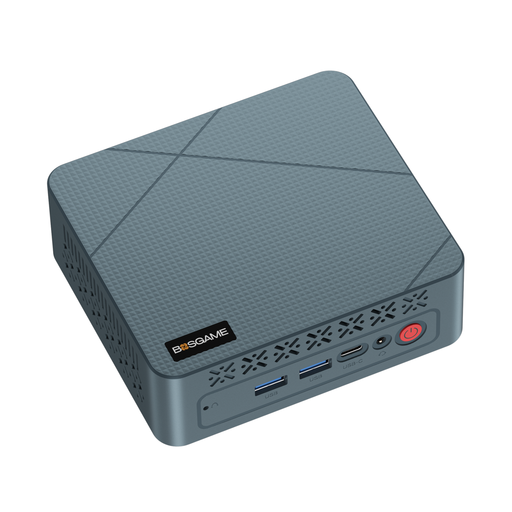
BOSGAME E2 neo mini PC, AMD Ryzen 5 3500U, 16 GB, 256 GB
An option for a compact workspace if you need DisplayPort and HDMI, as well as a wired network connection.
16 GB RAM and a 256-GB SSD; HDMI, DisplayPort and Gigabit Ethernet are listed.
View at Joybuy
 No image available
FIREBAT AM02L mini PC, AMD 6600H, 16 GB, 512 GB
A compact configuration if you’re looking for a 512-GB SSD and Windows 11 Home for local database files and tools running at the same time.
16 GB LPDDR5 RAM and a 512-GB M.2 NVMe SSD; HDMI 2.1, DisplayPort 1.4 and 2.5-Gb Ethernet are listed.
View at Joybuy
Frequently asked questions
Are the database software’s minimum requirements enough to make a buying decision?
No. Check the specific software version and all the applications you’ll be using at the same time. The PostgreSQL documentation covers memory requirements for database buffers; the Microsoft requirements for SQL Server 2022 apply specifically to that version on Windows and aren’t a general guide to every mini PC.
How do I back up a local database?
Set up a separate backup that you can restore, and test the recovery process. The PostgreSQL Global Development Group describes SQL dumps, file system-level backups and continuous archiving as different methods.
What else should I allow for with a mini PC kit?
Check whether RAM, an SSD and an operating system are included, as these components may be missing from a kit. The ASUS NUC 14 Pro specifications explicitly distinguish kits without a pre-installed operating system or included RAM.
What does CE marking tell me about a device’s suitability for databases?
It doesn’t confirm database performance. For products that require CE marking, the German Federal Network Agency lists the marking and accompanying documents required. Check the documentation for the specific product to see whether it meets the relevant requirements.


