When choosing a mini PC for local databases in a home office, start by considering your database software and the applications you’ll be running at the same time. Then check how much RAM is actually installed and whether you can add more, as well as the available SSD space. The PostgreSQL Global Development Group explains the memory requirements for shared buffers. According to Microsoft Learn, SQL Server 2022 on Windows also requires, among other things, an x64 processor and a supported version of Windows. A complete system saves you having to assemble one, while a kit gives you more choice over the components but means extra purchasing and installation.
Who should consider a mini PC for local databases
Developers running several local services
If you’re running other development tools or instances alongside your database, check how much RAM is actually installed and what upgrade options are available. The PostgreSQL Global Development Group documents the memory requirements for shared database buffers.
Users with important local data
If you run databases continuously, treat SSD capacity and data backup as separate considerations. The PostgreSQL Global Development Group describes several backup methods; a larger internal SSD alone isn’t a recoverable backup.
Buyers looking for a ready-to-use workstation
If you want to get started without assembling a barebone system, check the full specification of the exact variant, including RAM, SSD and operating system. Manufacturers such as ASUS, GEEKOM and HP offer different package contents and configurations.
What to look for when buying a mini PC
With a complete system, the components actually installed are what matter. With a kit, choosing and installing additional parts is part of the planning.
Fully equipped mini PC
Ideal if: you want to get started without buying RAM and an SSD separately, and need an operating system to be included.
Bear in mind: specifications and upgrade options can vary within a model range, so compare the full variant code.
Barebone or kit
Ideal if: you want to choose and install the RAM, SSD and operating system yourself.
Bear in mind: choosing additional components and setting everything up are part of the process. ASUS lists different package contents for NUC 14 Pro kits and complete systems.
| Buying consideration |
What to check before buying |
Who it matters most to |
| RAM and concurrent workloads |
Compare the RAM actually installed, available slots and supported maximum capacity with the applications you’ll be using at the same time. PostgreSQL documents the memory needed for shared buffers. |
If I’m running a database and development tools at the same time, the RAM actually installed matters. Around 36% of consumers put this consideration first. |
| SSD capacity and data backup |
Check the installed SSD and supported drive bays. Plan your backup destination and recovery method separately. The PostgreSQL Global Development Group describes different backup methods. |
As my data grows, I want to plan for enough space and a separate, recoverable backup. Around 29% of consumers prioritise data storage and backup. |
| Software, operating system and package contents |
Check that the database version, supported operating system and full model code are compatible. For SQL Server 2022 on Windows, Microsoft Learn lists requirements including an x64 processor and supported versions of Windows. |
If I want to use specific database software, the exact configuration needs to be compatible and supplied complete. Around 21% of consumers prioritise compatibility and setup. |
| Desk space and connections |
Check the exact variant’s case, mounting options and the monitor and network connections you need. MSI lists a case volume of 0.826 litres and mounting options for the Cubi NUC 1MG; specifications vary by model. |
If space on my desk is limited, I look for a suitable setup and the right connections. Around 14% of consumers prioritise space and connections. |
Avoid common buying mistakes
-
Assuming a kit is the same as a complete system
Different variants in the same model range can come with different package contents. A kit may not include RAM, an SSD or an operating system.
Compare the full model code and check which components are actually included.
A kit may mean extra component purchases and installation work.
-
Treating a larger internal SSD as a backup
More internal storage gives you extra space, but it doesn’t replace a separate backup. The PostgreSQL Global Development Group distinguishes between several backup methods, each with different requirements.
Choose your backup destination and method independently of the SSD, and plan to test the recovery process.
You may need a separate backup destination and time to set up and test recovery.
Brands and model ranges to consider
GEEKOM
The A5 Pro 2026 is a specifically named complete configuration for buyers who don’t want to start with an empty kit.
- For the Ryzen 5 7530U variant, GEEKOM Germany lists 16 GB RAM, a 1 TB SSD and Windows 11 Pro, and describes the RAM and storage as upgradeable.
- These specifications apply to the named variant and are not evidence of measured database performance.
MSI
The Cubi NUC 1MG family is worth considering if you have limited desk space.
- MSI Germany lists a case volume of 0.826 litres and mounting options.
- MSI says actual specifications vary by model, so the family name alone doesn’t tell you what RAM or SSD is included.
GMKtec
The NucBox M6 Ultra is worth comparing if you’re looking at the storage and networking options of a specific variant.
- GMKtec lists two SO-DIMM slots, two M.2 slots and two 2.5-Gbit Ethernet ports for this model.
- The product family includes both barebone and fully equipped variants, so check the package contents for the exact configuration.
Lenovo
The ThinkCentre M75q Gen 5 Tiny is a configurable business option if easy access to memory components is important to you.
- Lenovo describes tool-free access to SSD and memory modules.
- For the German configuration 12RQCTO1WWDE1, Lenovo lists 24 GB RAM. Check the storage specification for the exact order.
ASUS
According to ASUS, the NUC 14 Pro range includes both fully equipped mini PCs and kits for custom configuration.
- The German datasheet distinguishes between kits supplied without RAM, storage or an operating system and complete systems.
- The full model code and its corresponding package contents are essential when comparing options.
HP
The Pro Mini 400 G9 with product number 937U0EA#ABD is a specific complete configuration to compare with kits.
- For this exact variant, HP lists a Core i5-14500T, 16 GB RAM, a 512-GB SSD and Windows 11 Pro.
- These specifications don’t automatically apply to other Pro Mini 400 G9 variants.
Joybuy products
The products below are fully equipped mini PC configurations for use at a home office workstation. Compare the RAM, SSD and operating system with your database software and planned workload.
 No image available
ACEMAGIC E3B Mini Desktop Computer
The listed RAM is an important point to compare if you’ll be running database and development applications at the same time.
AMD Ryzen 7 7735HS, 24 GB LPDDR5, 512 GB NVMe SSD, two M.2-2280 slots and Windows 11 Pro.
View at Joybuy
 No image available
SOYO S5Air Mini PC
The listed complete configuration may suit you if you want to get started without assembling a barebone system. Check that it meets the requirements of your database software.
AMD Ryzen 5 7535HS, 16 GB LPDDR5, 512 GB NVMe SSD and Windows 11 Pro.
View at Joybuy
 No image available
SOYO S4PLUS Mini PC
If you’ll be running a database and other applications at the same time, compare the listed RAM with your requirements.
Ryzen 7 H 255, 24 GB LPDDR5 RAM, 512 GB PCIe3.0 SSD and Windows 11.
View at Joybuy
 No image available
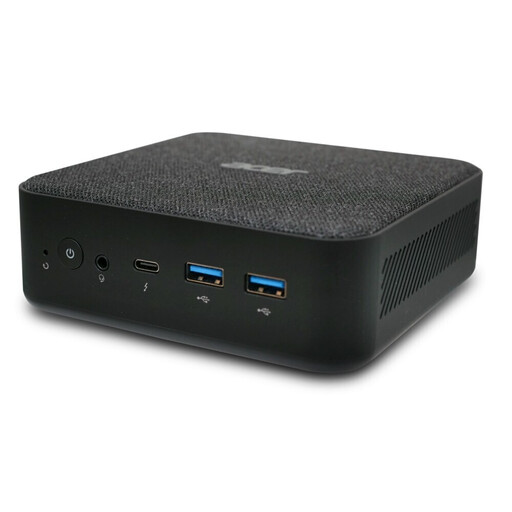
Acer Revo RB102 Mini PC
Check that the listed specification suits your database software and the applications you’ll be using at the same time.
Core Ultra 5 125U, 16 GB RAM, 512 GB SSD and Windows 11 Pro.
View at Joybuy
 No image available
ACEMAGIC AK1PLUS Mini PC
Compare the initial SSD capacity with your expected data storage needs. This configuration has less internal storage than the 512-GB models listed here.
Intel Celeron N5095, 16 GB LPDDR4X, 256 GB M.2-2280 SATA SSD and Windows 11 Pro.
View at Joybuy
Frequently asked questions
How much RAM does my local database need?
There’s no universal RAM requirement without knowing the database type and which applications will be running at the same time. The PostgreSQL Global Development Group describes the memory used for shared buffers as part of the configuration. SQL Server 2022 requirements also depend on factors such as the edition and operating system, and shouldn’t be confused with the total memory needs of a home office computer.
Can I simply copy the active data directory for PostgreSQL?
Not as an arbitrary file system backup while the database is running. The PostgreSQL Global Development Group describes options including SQL dumps, file system backups and continuous archiving. Choose a method that suits how you run the database, and plan to test the recovery process.
Can several computers access an SQLite database in WAL mode directly on a network drive?
No, not in this configuration. According to SQLite, the processes accessing the database must run on the same host; WAL doesn’t work over a network file system.
Are RAM, an SSD and Windows included with a NUC kit?
Not necessarily. ASUS lists NUC 14 Pro kits without supplied RAM, storage or a pre-installed operating system. The package contents for the full model code are what matter.
What are my rights if I need to return a product or report a fault after buying online in Germany?
According to Verbraucherzentrale, consumers generally have a 14-day right to cancel a distance contract, although statutory exceptions and the specific contract should be taken into account. Your statutory rights against the seller are separate from any voluntary guarantee.


