People reviewing long recordings
If you import and review long walking videos, you’ll need plenty of space for the original files, cache and, if necessary, proxies. Adobe also recommends a fast media drive for Premiere.


For long Rhine recordings, first check that you have enough space for your original files, cache and any proxies, as well as the right ports for additional media drives. For Premiere on Windows, Adobe recommends 32 GB of RAM or more and 8 GB of GPU memory for 4K and above. These figures, taken from Adobe’s technical requirements dated 7 October 2026, are recommendations for this use case, not a general requirement for every video editing project. Choose between a Mac mini, an upgradeable Windows mini PC and a larger model with a dedicated GPU only once you’ve checked that the editing software, source codec and full configuration suit your workflow.
If you import and review long walking videos, you’ll need plenty of space for the original files, cache and, if necessary, proxies. Adobe also recommends a fast media drive for Premiere.
If a usable preview while navigating and editing matters to you, check the hardware and proxy workflow alongside your editing software and source format. Adobe describes proxies as lower-resolution editing copies for working with large or resource-intensive media.
If you’re planning more demanding effects, compare the graphics hardware in the specific model with your software’s requirements. For Premiere on Windows, Adobe recommends 8 GB of GPU memory for 4K and above.
| Buying criterion | What to check before buying | Who it matters most to |
|---|---|---|
| Storage space | Check the SSD capacity, options for adding drives and ports for external media drives. Adobe recommends an additional fast media drive for Premiere. | If I need to store long original recordings, cache and possible proxies, I’ll plan my storage around my files. Around 33% of consumers say storage space is their main concern. |
| Preview while editing | Check that your editing software, source codec and proxy support are compatible. For Premiere on Windows, Adobe recommends 16 GB of RAM for HD and 32 GB or more for 4K and above. | If I need a usable preview while reviewing and editing, I’ll also check whether proxies can be used with my footage. Around 27% of consumers say preview performance is their main concern. |
| Graphics for effects | Compare the graphics hardware and GPU memory in the full configuration with your software’s requirements. For Premiere on Windows, Adobe recommends 8 GB of GPU memory for 4K and above. | If I’m prioritising effects or colour correction, I want to know exactly what graphics hardware the specific model includes. Around 27% of consumers say graphics for effects are their main concern. |
| Configuration and upgrades | Check the RAM, SSD and what’s included in the specific offer. For barebone models, also factor in the components you’ll need and the work involved in setting them up. | If I’m choosing between different specifications, or between a barebone and a fully configured device, I’ll compare the complete setup. Around 13% of consumers say configuration and future upgrades are their main concern. |
Your original files, cache and proxies can all take up storage space. Adobe also recommends an additional fast media drive for Premiere.
Estimate your needs based on your actual source files, then check the drive options and ports for external media.
For Premiere on Windows, Adobe recommends 32 GB of RAM or more for 4K and above. A 16 GB configuration won’t necessarily be suitable for this use case.
Compare the specific resolution and your editing software’s requirements with the amount of RAM actually included.
A barebone and a preconfigured mini PC may differ in the RAM and storage drive included.
Before buying, check what comes with the specific model and find out which components you’ll still need to buy and set up.
Mac mini models for buyers who want to use macOS or Final Cut Pro.
Windows mini PCs with a range of RAM and storage configurations. The A8 Max is one option for long media projects.
NUC mini PCs with integrated graphics, as well as larger NUC 15 Performance models with a dedicated laptop GPU.
The UM890 Pro is available as a barebone or preconfigured option. Compare what’s included carefully.
ThinkCentre M75q Gen 5 configurations for buyers who value a clearly documented business model.
This selection includes M6 Mac mini configurations and a BMAX mini PC. Compare the RAM, SSD and ports with your footage and planned proxy workflow.
 No image available
An option if you want to use macOS and connect media drives externally.
M6 with 12-core CPU and 12-core GPU; 16 GB unified memory; 512 GB SSD; Thunderbolt 4.
 No image available
This configuration is worth considering if you’re looking for a Mac mini with 24 GB of unified memory and a 512 GB SSD.
M6 with 12-core CPU and 12-core GPU; 24 GB unified memory; 512 GB SSD; Thunderbolt 4.
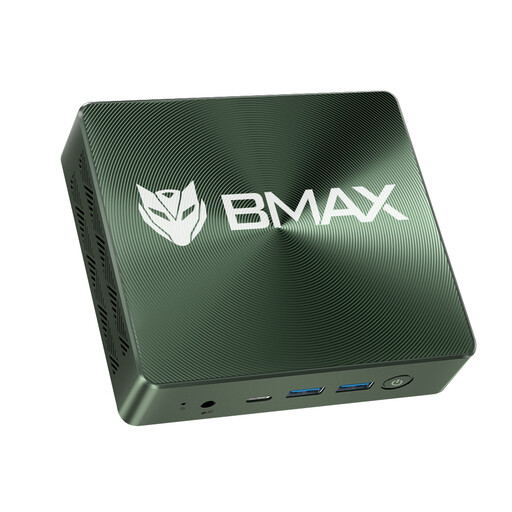 No image available
A Windows 11 option if you want a 1 TB SSD, as stated in the product title, for your media and working files.
Intel Core i7-1060NG7; 16 GB RAM; 1 TB NVMe SSD; two NVMe 2280 slots.
 No image available
A Mac mini configuration to consider if you’re looking for 1 TB of internal SSD storage.
M6 with 12-core CPU and 12-core GPU; 24 GB unified memory; 1 TB SSD; 2.5 Gigabit Ethernet.
 No image available
This model is worth considering if you’re planning to use 32 GB of unified memory with your Mac mini and manage your files externally.
M6 with 12-core CPU and 12-core GPU; 32 GB unified memory; 512 GB SSD; Thunderbolt 4.
No. The length of your recordings alone doesn’t mean you need 4K or a dedicated GPU. Check the resolution, codec, editing software and effects you plan to use. If you’re using Premiere on Windows for 4K or above, Adobe recommends 32 GB of RAM or more and 8 GB of GPU memory. These aren’t general requirements for every editing project.
In Premiere, you can create lower-resolution editing copies of suitable video clips and work with those. Adobe notes that clips with subtitles aren’t suitable for this proxy feature. Make sure you allow extra space for both your proxies and original files.
Check whether RAM and an SSD are included. The Minisforum UM890 Pro is available as a barebone or preconfigured model, so the components you’ll still need depend on the specific offer.
For a standard online purchase by a consumer, you generally have 14 days from receiving the goods to cancel the contract; statutory exceptions apply. If the goods are faulty, you have a statutory right to a minimum two-year guarantee from the seller, starting from the date you receive them. This is separate from any voluntary guarantee.