If you already have a suitable monitor and want to keep your desk as clear as possible, a Mini PC is an obvious place to start – provided the specific configuration is compatible with your mapping software and has the connections you need. An all-in-one combines the computer and screen, while a larger desktop may be worth considering if a particular configuration or potential upgrades matter more than having the smallest possible case. A general Mini PC review doesn’t prove how well it performs for GIS: check the requirements of the software you use, such as Esri’s requirements for ArcGIS Pro.
What should different users look for?
Map-makers with limited desk space
If you want to leave room beside your screen for a mouse, keyboard and map materials, it’s not just the size of the PC case that matters. COMPUTER BILD describes the GEEKOM A5 Pro as compact, but the power supply, cables and other devices still need space.
Users of specific GIS software
If you already know whether you’ll be using QGIS or ArcGIS Pro, you can check the operating system and specifications against the requirements of your chosen software. The QGIS documentation covers tasks such as creating a base map, while Esri publishes its own system requirements for ArcGIS Pro.
Buyers looking to upgrade their workstation
If you want to choose your connections and screen carefully, and may want to add storage or RAM later, check the specifications of the exact model variant. Lenovo lists a 1-litre case for the ThinkCentre M70q Gen 6, but the actual configuration is what counts.
What matters when you buy?
Mini PC with a separate monitor
A good fit if: You already have a suitable monitor or want to choose one separately from your computer.
The trade-off: You’ll still need space for the screen, power supply and peripherals. What’s included and the upgrade options vary between versions.
All-in-one PC
A good fit if: You want to buy the computer and screen as one unit, and the screen position and footprint suit your desk.
The trade-off: You’re also committing to the supplied screen, rather than choosing it separately from the computer.
Slim or larger desktop
A good fit if: You have enough space and specific features or potential upgrades matter more than having the smallest case.
The trade-off: Allow space for the case as well as your monitor and work materials.
| What to consider |
What to check before buying |
Who will find this especially important? |
| Desk space |
Measure the available space, including the monitor stand and cable routing; check whether the specific version supports mounting. |
If you want to leave room beside the screen for a mouse and map materials, the computer’s footprint matters. Around 33% of consumers give available desk space their highest priority. |
| Mapping software |
Decide which software and version you’ll use, then compare the operating system, installed memory and storage with its requirements. |
If you plan to use specific mapping or GIS software, the configuration should suit that exact workflow. Around 27% of consumers put software compatibility first. |
| Connections and what’s included |
Compare the video outputs and USB ports you need with your devices, and check which input devices are actually included. |
If you want to use the computer with your existing monitor and accessories, suitable connections and a clear list of what’s included are important. Around 20% of consumers prioritise a complete set-up that’s ready to connect. |
| Future upgrades |
Compare the installed components with the maximum supported specifications, and check which drive bays are available on the specific model. |
If you might want to add RAM or storage later, check the actual upgrade options for the model you choose. Around 20% of consumers put potential future upgrades first. |
Common buying mistakes
-
Comparing only the size of the case
A Mini PC isn’t a complete workstation on its own. The GEEKOM A5 Pro tested by COMPUTER BILD didn’t include a keyboard or mouse.
Plan your entire desk set-up and check what’s included with the exact version.
You may also need to buy a monitor, input devices or suitable accessories if you don’t already own them.
-
Confusing maximum supported RAM with installed RAM
A stated maximum doesn’t tell you how much memory is already installed. Specifications can also vary within the same model range.
Compare the RAM and SSD actually fitted to the specific version with your software and project files.
If the supplied specification isn’t enough later on, you may need to upgrade it.
-
Treating a general Mini PC review as a GIS test
The COMPUTER BILD review assesses Mini PCs in general; it doesn’t establish the GIS performance of the configurations mentioned here. ArcGIS Pro has its own system requirements.
Use a general review to learn about the model, then compare the specific configuration with your software’s requirements.
Suitable brands at a glance
GEEKOM
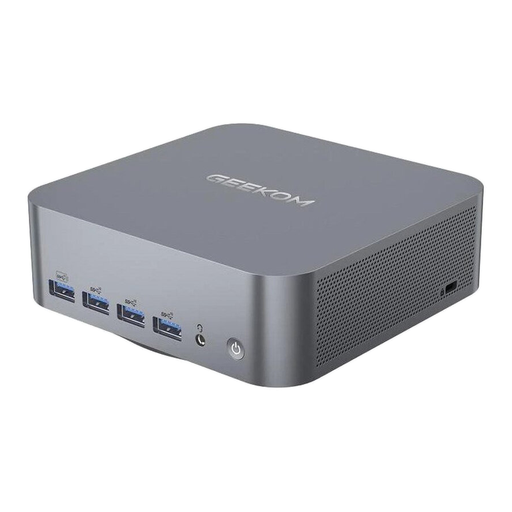
The A5 Pro 2026 is an example of a compact, ready-configured Windows Mini PC.
- COMPUTER BILD rates the version with Ryzen 5 7530U, 16 GB RAM and 1 TB SSD as compact, with good processing speeds.
- The review isn’t a GIS test; a keyboard and mouse weren’t included, and the review says the graphics aren’t suitable for graphically demanding games.
Lenovo
The ThinkCentre M70q Gen 6 range includes configurable Tiny PCs with a small footprint.
- Lenovo lists a 1-litre case for the range and offers the German variant 13A4007KEZ with 16 GB RAM and 512 GB SSD.
- Check the connections, what’s included and suitability for your GIS software against the variant you choose.
HP
The Pro Mini 400 G9 is a compact Windows desktop range with a choice of specifications.
- HP lists the German variant 938A5EA#ABD with 8 GB RAM, 256 GB SSD and a wired mouse.
- HP notes that components vary by configuration. This variant isn’t the D6B240EA model mentioned in the COMPUTER BILD Mini PC review.
MSI
The Cubi NUC 1M is a compact range for workstations where connections for multiple screens and peripherals are important.
- MSI lists HDMI and Thunderbolt 4 among the connections available in the range, along with a choice of processors.
- Range specifications don’t confirm the features of a specific retail configuration or its GIS performance.
Dell
The Pro Slim Plus is an alternative if specific configurations matter more than having the smallest case.
- Dell Germany lists Pro Slim Plus QBS1250 configurations with 16 GB or 32 GB RAM.
- The specifications and footprint of the exact version you choose are what matter; configuration details don’t automatically apply to other models.
Mini PCs for a separate monitor
This selection features Mini PCs for a workstation with a separate monitor. Before buying, check your software’s requirements and the connections and specifications of the configuration you’re considering.
 No image available
Beelink Mini PC EQ7, 16 GB RAM, 512 GB SSD
Its compact design and two HDMI outputs are useful for a workstation with a separate monitor.
Case: approx. 126 × 126 × 44 mm; 16 GB RAM; 512 GB SSD; Windows 11 Home; two HDMI outputs.
View on Joybuy
 No image available
Beelink Mini PC EQ5, 16 GB RAM, 512 GB SSD
The listed compact design and two HDMI outputs suit a set-up with a separate screen.
Case: approx. 126 × 126 × 44 mm; 16 GB RAM; 512 GB SSD; Windows 11 Home; two HDMI outputs.
View on Joybuy
 No image available
HP Z2 Mini G1a, Ryzen AI Max+ Pro 395, 128 GB RAM, 2 TB SSD
The listed Mini Workstation design may suit a compact workstation with a separate screen.
128 GB DDR5 RAM; 2 TB SSD; Windows 11 Professional; USB-C and Mini DisplayPort outputs; dimensions: 8.55 × 16.8 × 20 cm.
View on Joybuy
 No image available
Apple Mac mini M6, 16 GB Unified Memory, 256 GB SSD
QGIS is available for macOS, according to its installation guide; still, check that the specific software version suits your workflow.
12-core CPU; 12-core GPU; HDMI; Thunderbolt 4; macOS. A keyboard and mouse need to be connected separately.
View on Joybuy
 No image available
ACEMAGIC AK1PLUS, Intel Celeron N5095, 16 GB RAM, 256 GB SSD
The listed dimensions and two HDMI outputs are useful for a compact set-up with a screen.
Case: 128 × 128 × 51.5 mm; 16 GB LPDDR4X; 256 GB M.2 2280 SATA SSD; Windows 11 Pro; two HDMI 2.0 outputs; VESA mount listed as included.
View on Joybuy
Frequently asked questions
Do I need to buy a PC for ArcGIS Pro for a simple mapping task?
No, not simply because the task involves a map. The QGIS training manual explains how to create a basic map. If your task specifically requires ArcGIS Pro, check the requirements for the version you’ll be using.
What should I check before connecting a Mini PC?
Compare the video outputs on the exact PC version with the inputs on your monitor, and check what’s included. MSI lists various connections for the Cubi NUC 1M range; the GEEKOM A5 Pro tested by COMPUTER BILD didn’t include a keyboard or mouse.
What are my rights when buying a PC online?
For a consumer purchase made at a distance, you generally have a statutory 14-day right to cancel, although legal exceptions may apply. The Verbraucherzentrale also distinguishes between your statutory rights against the seller and a voluntary guarantee.
Does the CE marking prove that a PC is suitable for my mapping task?
No. According to Your Europe, CE marking is required only for products covered by relevant harmonised EU rules that explicitly require it. It doesn’t prove that a PC configuration is suitable for your GIS software.


