If you already have a suitable monitor, or want to choose where it goes, a mini PC is a space-saving option. If you’d rather have the computer and screen together in one unit, an all-in-one could be a good fit. Either way, consider the space taken up by your entire desk setup, the connections you need and what’s included with the specific configuration.
Which form factor is right for you?
Writers with limited desk space
If you need room for notes and interview documents as well as your screen and keyboard, consider the space taken up by the computer, monitor and stand together. Apple and HP describe different ways to set up a computer and screen.
Writers who already have a monitor
A mini PC could suit your workspace if you want to keep using your current screen. Check that the connections on the specific configuration are compatible with your monitor and the devices you use for your files; Apple and Lenovo offer different configurations and connections.
Writers who want their computer and screen together
An all-in-one combines the screen and computer in a single device. Compare the dimensions and screen position of the specific model with your desk; HP describes the OmniStudio X as having an adjustable-height stand.
What should you consider when buying?
Mini PC with a separate monitor
A good fit if: You want to keep using a monitor or choose where it goes.
Things to consider: You’ll still need a monitor; for some of the devices tested, input devices or other components weren’t included.
All-in-one PC
A good fit if: You want your screen and computer together, and the device with its stand will fit on your desk.
Things to consider: You’re tied to the screen that comes with the device. COMPUTER BILD’s test found that the RAM in the ASUS ExpertCenter P600 AiO PM640KA was soldered in place; this won’t necessarily apply to other models.
Small desktop PC with a separate monitor
A good fit if: You’re looking for a compact case and want to check the features and upgrade options of the specific model.
Things to consider: The word ‘compact’ on its own doesn’t tell you whether the computer, monitor, keyboard and paperwork will all fit on your desk.
| What matters when buying |
What to check |
Who is this important for? |
| Room for your whole desk setup |
Measure the usable space and allow for the computer, screen, stand, keyboard and paperwork. |
If my small desk also needs to hold interview documents, it’s the whole setup that matters, not just the size of the computer case. Around 36 % of consumers put available desk space first. |
| Screen position and writing space |
Check the screen dimensions, stand and adjustability of the specific model. |
When I’m writing for long periods, I want to position the screen comfortably without having to move my keyboard or paperwork. Around 29 % of consumers pay particular attention to screen position and writing space. |
| Connections and interview files |
Check that the connections work with your monitor and existing devices, and consider how you’ll back up your files. |
When I’m working with interview material alongside my writing, I need to be able to connect my devices and have a suitable way to back up my files. Around 21 % of consumers prioritise connections and working with interview files. |
| Everything you need included |
Check what comes with the exact configuration, including the operating system, storage and input devices. |
I want to know in advance what else I’ll need for my desk setup and what needs to be set up. Around 14 % of consumers pay particular attention to having a clearly defined package of equipment. |
Common buying pitfalls
-
Comparing only the size of the computer case
You’ll still need a screen with a mini PC. With an all-in-one, the screen and stand are part of the desk setup. So it’s the total space taken up that matters when planning your workspace.
Before choosing a form factor, consider the space needed for the screen, computer, keyboard and paperwork together.
-
Assuming a barebone is a ready-to-use complete PC
For the Intel NUC 13 NUC13ANKI7 tested by COMPUTER BILD, RAM, storage and an operating system had to be bought and installed separately. This finding applies to the model tested.
Check what’s included with the exact configuration, and find out which components and setup steps you’ll need for your workspace.
-
Assuming the form factor determines upgradeability
The RAM in the ASUS ExpertCenter P600 AiO PM640KA tested by COMPUTER BILD was soldered in place. The test found that the tested E5402 had upgradeable memory; these findings apply to those models.
Check the upgrade options for the exact model and configuration rather than assuming them from the form factor.
Brands to consider
Apple
The Mac mini is aimed at writers who use macOS and want to choose a separate screen.
- Apple lists different memory and SSD configurations for the Mac mini M6, as well as connections for external displays.
- Check the connections and compatibility with your software for the specific configuration; you’ll need to account separately for the screen and input devices when putting your setup together.
Lenovo
The ThinkCentre Neo 50q Gen 5 is a line of tiny desktop PCs for a Windows writing setup with a separate monitor.
- Lenovo describes the range as 1-litre tiny PCs.
- The processor, RAM, operating system and items included vary by configuration, so check the details of the device you choose.
HP
The OmniStudio X is an all-in-one option for anyone who wants their computer and screen together.
- HP describes the OmniStudio X as having an adjustable-height stand.
- Screen sizes vary by version. Compare the dimensions of the device you choose with your desk.
Dell
Dell offers compact desktop PCs such as the OptiPlex Micro and Pro Slim Plus.
- The product lines offer different case designs to consider for a workspace with limited room.
- The upgrade options Dell describes apply to the Pro Slim Plus and don’t confirm that the OptiPlex Micro has the same features.
ASUS
The ExpertCenter all-in-one models tested offer a point of reference for writers who prefer an integrated screen.
- COMPUTER BILD describes the monitor on the tested ExpertCenter E5402 as adjustable.
- COMPUTER BILD reports that the RAM in the tested P600 AiO PM640KA is soldered in place. These test findings apply to the specific models, not the brand as a whole.
Mini PCs at Joybuy
This selection at Joybuy includes mini PCs for a desk setup with a separate monitor. Before buying, check that the connections and what’s included with each configuration suit your workspace.
 No image available
SOYO Y5Pro mini PC
For a desk setup with a separate monitor; check which of the listed processors is included in the version you choose.
Intel Core i5 8250U/8350U, 8 GB DDR4, 256 GB SATA SSD, Windows 11, BT5.2 and Wi-Fi 5.
View at Joybuy
 No image available
Apple Mac mini M6
For a desk setup with a separately chosen screen; check that its connections match the specific configuration.
12-Core CPU, 12-Core GPU, 16 GB Unified Memory, 512 GB SSD, Thunderbolt 4, HDMI, 2.5GbE, Wi-Fi 7, Bluetooth 6 and macOS.
The product description states that the keyboard and mouse are sold separately.
View at Joybuy
 No image available
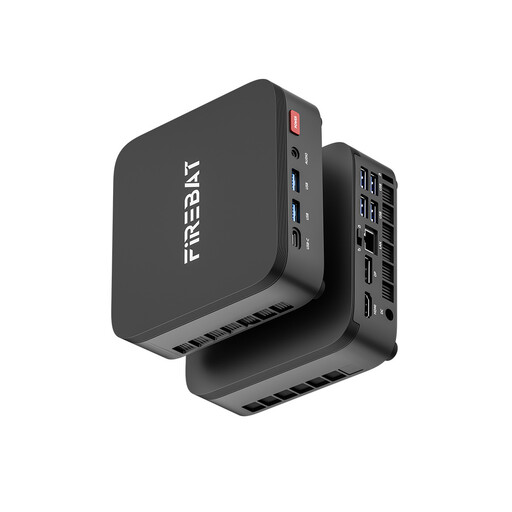
FIREBAT R3 mini PC
For a desk setup with a separate screen; check that the connections you need work with your devices.
AMD Ryzen 5 7430U, 16 GB LPDDR4 at 3733 MHz and 512 GB NVMe SSD.
View at Joybuy
 No image available
MaxMini B3 mini PC
For a desk setup with a separate monitor; check that the processor and connections suit how you plan to use it.
Intel N4100 up to 2.4 GHz, 8 GB LPDDR4, 256 GB SSD, Dual HDMI, 1000M LAN, 2.4G/5G Wi-Fi and BT 5.0.
View at Joybuy
 No image available
BMAX B7A Plus mini PC
For a desk setup with a separate screen; check that the connections on the specific configuration work with your equipment.
AMD Ryzen 5 6600H, 12 GB LPDDR5 and 512 GB NVMe SSD.
View at Joybuy
Frequently asked questions
Can I keep using my existing monitor with a mini PC?
Yes, as long as a video output on the configuration you choose matches an input on your monitor. Apple lists HDMI and Thunderbolt among the connections on the Mac mini M6; for Lenovo, check the connections on the specific ThinkCentre configuration.
How can I back up my writing and interview files?
On Windows, File History can use an external drive or a network location. Apple describes automatic backups to an external storage device using Time Machine. After setting it up, check that the files you want are actually being backed up.
What rights do I have when buying a PC online in Germany?
For a distance purchase by a consumer, there is generally a 14-day right to cancel from the date of delivery; exceptions and return costs should be taken into account. If goods are faulty, you have at least two years of statutory legal rights against the seller. These rights are separate from any voluntary manufacturer’s guarantee; the information from Your Europe applies to consumer purchases in the EU.
Does a small home desk have to meet the ASR A6 requirements?
Not all screen use in the home falls under ASR A6. The rules cover screen workstations in workplaces and teleworking workstations, while excluding screen use at home outside teleworking. Whether they apply to your workspace depends on how it is classified; they do not set one minimum device size for all buyers.


