Considerate evening gamers
If you play while someone else in the room is asleep or trying to concentrate, consider how noisy the PC is under the level of load you’ll be using it for – not just whether it’s generally described as ‘quiet’.


If you mainly play less demanding deck-building games, a compact PC with integrated graphics may be all you need; there’s no automatic need for a gaming tower. Check the requirements for any more demanding games separately against the exact PC configuration. In a shared bedroom, noise while gaming, the space available and what’s actually included in the box also matter. A manufacturer’s noise figures don’t prove that a device will be inaudible where you plan to use it.
If you play while someone else in the room is asleep or trying to concentrate, consider how noisy the PC is under the level of load you’ll be using it for – not just whether it’s generally described as ‘quiet’.
If you don’t want a large computer taking up room in a shared space, check the requirements of the games you actually play against a more compact PC.
If you might add more demanding games later, check their requirements separately and consider upgrade options independently of what your current deck-building games need.
For Balatro, Valve lists integrated graphics as a possible option for meeting the minimum requirements on Steam. Check other games individually, and don’t treat minimum requirements as a guarantee of performance.
A good fit if: Your games have modest requirements, and saving space and being considerate of the other person are priorities.
Trade-off: A compact design doesn’t automatically mean quiet operation or suitability for graphically demanding games.
A good fit if: You’re also planning to play games with higher graphics requirements or need room to upgrade, and you have enough space.
Trade-off: More power doesn’t solve the question of noise in a bedroom; what matters is how the specific configuration performs under load.
A good fit if: Your computer meets the requirements of your games and is quiet enough for both people sharing the room.
Trade-off: Before upgrading, check that the components and operating system still meet your needs.
| Buying priority | What to look for | Who is it important to? |
|---|---|---|
| Operating noise | Consider idle and load noise separately; look for an independent assessment of the exact configuration. | If you play while someone else in the room needs peace and quiet, the noise during your gaming sessions matters. Around 36 % of consumers put quiet operation first. |
| Suitability for your games | Check the operating system, graphics support, RAM and storage against the requirements of every game you plan to play on the specific PC model. | If your choice of games is the deciding factor, you’ll want to know that each title will run on the computer. Around 29 % of consumers put gaming suitability first. |
| Space and placement | Check the case dimensions, monitor connection and cable routing where you plan to place the PC; only plan for VESA mounting if it’s supported by the model you’re considering. | If desk space is limited in your shared bedroom, the computer needs to fit where you intend to put it. Around 21 % of consumers put space requirements first. |
| Total cost and ready-to-use setup | Before comparing prices, check what’s included with the exact model, which components you’ll need and whether an operating system is included. | If you’re weighing up the purchase price and the setup involved, you won’t want to overlook any missing components. Around 14 % of consumers put the overall cost and effort first. |
The label alone doesn’t tell you how much performance your games actually need. Balatro lists integrated graphics in its minimum requirements; other games you plan to play may have different requirements.
Start by making a list of the games you play, then compare the requirements for each one with the exact PC configuration.
A manufacturer’s description or an idle noise figure won’t tell you how the device sounds where you plan to use it while gaming.
Check idle and load figures separately, and look for an independent assessment of the specific model.
A barebone model may not include components such as RAM, an SSD or an operating system, so it isn’t directly comparable with a fully equipped model.
Only compare offers when it’s clear what’s included and they’re for the same model configuration.
Missing components and setup can mean extra work.
The A5 Pro 2026 is an example of a mini PC with a Ryzen 5 7530U, 16 GB RAM and a 1 TB SSD.
The Cubi NUC 1M range is a line of compact PCs, but placement and connections need to suit the specific configuration.
The NucBox M6 Ultra pairs a Ryzen 5 7640HS with integrated Radeon 760M graphics in the model described.
The Pro Mini 400 G9 family includes various configurations, so the exact model matters when comparing options.
The ExpertCenter PN55 is a mini PC range with different processor, graphics and storage configurations.
This selection includes compact mini PCs and a desktop tower. Check the specific configuration against your games, available space and noise requirements.
 No image available
A mini PC is an option if you want to save space; check its suitability for your games separately.
16 GB LPDDR4X, 256 GB M.2 2280 SATA SSD and Windows 11 Pro.
 No image available
Its compact design could suit a limited space; check graphics support against the games you play.
12 GB RAM, 256 GB SSD and Intel Iris Plus Graphics 655.
 No image available
This mini PC could be an option if space is limited; whether it’s suitable for your games depends on the requirements of the specific titles you play.
16 GB LPDDR5, 512 GB NVMe SSD, integrated AMD Radeon 660M and Windows 11 Pro.
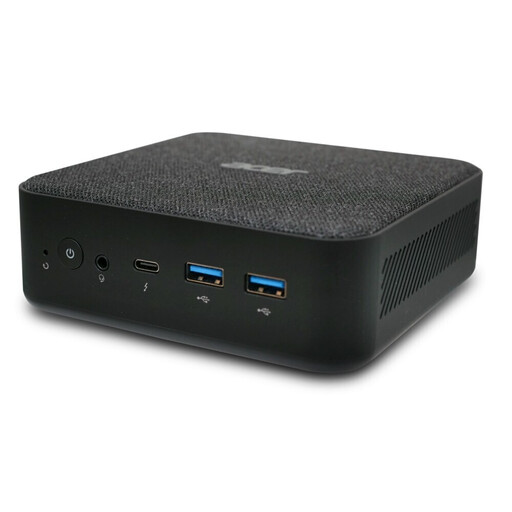 No image available
A mini PC can be useful when space is limited; check the specific case dimensions and noise figures in the product listing before you buy.
16 GB RAM, 512 GB SSD and Windows 11 Pro.
 No image available
This tower could suit you if you’re planning to play more demanding games as well as deck-builders; check their requirements and the space needed before you buy.
RTX 5060 with 8 GB GDDR7, 16 GB DDR5, 512 GB SSD and Windows 11 Home. At least 10 cm of clearance on all sides is specified for placement.
No. The published minimum requirements for Windows specify OpenGL 2.1-compatible graphics, including integrated graphics. Still, check the graphics support of the specific PC and the requirements of any other games you play; the minimum specification doesn’t guarantee a particular level of performance.
Before mounting it, check the fittings and connections on the specific model. For example, MSI lists VESA 100 × 100 mm for the Cubi NUC 1M. The German Environment Agency also recommends using energy-saving features and switching the computer off when you’ve finished using it.
For eligible consumer purchases made online in Germany, you generally have a 14-day right to cancel. The consumer advice centre explains that you must notify the retailer or other party to the contract that you wish to cancel. Your statutory rights relating to faulty goods and a voluntary guarantee are different things. Check the terms of your specific purchase.
According to information from the European Union, CE marking is only required for products covered by relevant harmonised EU rules that require it. It represents the manufacturer’s declaration that the product meets the applicable requirements; it isn’t an independent product recommendation.