If you’re creating or viewing a sales dashboard in a browser, the right monitor connections, browser support and network access all matter. For local data modelling with Power BI Desktop, you’ll need a suitable Windows version; the installed RAM and SSD should match your data and the programmes you have open at the same time. Also check the noise specifications, connections and what’s included for the exact configuration on offer, rather than assuming a test result applies to every variant.
Who uses a mini PC for a dashboard?
Local data modellers
If you prepare sales data on your mini PC and create reports using a desktop application, you’ll need a Windows version to run Power BI Desktop. Microsoft Learn describes Power BI Desktop as a Windows application; the right specification depends on the demands of your data.
Dashboards on a second screen
If you want a dedicated screen to display key figures alongside your work, check that the outputs on the specific mini PC configuration match your monitor connections. Also check how your workspace will connect to the network.
Quiet room users
If the computer will sit near where you study or sleep, noise specifications can help you understand how it performs in different operating conditions. Manufacturer figures and test results apply to the configuration described and don’t automatically carry over to other variants.
What should you look for when buying?
First decide whether you’ll mainly work in a browser or model data locally. Then check the monitor connections and network access. If the computer will be near where you study or sleep, also consider noise levels and everything included in the box.
| Consideration |
What to check before buying |
Who it matters most to |
| Performance for local data work |
Check the software you use, the operating system, and the RAM and SSD actually installed in the configuration on offer. |
If I import data and build models locally, I’ll match the specific configuration to my workload. Around 27% of consumers put local data work first. |
| Compatible monitors |
Check the number and type of video outputs against the inputs on your monitors. |
If I want to see key figures on a separate monitor, the connections need to suit my setup. Around 20% of consumers prioritise a multi-monitor workspace. |
| Noise near where you study or sleep |
Look for specifications or tests covering the specific configuration and comparable idle and load conditions. |
If the computer will be near my desk or bed, I want to know how loud the fans are likely to be during my usual use. Around 20% of consumers mainly look for a computer that won’t disturb them in their room. |
| A complete setup |
Check what’s included, the installed storage and the operating system. If it’s a barebone, find out which components you’ll still need. |
If I want to use the mini PC without any extra setup, I need a complete system rather than a barebone. Around 20% of consumers prioritise a ready-to-use setup. |
| Access to data and services |
Check the available network connection and data source. Make sure the Ethernet and Wi-Fi on the specific configuration suit the connection in your room. |
If my dashboard accesses a service or data source, the connection needs to work for my workspace. Around 13% of consumers prioritise access to data and services. |
How to avoid buying pitfalls
-
Assuming a barebone is a complete system that’s ready to use
A barebone may be supplied without RAM, an SSD or an operating system. A keyboard and mouse aren’t included with every configuration either.
Before you buy, check the list of components against what you already own and what you’ll need to get started.
-
Assuming the number of supported displays means the connections will suit your monitors
The advertised display support alone doesn’t tell you whether the outputs on the specific variant will work with your monitors. The model ranges covered here have different video outputs.
Compare the connections on your monitors with those on the exact mini PC configuration on offer.
-
Confusing Power BI Desktop with working in a browser
Microsoft distinguishes Power BI Desktop from the Power BI service. Some features are only available in Power BI Desktop, while sharing through the service depends on the licence you have.
Before choosing, decide whether you’ll model data locally, create reports in a browser or share reports with others.
Relevant brands to consider
GEEKOM
The A5-Pro-2026 range offers compact mini PC configurations. GEEKOM Germany lists a Ryzen 5 7530U for the configuration shown.
- COMPUTER BILD rated the tested A5-Pro configuration with 16 GB RAM and a 1 TB SSD highly for its working speed and low power consumption.
- The test result applies to this specific configuration; COMPUTER BILD says a keyboard and mouse aren’t included.
MSI
The Cubi-NUC-1M range is worth considering for a multi-monitor workspace. MSI lists two HDMI outputs and a VESA mounting option.
- MSI lists separate noise levels for idle and full-load conditions on its specifications page: 28 dB at idle and 38 dB at full load.
- The processor and operating system can vary within the product range. The manufacturer’s figures aren’t an independent test of every version on sale.
GMKtec
The NucBox M6 Ultra is worth considering if you’re comparing upgrade options and different display outputs.
- GMKtec EU describes upgradeable RAM and two SSD slots. The product range also lists HDMI, DisplayPort, USB4 and wired network connections.
- Upgrade options don’t guarantee that every listing includes the same specification. Check the details for the exact configuration.
HP
The Pro Mini 400 G9 family includes compact office PC configurations that you can compare by checking the operating system listed for each one.
- HP provides technical specifications for individual configurations, including the tested version with the identifier D6B240EA.
- HP notes that components vary by configuration. Don’t assume that details for the tested model apply to other listings without checking.
Joybuy mini PCs for your dashboard setup
This selection of Joybuy mini PCs includes options for local data work and compact monitor setups. If you want to use Power BI Desktop, check specifically that the configuration you’re considering includes Windows.
 No image available
THUNDEROBOT Mini PC Workstation AI Max+ 395, 128 GB LPDDR5X, 1 TB SSD
The listed RAM and storage can be compared with what you need for local data work.
The product name lists 128 GB LPDDR5X at 8000MT/s, a 1 TB SSD and Wi-Fi 7.
Joybuy
 No image available
Apple Mac mini M6, 12-Core CPU and GPU, 24 GB Unified Memory, 512 GB SSD
If you’re considering this Mac mini for your dashboard, check that it’s compatible with the way you plan to work. The product title lists macOS.
It also lists Thunderbolt 4, HDMI, 2.5 Gigabit Ethernet, Wi-Fi 7 and Bluetooth 6.
Joybuy
 No image available
ACEMAGIC E3B Mini PC, Ryzen 7 7735HS, 24 GB LPDDR5, 512 GB NVMe SSD
Windows 11 Pro is listed for local work with Power BI Desktop; Microsoft describes Power BI Desktop as a Windows application.
The title lists three display outputs: HDMI, DisplayPort and USB-C, as well as 2.5 GbE LAN and Wi-Fi 6. The description lists two M.2-2280 slots.
Joybuy
 No image available
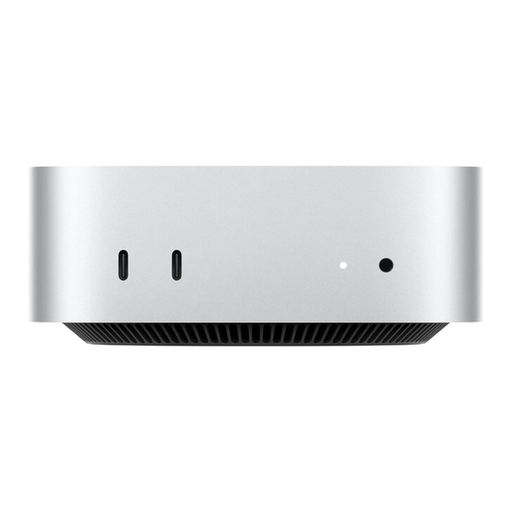
Apple Mac mini MHQK4ZD/A_CTO, M6, 24 GB Unified Memory, 1 TB SSD
If you choose this configuration for a dashboard, check that the operating system works with the software you plan to use. The product title lists macOS.
The description lists HDMI, three Thunderbolt 4 ports, support for up to three external displays and 2.5 Gigabit Ethernet.
Joybuy
 No image available
BMAX B6 Mini PC, Intel Core i3-8109U, 12 GB RAM, 256 GB SSD
If you want to view a dashboard on a separate monitor, compare the listed video outputs with the connections on your monitor.
It lists HDMI, DisplayPort, 1000M Ethernet, Wi-Fi 5 and Bluetooth 5.0. The description states that it supports two displays and measures 125 × 112 × 34 mm.
Joybuy
Frequently asked questions
Do I definitely need Windows for a sales dashboard?
Not for every type of dashboard work: Power BI has features available in supported browsers. If you specifically want to use Power BI Desktop, you’ll need its Windows application; some features are only available in that application.
How do I set up a workspace with a second monitor?
First check the inputs on your monitor and the video outputs on the specific mini PC configuration. MSI lists two HDMI outputs and a VESA mounting option for its Cubi-NUC-1M range. Check that these details suit your monitor and planned mounting setup.
Do I need to pay for extra software to use Power BI dashboards?
Microsoft says Power BI Desktop is free, and you can create content in your own workspace in the Power BI service with a free licence. Microsoft lists Pro or Premium Per User for sharing with others or publishing to shared workspaces, so check in advance which sharing features you need.
What rights do I have when buying a mini PC online in Germany?
Verbraucherzentrale distinguishes the statutory right to cancel an online consumer purchase from your statutory rights if goods are faulty and any voluntary manufacturer’s warranty. Check the time limits and terms for your specific purchase, and don’t confuse your statutory rights with a warranty.
What should I consider if my dashboard contains customer data?
If you process personal data in your dashboard, you’ll need to comply with the relevant data protection requirements. Your Europe explains the GDPR requirements for businesses and organisations that collect, store or manage personal data. Buying a mini PC alone doesn’t determine whether a particular use of data is lawful.


