What should you consider when choosing one?
First, check that the operating system and ports work with your existing setup. Then weigh up noise levels, placement and what’s included.
| What to consider |
What to check before buying |
Who it matters most to |
| Accounts and backups |
Check the operating system and plan for separate accounts and regular backups that you can restore. |
If several people use the same computer, I want to manage my writing in my own account and protect it from loss. Around 31% of consumers put separate accounts and backups first when buying a mini PC. |
| A quiet writing environment |
Distinguish a fanless design from a manufacturer’s claim that a device is “quiet”. |
If I’m writing right beside other people, I want to avoid potential fan noise. For around 25% of consumers, keeping their writing environment as quiet as possible is the main priority. |
| Space and ports |
Compare your monitor’s video inputs with the PC’s outputs, and check that it has the USB ports you need and supports suitable VESA mounting. |
If desk space is limited, I want to keep using my existing devices and position the computer to suit my setup. Around 25% of consumers prioritise saving space and port compatibility. |
| What’s included and setup |
Check whether an operating system, RAM and storage are included, and whether you’ll need to buy a monitor, keyboard or mouse separately. |
If I want to get started without extra setup, a complete package matters more to me than extras I won’t use. Around 19% of consumers prioritise predictable overall costs and a device that’s ready to use. |
Joybuy products for a compact writing desk
This selection includes compact Windows mini PCs and Mac mini configurations. For each variant, check that the operating system, ports and included items suit your writing setup.
 No product image available
SOYO Y5Pro mini PC, Intel Core i5 8250U/8350U, 8 GB DDR4, 256 GB SATA SSD
An option for a compact writing desk if you’re looking for a Windows mini PC with several video ports.
Windows 11, 8 GB DDR4 and 256 GB SATA SSD; the product name also lists two HDMI outputs, Type-C and four USB ports. The processor is listed as either Intel Core i5 8250U or 8350U.
View at Joybuy
 No product image available
HP Z2 Mini G1a Ryzen AI Max+ Pro 395, 128 GB RAM, 2 TB SSD
This mini workstation may suit you if you specifically need the high memory and RAM specifications listed in the product name.
Ryzen AI Max+ Pro 395, 128 GB RAM and 2 TB SSD. Check that this configuration suits your writing software and actual needs.
View at Joybuy
 No product image available
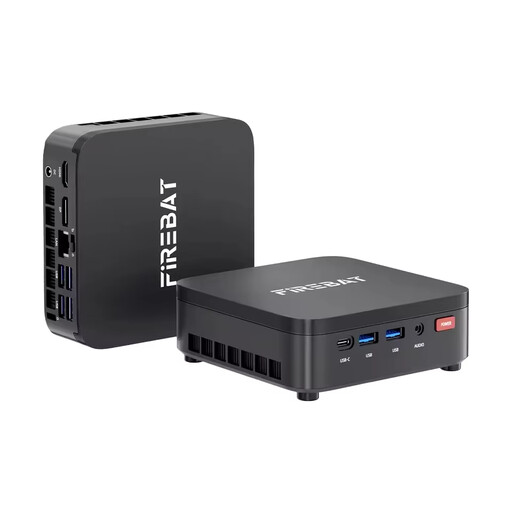
FIREBAT R3 mini PC, AMD Ryzen 3 4300U, 16 GB LPDDR4 RAM, 512 GB M.2 SATA SSD
A Windows option for a desk where you’ll want to connect devices as well as use your writing software.
Windows 11 Pro, 16 GB LPDDR4 RAM and 512 GB M.2 SATA SSD; the product name also lists Wi-Fi 6 and Bluetooth 5.2.
View at Joybuy
 No product image available
Apple Mac mini M6, 16 GB Unified Memory, 256 GB SSD
An option if your writing software runs on macOS and you want to add a Mac mini to your existing setup.
Apple M6 with 12-core CPU and 12-core GPU, 16 GB Unified Memory, 256 GB SSD, Thunderbolt 4 and HDMI. Keyboard and mouse sold separately.
View at Joybuy
 No product image available
Apple Mac mini M6, 16 GB Unified Memory, 512 GB SSD
This variant may suit you if you want to use macOS and the SSD capacity listed in the product name meets your needs.
Apple M6 with 12-core CPU and 12-core GPU, 16 GB Unified Memory, 512 GB SSD, Thunderbolt 4 and HDMI. Keyboard and mouse sold separately.
View at Joybuy
Frequently asked questions
Does everyone using a shared computer need their own account?
Separate user accounts are a good idea when sharing a computer, according to the German Federal Office for Information Security. You should also back up your text files regularly; having your own account isn’t a backup.
Can I use a fanless barebone for writing straight away?
Not necessarily: according to ASUS, the barebone ASUS ExpertCenter PN42 does not come with an operating system, RAM or storage. Choose a fully equipped version or plan for the setup and any additional components you’ll need.
What should I check before placing an order?
Check whether the operating system, RAM, storage, monitor, keyboard and mouse are included or available. Lenovo says that a keyboard, monitor and mouse are sold separately for the documented ThinkCentre Neo 50q Gen 5 configuration.
What are my rights when shopping online in Germany?
According to the Verbraucherzentrale, distance-selling contracts generally come with a 14-day right to cancel; exceptions and when the period starts depend on the specific contract. Your statutory consumer rights are separate from a voluntary manufacturer’s warranty.
What should I look out for when buying an imported mini PC?
The German Federal Network Agency lists CE marking and identifiable manufacturer details among the checks it carries out as part of its market surveillance. Also check that the plug type can be used in Germany; a product description alone can’t establish whether a specific offer complies with the relevant requirements.


