Gamers with limited desk space
If your monitor, mouse and keyboard already take up room, the computer’s dimensions and how you position it are especially important.


If your desk is always short on space, a pre-configured mini PC is a sensible place to start, provided it meets the requirements of the specific card games you play and its ports and cooling suit your setup. A compact tower is a better option if internal upgrades matter more than saving desk space. A laptop makes sense if you want to keep your workspace flexible.
If your monitor, mouse and keyboard already take up room, the computer’s dimensions and how you position it are especially important.
If you want to play a range of titles, check the operating system, graphics and storage of the specific PC configuration against each game’s requirements.
If you also use your desk for work or study, consider the cooling system and make sure the ventilation openings remain unobstructed.
On a small desk, the right choice depends on what matters most in your day-to-day setup.
A good fit if: you want to save desk space and use a separate monitor.
Things to consider: ports, cooling and internal upgrade options depend on the exact configuration.
A good fit if: internal drives or future upgrades matter more than having the smallest possible case.
Things to consider: measure the space you have in mind and check the upgrade options for the specific model.
A good fit if: you regularly need to clear your desk or don’t always play at the same desk.
Things to consider: an additional monitor or separate peripherals will affect how much space you need.
| Buying criterion | What to check before buying | Who should pay particular attention |
|---|---|---|
| Footprint and positioning | Case dimensions and mounting accessories; allow room for plugs and unobstructed airflow. | If I need to fit a monitor and peripherals on a small surface, I want to know whether the computer will fit where I plan to put it. Around 36% of consumers put desk space first. |
| Game compatibility | Compare the latest requirements for every title you want to play with the operating system, graphics, RAM and storage of the specific configuration. | I want to be able to play the titles I actually play on the model I choose, rather than relying on a ‘gaming’ label. Around 29% of consumers put game compatibility first. |
| Noise and airflow | Check the cooling system of the exact model and keep its ventilation openings clear at your chosen location. | If I play and work at the same desk, a quiet setup matters to me, without blocking airflow. This applies to around 21% of consumers who put quiet operation first. |
| What’s included and upgrade options | Check the operating system, RAM, SSD, required peripherals and mounting accessories, as well as the upgrade options for the specific model. | I want to know which components are included and whether I can make changes later. Around 14% of consumers put what’s included or upgrade options first. |
The case size doesn’t tell you whether a mount is compatible with your monitor or whether there will be enough room for cables and airflow.
Measure your entire setup and check the mounting points, ports and mounting accessories for the specific model.
Depending on your setup, you may also need a compatible mount or a port adapter.
Blizzard announced updated minimum requirements for Hearthstone in 2026. An older list of requirements may therefore no longer be suitable for the current version.
Before buying, compare the publisher’s latest information with the exact PC configuration and check each title you want to play individually.
Configurations vary in terms of operating system, storage, what’s included and potential upgrades.
Check the components included and any extras you’ll need for the specific offer before comparing models.
If the package is incomplete, you’ll need to budget separately for any required peripherals or mounting accessories.
The Cubi N ADL S range includes compact mini PCs, including a fanless model.
The A8 is available with options including a Ryzen 7 8745HS and integrated Radeon 780M graphics.
Its range includes the ExpertCenter PN55 mini PC series and the larger V500 Mini Tower.
The ThinkCentre M75q Gen 5 Tiny is a compact desktop that Lenovo says can be positioned horizontally or vertically.
The Pro Mini 400 G9 is a compact desktop available in a pre-configured setup.
This Joybuy selection features mini PCs for space-saving desk setups. Check the requirements of your card games and the specifications of each specific model.
 No image available
The mini PC form factor can work well in a space-saving setup; compare the requirements of each game you want to play with this specific configuration.
Specifications listed include Core Ultra 9 285T, Intel Graphics, Windows 11 Pro, 64 GB DDR5 and a 1 TB M.2 SSD. A VESA mount is optional.
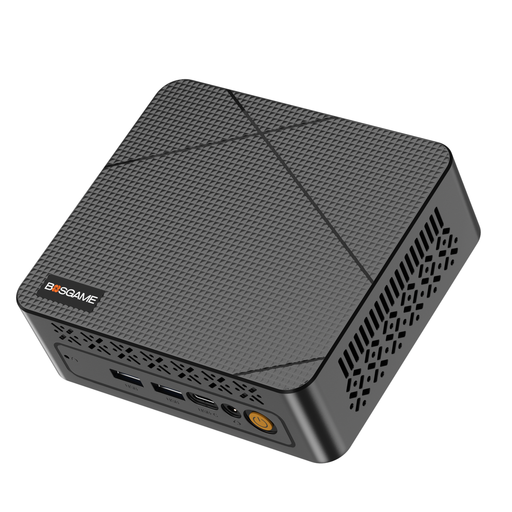 No image available
The mini PC form factor could suit a desk with limited space; check the latest requirements for the card games you want to play against the specific configuration.
The product name lists an Intel N95 up to 3.4 GHz, 16 GB DDR4, a 512 GB SSD and two 4K HDMI outputs.
 No image available
The mini PC format can suit a compact desk setup; check the specific configuration against your games’ requirements.
The product name lists an Intel N4100 up to 2.4 GHz, 8 GB LPDDR4 and a 256 GB SSD. It also lists two HDMI outputs, Gigabit LAN, Wi-Fi and Bluetooth 5.0.
 No image available
The compact design can save desk space; check the requirements of the card games you want to play and keep the air vents clear.
Specifications listed include Ryzen 5 6600H, integrated Radeon 660M, 12 GB LPDDR5 and a 512 GB NVMe SSD. The model is described as having two M.2 slots; use the original power supply.
 No image available
The mini PC form factor could work well in a space-saving setup, but on its own it doesn’t guarantee compatibility with a particular card game.
The configuration lists Ryzen 7 7735HS, integrated Radeon 680M, 16 GB RAM and a 512 GB SSD. It also lists two M.2 slots and video output via HDMI and USB4.
No. What matters is the latest requirements for each game and the exact PC configuration. Blizzard announced on 3 August 2026 that Hearthstone’s minimum requirements had changed, so check the publisher’s latest information.
No, it depends on the monitor, the mount and the specific PC model. Check the mounting pattern, bracket, room for cables and unobstructed airflow. MSI lists VESA 100 × 100 mm for the Cubi N ADL S family, while a mount for the ASUS PN55 series is optional.
For the specific offer, check whether the operating system, RAM, SSD, monitor, peripherals and any required mounting accessories are included. Information about a model family doesn’t necessarily describe what’s included with every individual configuration.
No. If goods are faulty, your statutory rights are against the seller; a guarantee is an additional voluntary promise with its own terms and conditions. According to the Verbraucherzentrale, consumers who order online also generally have a 14-day cancellation period from receipt of the goods.