What should you look for when buying?
First check how much room you have on your desk and which ports your monitor has. Then decide whether you want to view one or several screens at once, and whether you’re happy to set up the components yourself.
The percentages below relate to consumers choosing a mini PC for comparing train timetables at a small desk; each figure represents their main purchase consideration.
| Priority |
What to check before buying |
Who is it most relevant to? |
| Desk space and positioning |
Case dimensions and space for the power supply and cables; if mounting the device, check that it is compatible with the VESA mount and monitor. |
On a small desk, the computer, power supply and cables all need to fit without making the monitor difficult to access; around 31% of consumers put desk space first. |
| Using a browser to check timetables |
Check that the device has a usable operating system, an up-to-date browser and an internet connection; Deutsche Bahn’s journey planner requires JavaScript to be enabled. |
If you check connections in a browser and switch between alternatives, prioritise the right basic setup rather than unnecessary extra performance; around 31% of consumers prioritise browser use. |
| Screen overview and connections |
Check that the video outputs on the specific variant match the inputs on your monitors, and confirm that they can be used at the same time. |
If I want to view timetables side by side on two monitors I already own, I need compatible outputs and cables; around 23% of consumers prioritise viewing multiple screens at once. |
| What’s included and set-up |
Check the operating system, RAM, storage, power supply and included accessories for the specific offer. |
If you don’t want to add components or install an operating system yourself, choose an offer that clearly lists what’s included; around 15% of consumers prioritise a straightforward set-up. |
Joybuy product recommendations
This selection from Joybuy includes mini PCs for comparing train timetables at a small desk, including variants with multiple display outputs and fully configured models.
 No image available
SOYO Y5Pro mini PC, Intel Core i5-8250U/8350U, 8 GB DDR4, 256 GB SATA SSD, Windows 11
The product description lists two HDMI outputs for connecting two monitors.
The product title lists Windows 11, 8 GB DDR4 and a 256-GB SATA SSD; the description gives dimensions of 105 × 113 × 45 mm. The title lists the 8250U and 8350U processor variants.
View on Joybuy
 No image available
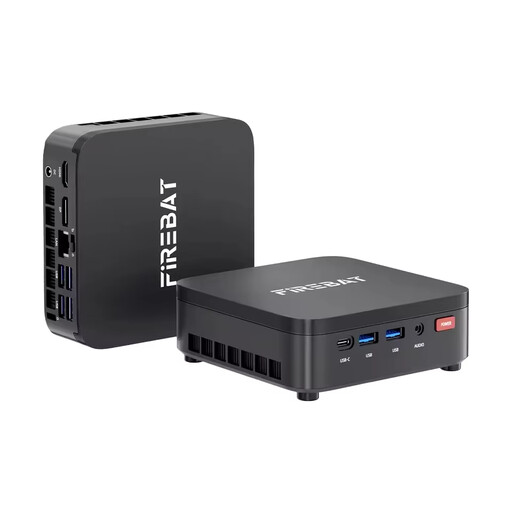
FIREBAT R3 mini PC, AMD Ryzen 3 4300U, 16 GB LPDDR4, 512 GB M.2 SATA SSD, Windows 11 Pro
If you’re looking for a fully configured device to use with a monitor you already own, the product title lists a pre-installed operating system.
The title lists 16 GB LPDDR4, a 512-GB M.2 SATA SSD, Wi-Fi 6 and Bluetooth 5.2. According to the product description, use the original power supply, keep the ventilation openings clear and use the device indoors only.
View on Joybuy
 No image available
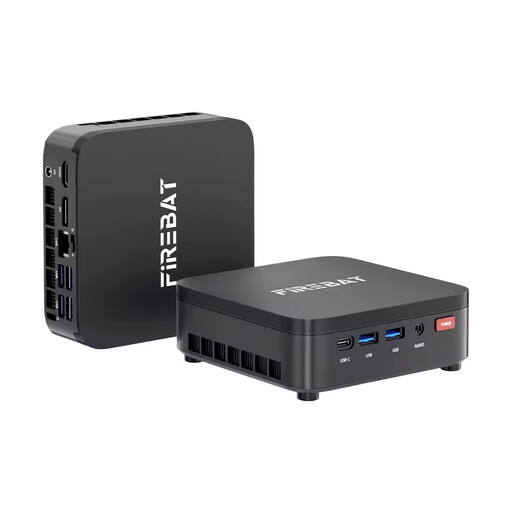
FIREBAT R3 mini PC, AMD Ryzen 3 4300U, 8 GB LPDDR4, 256 GB M.2 SATA SSD, Windows 11 Pro
If you’re looking for a compact device with a specified operating system, this variant is an option for use with a monitor you already own.
The title lists 8 GB LPDDR4, a 256-GB M.2 SATA SSD, Wi-Fi 6 and Bluetooth 5.2. According to the product description, use the original power supply, keep the ventilation openings clear and use the device indoors only.
View on Joybuy
 No image available
BMAX B7A Plus mini PC, AMD Ryzen 5 6600H, 12 GB LPDDR5, 512 GB NVMe SSD
The product description lists two HDMI outputs for connecting two monitors.
The description gives dimensions of 113 × 113 × 44,5 mm. It also recommends using the original power supply and ensuring adequate ventilation.
View on Joybuy
 No image available
FIREBAT mini PC, AMD Ryzen 7 7735HS, 16 GB RAM, 512 GB SSD, triple display
If you want to use several screens at once, the product title lists a triple-display configuration.
The title also lists 16 GB RAM, a 512-GB SSD and dual M.2 slots. Check that the ports on the specific variant are compatible with your monitors.
View on Joybuy
Frequently asked questions
What does a mini PC need to run DB’s journey planner?
To use the service on bahn.de, you need a browser with JavaScript enabled. The journey planner offers alternative connections and transport filters; Deutsche Bahn does not specify a particular mini PC model.
Can I simply mount the mini PC behind my monitor?
Only if the device, mount and monitor are compatible, and the ports and cables remain accessible. MSI lists VESA 100 × 100 mm for the Cubi NUC 1M; ASUS provides a VESA guide for the PN42. Also check whether your specific monitor is suitable.
What extra equipment might I need?
Depending on the offer, you may also need a monitor, keyboard, mouse or compatible cables. If you choose a barebone, check which components and operating system you’ll still need to add and set up.
Is a manufacturer’s guarantee the same as statutory warranty rights?
No. Statutory warranty rights are against the seller; a guarantee is a voluntary service offered under its own terms. For ordinary defects in purchased goods, § 438 BGB generally provides for a two-year limitation period from delivery; exceptions may apply.
What should I check to ensure a product complies with regulations?
Check the information provided about the product and manufacturer, and whether the required instructions are available in German. Alongside CE marking, the Bundesnetzagentur includes these points in its market surveillance. CE marking is the responsible manufacturer’s declaration that the product meets the relevant EU requirements; it is not a general, independent quality mark.


