What should you look for when buying?
For managing your budget in a student room, it’s not just the size of the computer that matters. Your existing accessories, the software you use and where you’ll set up the computer all play a part, too.
| What matters when buying |
What to check |
Who it matters most to |
| Cost of the complete workspace |
Check what you already have, including a monitor, cables, keyboard and mouse, as well as the operating system and software access. |
If I still need a monitor or peripherals, the total cost of a complete workspace matters most to me. Around 28% of consumers put the overall cost first. |
| Monitor connections and space |
Match the video output to your monitor’s input, and allow room for the computer, power supply and cables. |
If I already have a monitor but limited desk space, the connection and where I put the computer need to work for me. Around 22% of consumers prioritise monitor connectivity and space requirements. |
| Spreadsheet software and multitasking |
Check that the software you want to use is compatible with the operating system, and check the RAM and upgrade options for the specific configuration. |
If I often use other programmes alongside my expense overview, software compatibility and enough memory matter most to me. Around 22% of consumers put software and multitasking first. |
| Noise and placement |
Keep the ventilation openings clear. If you’re sensitive to noise, look for measurements of the specific configuration under a comparable workload. |
If the computer is in the room where I work and sleep, I want to consider where I put it and how much noise it makes. Around 17% of consumers prioritise quiet operation and placement. |
| Keeping your expense data safe |
Choose where to save your files, keep a separate backup of your spreadsheet and test that you can restore it. |
If I want to keep my expense overview long term, I need a backup separate from the only copy on my computer. Around 11% of consumers put keeping their data safe first. |
Mini PCs at Joybuy
This selection includes compact mini PCs for simple spreadsheet work, as well as configurations with more memory for multitasking. Compare the specifications of each model with your software, the accessories you already have and the space available.
 No image available
SOYO Y5Pro mini PC, Intel Core i5-8250U/8350U, 8 GB RAM, 256 GB SATA SSD
This configuration may suit simple spreadsheet work, provided the software you want to use is compatible with the operating system listed.
Listed in the product title: Windows 11, 8 GB DDR4 RAM and a 256 GB SATA SSD. The processor is listed as an Intel Core i5-8250U/8350U.
View at Joybuy
 No image available
Apple Mac mini, M6, 24 GB Unified Memory, 512 GB SSD
The listed memory gives you room to work if you want to use your expense overview alongside other applications.
Listed in the product title: macOS, 24 GB Unified Memory, 512 GB SSD, Thunderbolt 4 and HDMI. According to the product description, the keyboard and mouse are sold separately.
View at Joybuy
 No image available
Ninkear L12 Pro mini PC, 16 GB DDR4 RAM, 1 TB SSD
The listed memory configuration could suit an expense overview that you keep open alongside other applications.
Listed in the product title: Windows 10/11, Intel Core i9-12900HK, 16 GB DDR4 RAM, 1 TB SSD and USB 4.0.
View at Joybuy
 No image available
Ninkear L20 mini PC, Intel Core Ultra 5 226V, 16 GB RAM, Windows 11
Consider this configuration if you’ll be running other programmes alongside your spreadsheet or using multiple monitors at your workspace.
Listed in the product title: 16 GB RAM, Windows 11 and support for three 4K monitors. The SSD is listed as 512 GB/1 TB.
View at Joybuy
 No image available
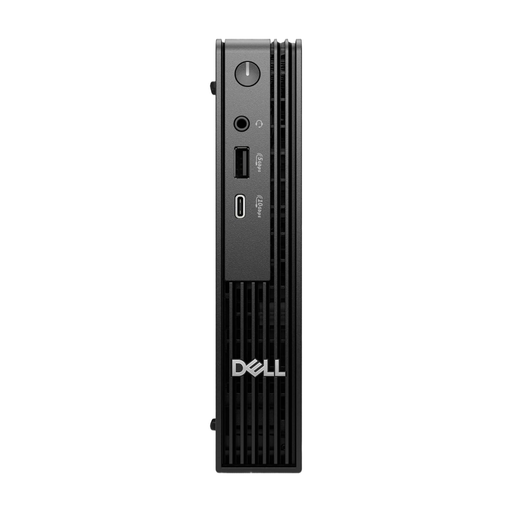
Dell Pro Micro QCM1250 MJ5TK TPM, Intel Core i7-14700T, 16 GB DDR5, 512 GB NVMe SSD
The listed specifications make this an option to consider if you plan to use several applications at once.
Listed in the product title: Windows 11 Pro, 16 GB DDR5 RAM, 512 GB NVMe SSD and Intel UHD 770.
View at Joybuy
Frequently asked questions
Do I have to pay for Excel to create expense charts?
No. LibreOffice Calc has charting features. Microsoft also offers Excel for the web; according to Microsoft, you’ll need to save files to OneDrive to use it. Check that this suits your preferred storage location and workflow.
What do I need to connect a mini PC in my student room?
You’ll need a separate monitor with a compatible video input, a cable, a keyboard and a mouse. Lenovo notes that mini PCs generally don’t include a monitor or peripherals; check what’s included with the specific configuration.
How can I protect my expense spreadsheet from data loss?
Back up the file regularly somewhere separate from your computer, and test that you can restore it. The German Federal Office for Information Security lists spreadsheets you’ve created yourself as important application data to back up.
What should I look for in the RAM and operating system?
Check the exact configuration and make sure the operating system is compatible with your spreadsheet software. Lenovo considers 8 GB of RAM sufficient for most everyday tasks, and recommends 16 GB or more for heavy multitasking. This is the manufacturer’s guidance, not a guarantee for every workflow.
What are my rights if a mini PC bought online in Germany is faulty?
For a fault, your statutory rights are against the seller and are separate from any voluntary guarantee. According to the German consumer advice centre, online purchases generally come with a 14-day right to cancel from delivery. Exceptions may apply, so check the specific terms and conditions.


