What to look for when buying
First, make sure your software will work. Then check that the computer, monitor and accessories will fit into your shared workspace.
Pre-configured Windows mini PC
A good fit if: you use a Windows desktop application you need, or would rather not install the operating system and components yourself.
The trade-off: specifications and included accessories depend on the specific model variant.
Barebone or mini PC kit
A good fit if: you want to choose and install the operating system, RAM and storage drive yourself.
The trade-off: to get a system ready to use, you’ll need to factor in any missing components and the time needed to set it up.
Mac mini
A good fit if: the applications and files you need work on macOS or through a suitable web version.
The trade-off: Citavi Web involves a different workflow from the locally installed Citavi Windows application.
| What matters |
What to check when buying |
Who it matters most to |
| Software compatibility |
Check the required software version, operating system, Word integration and, where applicable, campus licence. |
If I rely on specific writing or reference-management software, I want to keep using the same workflow; around 27% of consumers rank software compatibility as their most important buying consideration. |
| Desk space and ports |
Check monitor inputs, how many screens you need, available ports and mounting options. |
If there’s very little free space on my desk, the computer and monitor need to fit together; around 27% of consumers put desk space and ports first. |
| Back-ups and separate user accounts |
Plan how you’ll back up and restore your files; if you share a PC, set up individual, password-protected accounts. |
If other people use the computer too, or I need to protect my thesis, separate accounts and back-ups matter; around 20% of consumers prioritise these points. |
| Operating noise |
Consider noise levels at idle and under load separately, and make sure reviews relate to the specific model variant. |
When I’m concentrating on writing next to the computer, I want to know what noise it might make; around 13% of consumers put operating noise first. |
| Total cost and what’s included |
Check the operating system, RAM, SSD and any accessories you need for the specific model variant. |
When I’m budgeting for a complete, usable workstation, I don’t want to overlook anything that’s missing; around 13% of consumers give the overall set-up more weight than the computer’s price alone. |
Joybuy product selection
This selection includes compact mini PCs for a space-saving writing set-up, as well as a portable extra monitor. Check the stated laptop compatibility before choosing the monitor.
 No image available
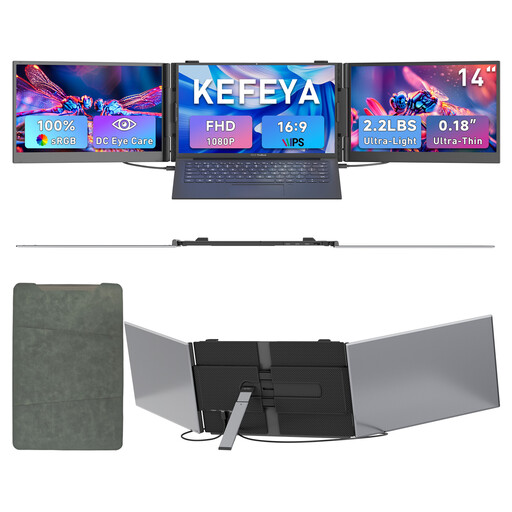
KEFEYA 14-inch portable laptop monitor, FHD 1080P IPS
Described as an extra screen for a laptop; stated compatibility covers laptops from 13 to 17.3 inches.
FHD 1080P, IPS display; listed as compatible with Windows and Mac in the product name.
View on Joybuy
 No image available
ACEMAGIC AK1PLUS mini PC, Intel Celeron N5095
Described as a mini PC for office and business use; the product specifications list Windows 11 Pro.
16 GB LPDDR4X, 256 GB M.2 2280 SATA SSD, HDMI 2.0 and 4K/60Hz, according to the product name.
View on Joybuy
 No image available
ACEMAGIC E3B mini PC, AMD Ryzen 7 7735HS
Described as suitable for a compact multi-monitor workspace; the product specifications list three display outputs.
24 GB LPDDR5, 512 GB NVMe SSD, Radeon 680M and two M.2-2280 slots, according to the product name.
View on Joybuy
 No image available
MaxMini B3 mini PC, Intel N4100
Described as a space-saving mini PC for everyday computing and office tasks; the product name lists two HDMI outputs.
Up to 2.4 GHz, 8 GB LPDDR4, 256 GB SSD, 1000M LAN, 2.4G/5G WiFi and BT 5.0, according to the product name. The description says it’s for indoor use only; use only the supplied power adapter.
View on Joybuy
 No image available
FIREBAT mini PC, AMD Ryzen 7 7735HS
Described as a compact mini PC for working from home and everyday use; the product name lists support for three displays.
16 GB RAM, 512 GB SSD, Radeon 680M, dual M.2 slots and Wi-Fi 6, according to the product name.
View on Joybuy
Frequently asked questions
Will Zotero and Citavi work on a Mac mini?
Zotero lists macOS as a supported system. According to its provider, Citavi Web works in a current browser on Mac OS and is different from Citavi for Windows. Check which version you need for your thesis and whether you need Word integration.
How do I set up a computer that several people will use?
If you’ll actually share the same PC, the German Federal Office for Information Security recommends that each person has their own password-protected account. Back up your work files to an external device regularly and check that you can restore them. Sharing a desk alone doesn’t mean you need to share a PC.
What extra parts should I budget for with a mini PC kit?
According to the manufacturer, you’ll need to budget separately for an operating system, RAM and storage with the ASUS NUC 14 Pro+ Kit. Check whether a power cable and peripherals are included with the specific offer too, as package contents vary by model.
What are my rights if a mini PC is faulty or I buy one online in Germany?
For a consumer purchase, the seller is generally responsible for statutory rights relating to faulty goods; the Verbraucherzentrale explains that the statutory warranty period is two years. For online orders, you usually have 14 days from receiving the goods to cancel. These statutory rights each have their own conditions and are separate from a voluntary manufacturer’s guarantee.
What should I check when buying a mini PC for the German market?
For the specific offer, check the CE marking, product identification, manufacturer details and declaration of conformity, among other things. The Bundesnetzagentur lists these points for market surveillance; devices with Wi-Fi or Bluetooth must also meet the relevant requirements for radio equipment.


