Joybuy products for your desk
The Joybuy mini PCs below are described for browser and spreadsheet work at a shared desk. When choosing, check the specifications of the specific version and make sure its display outputs are suitable for your monitor or monitors.
 No image available
SOYO Y5Pro mini PC, Intel Core i5 8250U/8350U, Windows 11, 8 GB DDR4, 256 GB SATA SSD
The described Windows configuration may suit browser and spreadsheet work, provided it’s compatible with the software you need.
The product specifications list two HDMI outputs, one Type-C connection and four USB connections. The processor is listed as an Intel Core i5 8250U/8350U.
View at Joybuy
 No image available
MaxMini B3 mini PC, Intel N4100, 8 GB LPDDR4, 256 GB SSD
The listed memory and processor specifications are relevant for browser and spreadsheet work; check them against the requirements of your software.
The product specifications list two HDMI outputs, 1000M LAN, Wi-Fi and Bluetooth 5.0.
View at Joybuy
 No image available
BMAX B6 mini PC, Intel Core i3-8109U, 12 GB RAM, 256 GB SSD
If you want to view the source and table on two screens, check this model’s connections against the inputs on your monitors.
The product specifications list HDMI and DisplayPort, as well as 1000M LAN, Wi-Fi 5 and Bluetooth 5.0.
View at Joybuy
 No image available
SOYO S5Air mini PC, AMD Ryzen 5 7535HS, Windows 11 Pro, 16 GB LPDDR5, 512 GB NVMe SSD
The described Windows 11 Pro configuration is an option if this operating system is compatible with the software you need.
The product specifications list HDMI, DisplayPort, Type-C, six USB 3.0 connections and 1G-RJ45.
View at Joybuy
 No image available
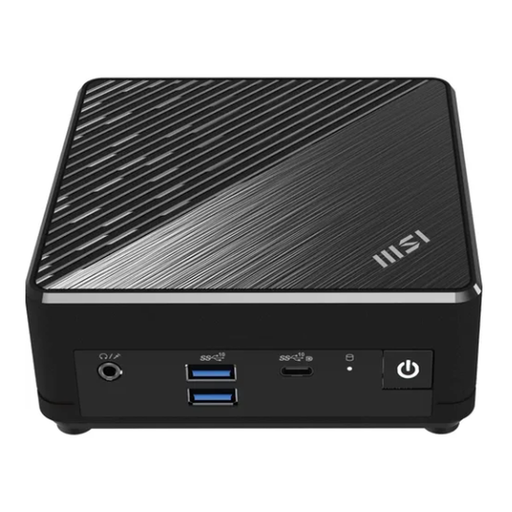
MSI Cubi N ADL S-217DE N200, 8 GB RAM, 256 GB SSD, Windows 11 Pro
The listed Windows 11 Pro configuration may suit a shared desk if the operating system and connections meet your needs.
The product specifications list HDMI 2.1, DisplayPort, USB-C, five USB connections and two Gigabit LAN connections. A VESA mounting option is also described.
View at Joybuy
Frequently asked questions
Do I need a particularly powerful mini PC for tide tables?
First decide whether you’ll use BSH pages in a browser, downloaded data or a specific spreadsheet programme. This will determine which operating system compatibility and display connections you need to check. The task alone doesn’t point to a general minimum CPU requirement.
How do I set up the computer for several people?
Windows lets you create several user accounts on the same device, each with its own documents and settings. Set up separate accounts for everyone who will use it rather than assuming you’ll share one personal workspace.
Can I treat predicted tide levels as current water levels?
No. The BSH explains that long-term tide predictions do not include the current effects of wind and air pressure. Separate water level forecasts are available for current conditions. Also check that you’re using the right tide gauge location.
What rights do I have if my purchase is faulty?
EU consumer information states that consumer purchases from traders in the EU come with a minimum two-year legal guarantee against the seller. This is separate from any additional manufacturer’s guarantee, which does not replace your statutory rights.
What should I look for with CE marking?
Electrical and electronic equipment must comply with the applicable EU conformity rules. The required CE marking is the manufacturer’s declaration that these requirements have been met; it does not mean a public authority has independently checked the individual device before purchase. Check the details for the specific device on offer.


