Which mini PC is right for you?

Editing with separate audio

If you film demonstrations and record speech or sounds separately, look for a suitable synchronisation feature, a clear file structure and enough space for media and audio cache. Adobe Premiere and DaVinci Resolve both describe features for combining or synchronising separately recorded content.

Regular 4K editing

For high-resolution or more complex demonstrations, check RAM, graphics and codec support against your actual source footage and editing software. Adobe's recommendations for Premiere 26 distinguish between HD and 4K and higher resolutions.

Supervised training workstation

For a compact workstation at your organisation, important considerations include software requirements, the components actually included and the handling of personal recordings. ASUS and Lenovo offer different device configurations, while the BfDI highlights the specific requirements for consent in employment relationships.

What should you look for when buying?

What to consider What to look for Who it's especially important for
Synchronising separate recordings Adobe Premiere supports combining separately recorded clips; DaVinci Resolve lists waveform and timecode as synchronisation methods. Check that the software, operating system and your files are compatible. If I record video and audio separately, I want to be able to combine them reliably in my editing software. Around 36% of consumers put synchronising separate tracks first.
RAM and resolution For Premiere 26, Adobe recommends 16 GB of RAM for HD and at least 32 GB for 4K and higher resolutions. Check the installed RAM and support for your codecs and effects. If I regularly edit 4K footage, I want to choose a specification that suits my material, rather than relying on the model name alone. Around 29% of consumers prioritise enough performance headroom for their planned resolution.
Storage and file management Allow space for media and cache. Adobe recommends fast storage locations and suggests external drives when internal storage is limited; check that you have the connections you need. When files from my camera and recorder come together, I want to import and organise them without needing unexpected adapters. Around 21% of consumers prioritise storage capacity and suitable file management.
What's included and setup ASUS distinguishes between fully configured devices and kits for the NUC 14 Pro. Check the model number, RAM, SSD, operating system and software costs individually; Final Cut Pro is sold separately. When I set up a training workstation, I want to know which components are included and what still needs to be installed. Around 14% of consumers prioritise what's included and the effort needed to get set up.

Common buying misconceptions

  • Assuming HD requirements apply to every 4K editing project

    Adobe's recommendations for Premiere 26 distinguish between HD and 4K or higher resolutions. A device that suits an HD project won't necessarily be right for your 4K footage.

    Choose a specification that suits your source footage, editing software and effects. Check the installed RAM; proxies may be an option as working copies for suitable footage.

  • Assuming a kit is the same as a fully configured mini PC

    ASUS sells the NUC 14 Pro both as a mini PC and as a kit. The versions may differ in the memory and operating system included.

    Compare the full model number and what's included before deciding which components you still need.

    Depending on the kit, RAM, SSD and operating system may need to be purchased and set up separately.

  • Relying on the internal SSD alone for media and current projects

    Original recordings, separate audio files and cache all need storage space. Adobe recommends fast storage locations for media and cache, and suggests external drives when internal storage is limited.

    Estimate how much space your recordings will need, and check before buying that the drive and connection suit your planned workflow.

Relevant brands and product ranges

GEEKOM

The A8 Max is a range of pre-configured Windows mini PCs available with different RAM configurations.

  • GEEKOM lists USB4 and an SD card reader for the A8 Max. The Ryzen 9 8945HS version is listed with 32 GB of RAM and a 1 TB SSD, while the Ryzen 7 version is listed with 16 GB of RAM.
  • These details distinguish between the versions, but don't provide independent evidence of editing performance. Check which specification is included in the specific listing.

Apple

The Mac mini with M4 is a macOS option if your editing software runs on that operating system or you're planning to use Final Cut Pro.

  • Apple lists at least 16 GB of unified memory and a 256 GB SSD for documented M4 configurations. Final Cut Pro describes waveform matching for separately recorded audio.
  • With a 256 GB configuration, additional external storage may be useful for larger media libraries. Also check the specific generation, connections and software costs.

ASUS

Depending on the version, the NUC 14 Pro is available as a fully configured mini PC, a kit or a board.

  • ASUS distinguishes between these form factors in its technical specifications, giving buyers the option to choose their own components depending on the version.
  • For Core Ultra configurations, ASUS specifies Arc graphics only when two SO-DIMM modules are installed. Check the model number, memory configuration and what's included.

Lenovo

The ThinkCentre neo 50q Gen 5 is a configurable range of compact business PCs for supervised workstations.

  • Lenovo offers different processor, RAM, SSD and Windows configurations within the range, including specifications with 16 GB of RAM and a 512 GB SSD, as well as 32 GB of RAM and a 1 TB SSD.
  • Its business focus isn't independent evidence of video-editing performance. Check that the specific device meets your software, connection and codec requirements.

Joybuy products

The products below represent the pre-configured Windows mini PC option. Before buying, check that the software and file formats are compatible with your editing project.
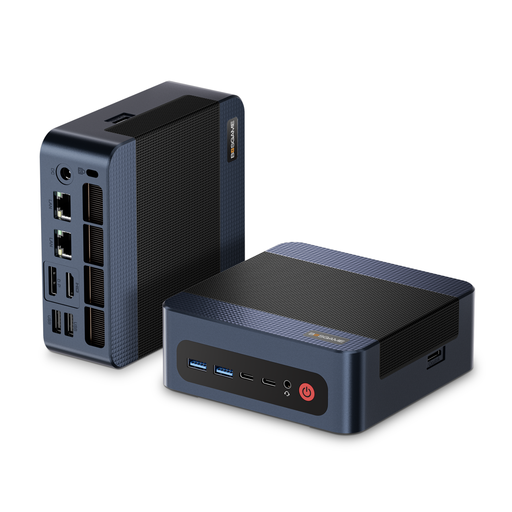
BOSGAME M4 Plus Mini PC

BOSGAME M4 Plus Mini PC

The listed Windows 11 Pro specification makes this a Windows option. Before buying, check that it supports your editing software and source formats.

The listed specification includes an AMD Ryzen 9 7940HS processor with speeds of up to 5.2 GHz, 32 GB of DDR5 RAM and a 1 TB PCIe 4.0 SSD. The product description also mentions two USB 4.0 ports and the option to install a second PCIe SSD.

View at Joybuy

Frequently asked questions

Do I need special mini PC hardware to synchronise separately recorded audio?

No. Synchronisation is a feature of your editing software. Adobe Premiere describes combining separately recorded clips, while DaVinci Resolve lists waveform and timecode as synchronisation methods. Check that your software runs on the operating system you choose and can work with your files.

Can I use proxies with footage that's difficult to play back?

Yes. Premiere can create lower-resolution working copies for suitable video clips. Allow extra storage space for these files and check whether any restrictions apply to your clips; Adobe lists clips with captions and growing files among the examples.

What should I consider when it comes to storage and backups?

Keep your video, separate audio and project files clearly organised, and allow for fast storage locations for media and cache. Adobe suggests external drives when internal storage is limited. Having an organised filing system doesn't replace a separate backup of your original recordings.

Is a manufacturer's warranty the same as statutory consumer rights?

No. For a consumer purchase, statutory rights against the seller are distinct from a voluntary manufacturer's or retailer's guarantee. For ordinary goods, § 438 BGB generally provides a two-year limitation period for the defect claims covered by that provision; this usually begins when the goods are delivered. The specific position depends on the circumstances. Verbraucherzentrale explains the difference between statutory rights and a guarantee.

Can I edit or publish recordings of identifiable trainees without further consideration?

No. Having a suitable PC doesn't, by itself, resolve the data protection requirements. If recordings contain personal data, you need to check the legal basis and purpose for processing, as well as any planned publication. The BfDI notes that, where consent is given in an employment relationship, there must be no clear imbalance between the controller and the person concerned. Check the specific use with the responsible department.