First, choose a mini PC that can run your development tools and the test platform you need. Then compare the memory, SSD, processor and ports available for your workspace. If you use containers or several tools at once, the overall specification needs to suit your workflow. With a kit, you’ll also need to check what’s included and which components you’ll need to buy separately.
Who is a mini PC suitable for?
Developers running tests locally
If you run unit tests mainly on your own machine, your development environment, browser and test results should suit your project and tools. Lenovo Germany recommends 16 GB or more when you run lots of programmes at once or use demanding applications.
Developers testing with containers
If you run containers or a Linux environment alongside your editor and tests, check the requirements of your specific workflow and the available memory. For its documented Docker Desktop workflow on Windows, Docker specifies 8 GB of system RAM and enabled hardware virtualisation.
Developers with platform requirements
If your tests require a particular host or target platform, check this before comparing hardware. Apple Developer describes Xcode as a tool for developing and testing on Apple platforms.
What should you look for when buying?
Start by checking the operating system and test environment you need. Then compare the specification and ports of the exact model with your home-office workflow.
| What matters when buying |
What to check |
Who should pay particular attention |
| Local testing and running tools in parallel |
Check the RAM and SSD capacity actually included against your IDE, tests and projects. Don’t confuse the installed memory with the maximum supported capacity. |
If I use my editor, tests and other tools locally at the same time, I need a specification that can handle them all. Around 36% of consumers put local parallel workflows first. |
| Containers and local test services |
Check the host operating system, virtualisation support, installed RAM and storage space against your container workflow. For its documented Windows workflow, Docker specifies 8 GB of system RAM; this isn’t a blanket recommendation for everyone buying a mini PC. |
If I run local containers or test services alongside unit tests, the host and specification need to support them. Around 29% of consumers consider container workflows their main buying priority. |
| Operating system and test platform |
Check that your IDE, test framework and native dependencies are compatible with the required host operating system. If you’re buying a Mac, check compatibility with Apple Silicon too. |
If my tests require a particular host or target platform, compatibility matters more than simply comparing processors. Around 21% of consumers put platform compatibility first. |
| Setting up your workspace |
Check that the video ports work with your monitors and confirm what’s included with the exact model. A kit may require you to buy memory, a drive and an operating system separately. |
If I want to connect the computer to my existing monitors and get started without unnecessary setup, the ports and what’s included are crucial. Around 14% of consumers focus mainly on their home-office setup. |
Common buying mistakes
-
Confusing the maximum supported RAM with the RAM included
The fact that a product range can be upgraded doesn’t tell you how much memory is already included with the model on offer.
Check the specification of the exact configuration and distinguish between the installed and maximum supported capacity.
-
Assuming a kit is a complete PC that’s ready to use
ASUS lists kit and mini PC versions separately. For the NUC installation scenario described, memory and a drive need to be bought separately.
Check what’s included with the exact model and how much setup it requires before choosing a kit.
-
Checking your test platform only after buying the hardware
A Windows mini PC won’t automatically meet the needs of a workflow that requires a Mac for testing with Xcode.
First check your target test platform, tools and dependencies, then compare the hardware.
Brands worth considering
Lenovo
The ThinkCentre M75q Gen 5 Tiny is a pre-configured Windows option for a permanent workstation.
- For part number 12RQ003QEZ, Lenovo Germany lists a Ryzen 7 PRO 8700GE, 16 GB of RAM and a 512 GB SSD. Lenovo specifies Windows 11 Pro and three years of on-site service for this exact model.
- The product page describes access to the SSD and memory modules. This doesn’t tell you how well it will perform with particular tests or what every ThinkCentre model includes.
Apple
The Mac mini with M6 is an option for a macOS workstation, for example if your development workflow needs Xcode for Apple platforms.
- For the German M6 base configuration, Apple Germany lists 16 GB of unified memory and a 256 GB SSD. Higher-spec configurations are also available.
- Before buying, check the storage capacity your projects need and make sure your tools are compatible. A macOS computer won’t replace a Windows test host if you need one.
ASUS
The NUC 15 Pro range includes both mini PC and kit versions, which may differ in what’s included.
- Having separate mini PC and kit options may appeal to developers who want to choose their own components.
- For the NUC installation scenario in question, ASUS says memory and storage components need to be bought separately. Check the specification of the exact model.
GEEKOM
The A8 range offers a pre-built AMD configuration that may suit a Windows development workstation.
- For the available configuration, GEEKOM Germany lists a Ryzen 7 8745HS, 16 GB of RAM and a 1 TB SSD.
- Other specifications refer to different models. Don’t assume that upgrade options or ports apply to this configuration without checking.
Joybuy products for development workstations
This selection of Joybuy products includes Mac mini and pre-configured mini PC options for local development tools. Before buying, check that the operating system, memory and ports suit your specific testing workflow.
 No image available
Apple Mac mini M6, 16 GB, 256 GB SSD
For a macOS development workstation if your tools and tests are compatible with Apple Silicon.
Apple M6 with 12-core CPU and 12-core GPU, 16 GB of unified memory, 256 GB SSD and macOS. The title also lists Thunderbolt 4 and HDMI.
View at Joybuy
 No image available
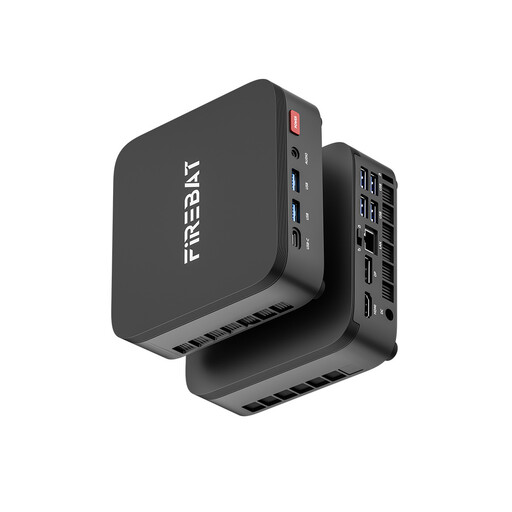
FIREBAT R3, Ryzen 5 7430U, 16 GB, 512 GB NVMe SSD
A pre-configured mini PC for local development tools, provided its specific host platform suits your workflow.
The product title lists 16 GB of LPDDR4 at 3733 MHz and a 512 GB NVMe SSD.
View at Joybuy
 No image available
Ninkear M8, Ryzen 7 8745HS, 16 GB DDR5, 1 TB SSD
For local development projects if the specified Windows version and storage capacity suit your setup.
The product title lists Windows 10/11, 16 GB of DDR5 memory, a 1 TB SSD and dual 2.5G Ethernet.
View at Joybuy
 No image available
Ninkear M7, Intel Core i7-1185G7, 16 GB DDR4, 512 GB SSD
An option for a development workstation if the listed operating system compatibility suits your tools.
The product title lists Windows 10/11, Ubuntu compatibility, 16 GB of DDR4 memory and a 512 GB SSD. Dual-band Wi-Fi 6 and support for three displays are also specified.
View at Joybuy
 No image available
FIREBAT AM02L, AMD 6600H, 16 GB LPDDR5, 512 GB NVMe SSD
For a Windows workstation if the listed specification and video ports suit your setup.
The product title lists Windows 11 Home, 16 GB of LPDDR5 memory and a 512 GB NVMe SSD. Video ports include HDMI 2.1 and DisplayPort 1.4.
View at Joybuy
Frequently asked questions
Is 8 GB of RAM enough for unit testing?
It depends on your IDE, project and the services running at the same time. For its documented Docker Desktop workflow on Windows, Docker specifies 8 GB of system RAM as a requirement. That doesn’t guarantee smooth testing, nor is it a general minimum for unit testing without Docker.
What should I check before setting up a NUC kit?
Check what’s included with the exact kit version. ASUS says that memory and storage components for installing an operating system on a NUC must be bought separately. Also check which operating system and drivers your setup needs.
What rights do I have when buying online as a private consumer in Germany?
When you buy goods from a trader, the EU consumer portal explains that you’re entitled to a legal guarantee of at least two years from the date you receive them. Online purchases generally come with a 14-day right to cancel, as explained by the Verbraucherzentrale. Check the terms of your specific contract and distinguish the legal guarantee from any additional manufacturer’s warranty.
How should I dispose of an old mini PC?
According to the German Environment Agency, waste electrical equipment must not go in your household rubbish. Use an official take-back option, such as a collection point, and check which options are available locally.


