Regular 4K editors
If you edit high-resolution demonstrations, check that the RAM, graphics and drives are suitable for your specific editing software. Adobe recommends 32 GB RAM or more for 4K media in Premiere on Windows.


Choose a mini PC based on your editing software, source format and project size. For Adobe Premiere on Windows, Adobe recommends 16 GB RAM for HD and at least 32 GB for 4K. You’ll also need to plan for storage for your footage and a practical way to transfer files from your recording device. Syncing separately recorded audio depends on your editing software, not on a particular mini PC brand.
If you edit high-resolution demonstrations, check that the RAM, graphics and drives are suitable for your specific editing software. Adobe recommends 32 GB RAM or more for 4K media in Premiere on Windows.
If your video and audio come from separate recordings, check how you’ll transfer the files and whether your editing software supports the synchronisation you need. Adobe describes a feature for this in Premiere.
If you want to keep raw clips and project files locally, check the SSD actually installed, the options for adding more storage and what’s included with your chosen configuration.
A good fit if: Your editing software and peripherals work with macOS, and you want to use the hardware codecs listed by Apple.
Consider: According to Apple, the M6 base configuration has 16 GB of unified memory and a 256 GB SSD; higher-spec options are available. These specifications don’t provide a basis for estimating specific export times.
A good fit if: You need Windows and would rather buy a ready-configured model before you start editing.
Consider: Compare the RAM and SSD in the specific configuration. The 16 GB version of the GEEKOM A8 Max falls below Adobe’s recommendation for Premiere in 4K; the manufacturer also offers a 32 GB version.
A good fit if: You want to choose your own RAM and drives, or upgrade the computer later to suit your needs.
Consider: The ASUS NUC 14 Pro Kit doesn’t come with an operating system or storage pre-installed or included. You’ll need to choose the components and set it up yourself.
The percentages below reflect different priorities within this buying scenario. For Premiere on Windows, Adobe recommends a fast internal SSD for the application and cache, plus an additional fast drive for media.
| Priority | What to check before buying | Who it matters most to |
|---|---|---|
| Editing requirements | Check the editing software, operating system, source resolution and RAM in the specific configuration. | If I regularly edit 4K footage, I want the specification to suit my software and files. Around 33% of consumers prioritise editing requirements. |
| Separate video and audio workflow | Check how you’ll transfer files from your camera and recorder, and whether your editing software has a synchronisation feature. | If my video and audio are recorded separately, I want to be able to transfer and combine both files reliably. Around 25% of consumers put this workflow first. |
| Local media storage | Check the built-in SSD capacity, available drive bays and connections for external drives. | If I keep raw clips and projects locally, the space actually available is what matters to me. Around 25% of consumers prioritise their local media archive. |
| Complete workstation | Check what’s included, the operating system and any accessories you already have for each specific configuration. | If I want to get started with set-up straight away, I want to know which components and accessories I still need. Around 17% of consumers focus on being able to plan their complete set-up. |
Adobe recommends 16 GB RAM for HD in Premiere on Windows, but at least 32 GB for 4K. This recommendation applies to this software and doesn’t replace checking your other requirements.
First decide which editing software and source format you’ll use, then check the RAM in the specific configuration.
According to ASUS, the ASUS NUC 14 Pro Kit doesn’t come with an operating system or storage pre-installed or included. This affects what you’ll need to add and set up yourself before your first edit.
Check the full specification, including RAM, SSD and operating system, before choosing a model.
An upgrade option doesn’t tell you how much SSD storage is already included in your chosen configuration. Adobe also recommends a fast media drive for Premiere.
Compare the installed capacity with the media you want to keep locally, and check which additional drives you can fit.
The Mac mini M6 is worth considering if your editing set-up is compatible with macOS.
The A8 Max is a range of Windows mini PCs with different RAM configurations.
The NUC 14 Pro is available as both a fully equipped mini PC and a kit.
The ThinkCentre neo 50q Gen 5 range includes a variety of compact Windows configurations.
The Cubi NUC 1M may suit a compact workstation that needs several display and storage connections.
This selection features mini PCs with stated RAM and SSD configurations for local video projects. Before buying, check that the ports, storage and operating system in the specific configuration are suitable for your camera, recorder and editing software.
 No image available
The stated RAM and SSD specifications may be useful when planning local project storage; they don’t, on their own, indicate editing speed.
128 GB LPDDR5X RAM at 8000 MT/s; 1 TB SSD.
The product title mentions a side-mounted SSD interface and Wi-Fi 7.
 No image available
This Windows configuration has a specified SSD for local files; check that the RAM is suitable for your editing software and source format.
16 GB DDR5 RAM and 512 GB SSD; Windows 11 Pro.
The title mentions USB4.0 and Wi-Fi 6.
 No image available
If you want to store local project files on the computer, compare the stated SSD capacity with your needs and check that the RAM suits your editing software.
12 GB DDR5 RAM and 512 GB SSD; Windows 11 Pro.
The title mentions USB4.0 and Wi-Fi 6.
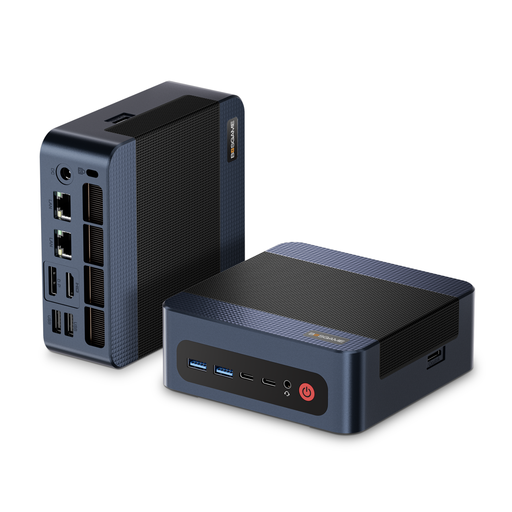 No image available
The stated 32 GB RAM and 1 TB SSD are useful configuration details for local projects; they don’t indicate measured editing performance.
32 GB DDR5 RAM and 1 TB PCIe 4.0 SSD.
The product title mentions Windows 11 Pro and a maximum processor clock speed of up to 5.2 GHz.
 No image available
The stated 1 TB SSD may be useful for locally stored footage and projects; also check that 16 GB RAM is suitable for your software and files.
16 GB DDR5 RAM and 1 TB SSD.
The title mentions Windows 10/11, Wi-Fi 6 and dimensions of 130 × 127,5 × 52 mm; check which operating system comes with the specific configuration.
Not just because the audio was recorded separately. Adobe describes a feature in Premiere for merging separately recorded audio and video. Check that your editing software offers this feature and how you’ll transfer files from your recorder.
It depends on your editing software and footage. For Premiere on Windows, Adobe recommends 16 GB for HD media and at least 32 GB for 4K or higher. This isn’t a general rule for every editing application.
Check the parts list for the specific configuration. According to ASUS, the ASUS NUC 14 Pro Kit doesn’t come with an operating system or storage pre-installed or included; a fully equipped mini PC from the same family may come with different components.
Your statutory rights relating to faulty goods apply against the seller and are separate from any voluntary guarantee. According to Verbraucherzentrale, online purchases in Germany generally come with a 14-day right to cancel; the terms of the specific contract apply.
For market surveillance, the Bundesnetzagentur lists checks including CE marking, manufacturer details, identification, German-language instructions and a declaration of conformity. A shop listing alone doesn’t prove that a particular model on offer has been officially inspected.