What should you look for?
First, find out how your editing software handles syncing. Then compare the requirements of your film files with the RAM, storage and ports on the specific model you’re considering.
| What you need |
What to check before buying |
Who it matters most to |
| Syncing separately recorded audio |
Check that your editing software can sync your existing recordings, and make sure the operating system and ports are compatible with your devices. DaVinci Resolve explains how to sync using timecode or audio waveform, while Adobe covers merging separately recorded clips in Premiere. |
If I record interviews using a separate recording device, I want to be able to match the video and audio reliably in my chosen programme. Around 33% of consumers prioritise this syncing capability. |
| Editing footage smoothly |
Compare the resolution and file formats of a sample project with the requirements of your software and the specifications of the model you’re considering. For certain Premiere configurations on Windows, Adobe specifies at least 32 GB of RAM and a GPU with at least 4 GB of VRAM. Adobe says proxy files can make editing easier on less powerful hardware. |
If I edit longer or high-resolution films, I want to check that my computer meets my project requirements and be able to use proxies if needed. Around 27% of consumers prioritise editing performance. |
| Backing up original footage and projects |
Allow enough storage for source footage, projects and, if needed, proxies, and make sure you have a port for a separate backup device. Germany’s Federal Office for Information Security recommends regular backups and checking that data can be restored. |
If I want to keep historical original footage and project files, I need a separate backup as well as my working drive, and I want to know that I can restore it. Around 20% of consumers prioritise archiving. |
| Checking what’s included |
Check the exact model variant for built-in RAM, SSD and operating system, as well as the ports you need. A barebone may require additional components to get it up and running; the series name alone doesn’t tell you what’s included. |
If I want to get started without installing additional components, it’s important to know exactly what comes with the model I choose. Around 20% of consumers prioritise a complete specification and the work involved in setting it up. |
Mini PCs at Joybuy
These are fully equipped Windows mini PCs for editing projects. Compare the specifications of each model with your software, film files and required ports.
 No image available
SOYO Y5Pro, Intel Core i5 8250U/8350U, 8 GB DDR4, 256 GB SATA SSD
If you want to connect several existing devices, the product description lists two HDMI ports, one Type-C port and four USB ports.
The title lists Windows 11, Bluetooth 5.2 and Wi-Fi 5. Check which of the stated processor options is included in the specific version.
View at Joybuy
 No image available
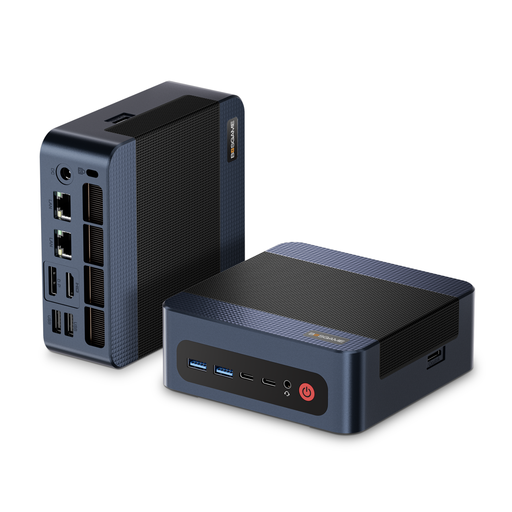
BOSGAME M4 Plus, AMD Ryzen 9 7940HS, 32 GB DDR5, 1 TB SSD
If you’re looking for a Windows mini PC with more memory and local storage, the title lists 32 GB of DDR5 RAM and a 1 TB SSD.
The description lists a second PCIe SSD as an upgrade option, as well as USB 4.0, HDMI and DisplayPort. Check which ports your devices need.
View at Joybuy
 No image available
MaxMini B3, Intel N4100, 8 GB LPDDR4, 256 GB SSD
If you’re considering a compact computer for a small editing project, the product title lists two HDMI ports and Gigabit LAN.
The title also lists Wi-Fi 5 and Bluetooth 5.0. Check the specifications against the requirements of your editing software and the size of your projects.
View at Joybuy
 No image available
BMAX B6, Intel Core i3-8109U, 12 GB RAM, 256 GB SSD
If you want to connect devices as well as a monitor, the product description lists HDMI, DisplayPort and Gigabit Ethernet.
The description also lists two M.2 slots for SATA or NVMe drives. Before buying, check which storage drives are compatible with the configuration you’ve chosen.
View at Joybuy
 No image available
BMAX B7A Plus, AMD Ryzen 5 6600H, 12 GB LPDDR5, 512 GB SSD
If you want to connect several devices or displays, the product description lists five USB ports, two HDMI outputs and one Type-C port.
The description also lists two M.2 slots for additional NVMe drives and a 3.5 mm audio port. Check that these ports and storage options suit your setup.
View at Joybuy
Frequently asked questions
Do I need a special port on my mini PC for separately recorded audio?
For recordings that have already been saved, the first thing to check is whether your editing software can import and sync the files. DaVinci Resolve explains how to sync using audio waveform or timecode, while Adobe covers merging separately recorded clips in Premiere. Also check that your specific recording devices have the connections you need.
How can I edit high-resolution footage on a less powerful mini PC?
If your editing software supports proxy files, lower-resolution working copies can make editing easier. Adobe describes this workflow for editing 4K footage or higher resolutions on less powerful hardware. Allow space for the working copies, then switch back to the original media when you finish your project.
How should I preserve historical original footage after editing?
Back up your original footage and project files regularly, separately from your working drive, and check that you can restore them from the backup. Germany’s Federal Office for Information Security recommends regular backups and checking that they can be restored. This does not guarantee that any particular storage device will last indefinitely.
What extra components might a barebone need?
It depends on what’s included with the specific version. The Intel NUC13ANKI7 kit listed by COMPUTER BILD required RAM, storage and an operating system to be added separately. Check which components and setup steps are still needed for the model you’re comparing.
How long do statutory claims for defects generally last when buying a mini PC in Germany?
For standard statutory claims for defects, § 438 BGB generally sets a limitation period of two years from delivery. Whether a claim applies in a particular case depends on the legal requirements. A voluntary manufacturer’s warranty is separate.


