For your browser, editor and local preview, your mini PC should suit your software workflow and the ports you need at your desk – not just a benchmark result. If you also use containers or several local services, check the exact RAM and SSD configuration, as well as the operating system. With a barebone, you’ll also need to factor in setup and any missing components. Docker lists the current system requirements for Docker Desktop on Windows, which you should compare with your planned configuration.
Which mini PC is right for you?
New to website development, with limited desk space
If you want to use a browser, editor and local preview at an existing workstation, check the operating system, monitor ports and what’s included with the specific version. MSI lists two HDMI outputs among the features of its Cubi NUC 1M series, but the ports vary by model.
Developers using local services
If you also want to use containers or several local services, check the RAM and SSD against the requirements of your operating system and workflow. Docker lists WSL 2 as the default for Docker Desktop on Windows, but your particular software setup will determine what you need.
Those who want to configure their own system
If you want to choose components yourself or upgrade them later, a configurable mini PC is worth considering – provided you’re comfortable choosing the components and setting it up yourself. ASUS describes the NUC 14 Pro as having tool-free access to the case; this manufacturer’s claim applies to the product line mentioned.
What should you look for when choosing?
First, compare your development tools with the exact configuration. Then check that the ports, included items and upgrade options suit your workspace.
| What matters to you |
What to check before buying |
Who is this particularly important for? |
| Performance and storage for your workflow |
Check the RAM configuration and available slots, and make sure the SSD meets the requirements of your tools. |
If I’m going to run a browser, editor and local services at the same time, I want the RAM and SSD to suit the tools I use. Around 33% of consumers put this exact development workflow first. |
| Complete setup and total cost |
Check whether RAM, an SSD and an operating system are included, and what peripherals come with it. |
I want to get started straight away and know exactly what’s included in the offer. Around 25% of consumers say a complete setup and total cost are their main considerations. |
| Ports for your workspace |
Check the display outputs, USB and network ports against your monitors and devices. |
I want to connect my existing monitors and devices using the right ports. Around 17% of consumers prioritise the ports available for their workspace. |
| Operating system and upgrade options |
Check the operating system version, software requirements and available RAM and drive slots. |
If my development workflow has specific operating system or container requirements, I want to check these in advance. Around 25% of consumers prioritise the operating system and future upgrade options. |
Which buying mistakes can you avoid?
-
Confusing a barebone with a fully set-up mini PC
A barebone may be supplied without RAM, storage or an operating system. In its review of the Intel NUC 13 NUC13ANKI7, COMPUTER BILD notes that additional components need to be bought separately.
Compare the complete version and what’s included, rather than looking only at the case or model family.
You may need to choose and install missing components. Installing the operating system will also be part of the set-up process.
-
Assuming a review applies to a different model variant
The GEEKOM A5 Pro tested by COMPUTER BILD came with a Ryzen 5 7530U. A different A5 Pro version with a Ryzen 5 7430U isn’t automatically covered by the same review.
Before applying a review to an offer, check the processor and the full configuration against the version that was tested.
-
Relying on the internal SSD as your only backup
If your computer fails or you lose data, a separate backup gives your project files extra protection. Germany’s Federal Office for Information Security recommends making regular external backups.
When setting up your computer, plan to back up your data regularly to a suitable external device or using another appropriate backup method.
Remember to include a separate backup device or another backup method in your set-up plans.
Key brands and model details
GEEKOM
The A5 Pro 2026 is a mini PC range where the exact processor and memory configuration matter when comparing models.
- COMPUTER BILD specifically reviewed the version with a Ryzen 5 7530U, 16 GB RAM and a 1 TB SSD.
- The review doesn’t automatically apply to the version with a Ryzen 5 7430U. According to COMPUTER BILD, the version tested didn’t include input devices.
MSI
The Cubi NUC 1M range is worth considering if you want to compare the ports and upgrade options available with a specific configuration.
- MSI lists two RAM slots, two HDMI outputs and two network ports for the range.
- The operating system and actual components depend on the version you choose. COMPUTER BILD criticised access to the SSD on the Cubi NUC 1M it tested; this doesn’t apply to every configuration.
HP
The Pro Mini 400 G9 is a compact desktop range; the key is whether the specific business configuration suits your workspace.
- COMPUTER BILD specifically reviewed version D6B240EA and notes that its RAM and storage can be upgraded.
- HP points out that components and features vary depending on the individual configuration.
ASUS
The NUC 14 Pro is a mini PC range for buyers who want to compare configurations and how easy it is to access components later.
- ASUS describes the NUC 14 Pro as having tool-free access to the case.
- Check the features and accessibility of the specific version. ASUS’s claims about leading performance are manufacturer statements, not an independent product comparison here.
Joybuy products for working on websites from home
This selection includes ready-to-use Windows mini PCs, as well as a barebone for which you’ll need to choose the components and operating system yourself.
 No image available
ACEMAGIC AK1PLUS, Intel Celeron N5095
For a Windows workstation with a browser, editor and local preview, the operating system, memory and display ports are specified.
16 GB LPDDR4X, 256 GB M.2 2280 SATA SSD and Windows 11 Pro; two HDMI outputs.
View at Joybuy
 No image available
ACEMAGIC E3B, AMD Ryzen 7 7735HS
This configuration is designed for a Windows workstation where the specified memory and multiple display outputs are important.
24 GB LPDDR5, 512 GB NVMe SSD and Windows 11 Pro; two M.2 2280 slots, supporting up to 4 TB according to the description, and three display outputs.
View at Joybuy
 No image available
SOYO S5Air, AMD Ryzen 5 7535HS
For a compact Windows workstation with several monitor connections, the exact memory configuration and listed video outputs are worth checking.
16 GB LPDDR5, 512 GB NVMe SSD and Windows 11 Pro; HDMI, DisplayPort and USB-C video outputs. Listed case dimensions: 128 × 128 × 47,6 mm.
View at Joybuy
 No image available
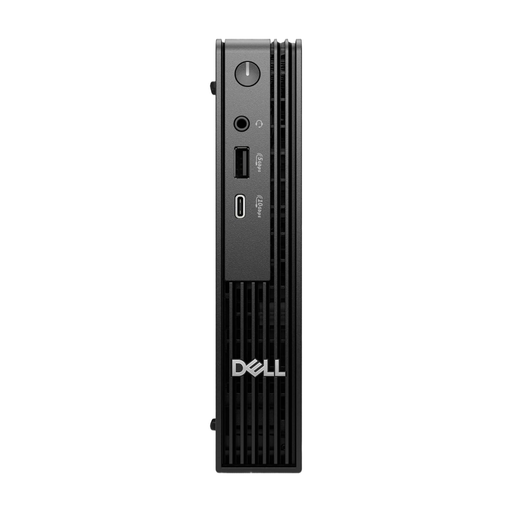
Dell Pro Micro QCM1250 MJ5TK TPM, Intel Core i7-14700T
This micro desktop is described as suitable for a compact workspace, and the specific configuration includes Windows 11 Pro.
16 GB DDR5, 512 GB NVMe SSD and Windows 11 Pro. The description says it can be placed behind a monitor or under a desk.
View at Joybuy
 No image available
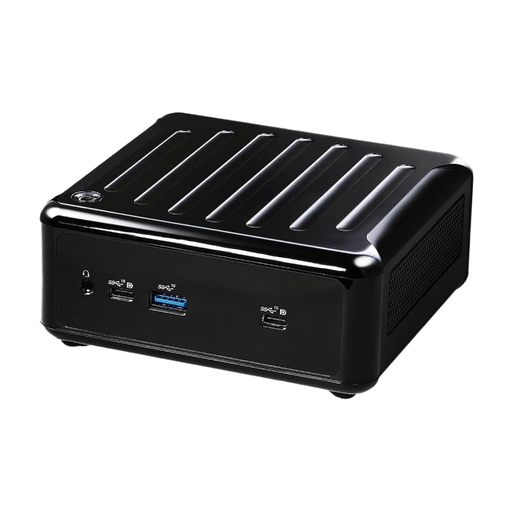
ASRock 4x4 BOX-5600U/EU/AI, AMD Ryzen 5600U
This barebone is suited to a build-your-own setup if you want to choose the components and take care of the installation yourself.
No operating system; two RAM slots, supporting up to 64 GB according to the description, plus M.2 and SATA storage connections. Four display outputs and two LAN ports are listed.
View at Joybuy
Frequently asked questions
Do I need Docker for every small website?
No, it depends on your project and the development workflow you choose. If you want to use Docker Desktop on Windows, compare the current system requirements with your operating system and computer. Docker lists WSL 2 as the default; according to Docker, it works for most users without administrator rights.
What should I back up once I’ve set up my projects?
Make regular additional backups of your project files to an external device. Germany’s Federal Office for Information Security recommends making regular backup copies; an internal SSD on its own isn’t a separate backup.
What are the key return and fault rights when buying online in Germany?
According to the Verbraucherzentrale, consumers buying at a distance generally have a 14-day right to cancel; the start date and exceptions depend on the circumstances. Your statutory rights against the seller are separate from any voluntary guarantee.
Does the CE mark prove the performance or quality of a specific mini PC?
No, the CE mark isn’t an independent assessment of a specific mini PC’s performance. According to Germany’s Federal Network Agency, the required marking applies to products covered by the relevant EU harmonisation legislation and placed on the EU market. Check the requirements for the specific offer.


