
Lieferung heute & morgen

Qualitätsgarantie

Willkommens-Angebote freischalten: KOSTENLOSE Lieferung | Bis zu 80 % RABATT | Kostenlose 30-Tage-JoyPlus-Testphase
App herunterladen
A mini PC takes up little space, can drive multiple monitors and, depending on its specification, is suitable for the office, working from home, multimedia, development or gaming. However, its compact design alone tells you little about its actual performance or how well it will suit everyday use. The key factors are the processor, memory, storage technology, ports, cooling and pre-installed operating system.
A current model name or high clock speed doesn’t automatically mean a computer is suitable for every application. An efficient quad-core processor is often enough for office software and video calls. But if you use virtual machines, edit images or run AI applications locally, you’ll need more cores, threads and memory.
You should also consider the integrated graphics. An AMD Ryzen mini PC with Radeon 660M, 680M, 760M or 780M graphics may be suitable for light graphics work and selected games. However, an integrated GPU isn’t automatically a substitute for a dedicated graphics card when it comes to demanding, recent games.
The term mini PC with 4K support initially describes only the available video output. You should also check:
For office setups with several screens, specific details about the number and type of video outputs matter more than a general claim about 4K.
A mini PC with 16 GB RAM provides a solid starting point for web browsing, office work, video calls and many study tasks. For creative software, development or data processing, 24 GB or 32 GB may be a better fit. It’s also important to check whether the memory can be upgraded or is soldered in place.
A Windows 11 Pro mini PC comes with the operating system set up. A Linux mini PC or barebone such as the ASRock 4x4 BOX-5600U/EU/AI, on the other hand, is supplied without a pre-installed operating system. This lets you choose the storage and memory yourself, in line with the relevant technical specifications. However, you’ll need to allow extra time for installation and may need to buy a valid licence.
Depending on your workload, efficient processors such as the AMD Ryzen 3 4300U or Intel Celeron N5095 are enough for office work and working from home. For frequent multitasking, consider models with six to eight cores. A high-performance mini PC needs more than a high peak clock speed: it should also have a suitable cooling system.
Keep the ventilation openings clear and place the computer on a firm, well-ventilated surface. Don’t use a compact desktop PC in an enclosed compartment if this restricts heat dissipation.
An SSD reduces start-up and loading times compared with a traditional hard drive. 256 GB is suitable for a lean system with few files stored locally; 512 GB gives you more room for programmes and documents. If you plan to store large media libraries, virtual machines or local models, consider 1 TB or the option to expand the storage.
Also check whether there’s a second M.2 slot or a SATA port. This is particularly relevant for devices with dual-storage configurations.
For a permanent workstation, several USB ports, 2.5-gigabit Ethernet and multiple video outputs can make everyday use easier. Wi-Fi 6, Wi-Fi 6E and Wi-Fi 7 are modern standards, but actual speeds depend on your router, broadband plan, distance and surroundings.
An AI mini PC for local inference also needs a suitable software environment. According to the product details, the ASUS Ascent GX10 comes with NVIDIA DGX OS and CUDA, PyTorch and TensorFlow components pre-installed. It’s aimed at developers and data scientists, rather than primarily at traditional office users.
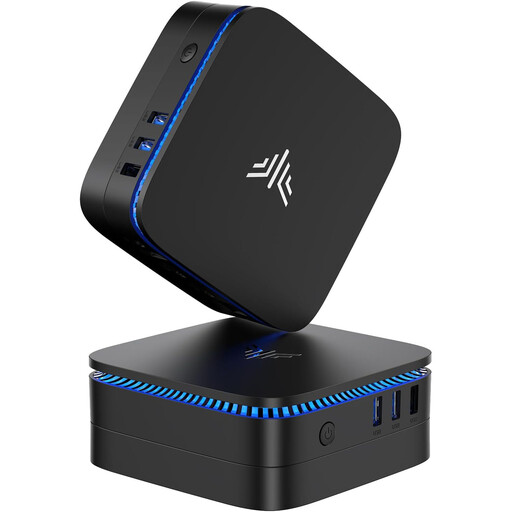
Why this product suits this type of user: The Intel Celeron N5095, 12 GB LPDDR4X and 256 GB M.2 SATA SSD are designed for everyday tasks, streaming and basic office applications. Windows 11 Pro comes pre-installed.
The specific details on RAM, SSD and HDMI 2.0 make it easier to assess than broad performance claims. However, this specification isn’t designed for demanding games or local AI tasks.
Compact case, 4K output at 60 Hz via HDMI 2.0 and Windows 11 Pro pre-installed.

Why this product suits this type of user: The Apple M6, 32 GB Unified Memory, 512 GB SSD and macOS make this a good fit for users in the Apple ecosystem, as well as creative and productivity-focused workflows.
Storage capacity, display support and connectivity are clearly specified. Bear in mind that you’ll be tied to macOS, and a keyboard and mouse need to be purchased separately.
32 GB Unified Memory, 512 GB SSD, Thunderbolt 4, HDMI and 2.5-gigabit Ethernet.
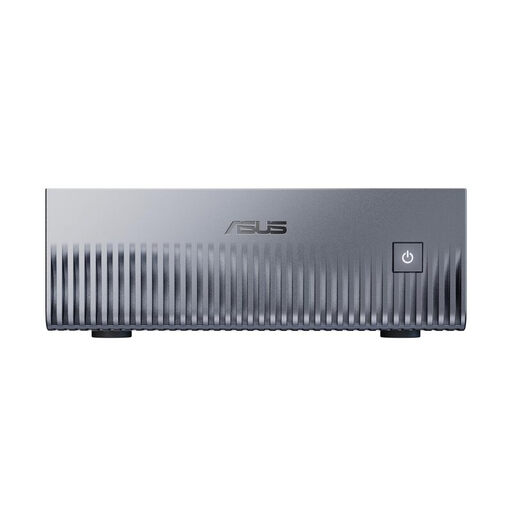
Why this product suits this type of user: According to the product details, it features the NVIDIA Grace Blackwell GB10, 128 GB Unified Memory, a 2 TB NVMe SSD and DGX OS. It’s designed for AI development, data science and edge inference.
Its high memory capacity and pre-installed Linux-based environment offer more specific information than a general AI label. This platform may be overkill for typical office tasks.
128 GB LPDDR5x Unified Memory, 2 TB PCIe 4.0 SSD, 10-gigabit Ethernet and Wi-Fi 7.

Why this product suits this type of user: The AMD Ryzen AI 9 365, with 24 GB DDR5, a 1 TB PCIe 4.0 SSD and Radeon 880M graphics, is worth considering if you’re planning to use several displays, handle more demanding multitasking or play light to moderately demanding games.
The specifications list the memory capacity, graphics solution, number of displays and ports. For recent games, check the resolution, detail settings and frame rate separately before buying.
24 GB DDR5 RAM, 1 TB SSD, USB4, HDMI 2.1, Oculink and support for up to four 4K displays, according to the product details.
We’ve put together a complete, regularly updated list of products that fully meet these strict selection criteria and the safety regulations in force in the EU.
Yes, as long as the processor, RAM and ports suit your workload. 8 to 16 GB RAM is often enough for browsing, office work, video calls and documents. If you regularly have lots of browser tabs, virtual meetings and large spreadsheets open at the same time, consider 16 GB or more.
Its lifespan depends on cooling, components, software support and how you use it. Keeping the ventilation clear, using it in a low-dust environment and installing the latest security updates all help ensure reliable operation. If the RAM is soldered in place, make sure you choose the right memory capacity when you buy it.
Many mini PC models use mobile or efficient processors and may therefore use less energy than a traditional desktop PC, depending on how they’re used. Actual power consumption depends on the processor, number of displays, power supply, workload and connected devices. To get a reliable estimate, check the power consumption under your specific operating conditions.