What should you look for when buying?
For Premiere, Adobe recommends 16 GB RAM for HD and at least 32 GB for 4K or higher. Premiere Productions is designed for editor teams working with shared storage. The German Federal Office for Information Security recommends regular external backups.
| Consideration |
What to check when buying |
Who should consider this? |
| Project handovers and media access |
Check whether several people need to work at the same time. Plan the storage location and network to suit your software and footage. |
If we edit projects and media as a team, everyone needs access from their workstation; around 31% of consumers put team access first. |
| Editing performance for your footage |
Check the resolution, codec and software version against your editing software’s requirements. |
For 4K footage, I want to match the configuration to my editing software rather than choosing based on the CPU alone; around 31% of consumers prioritise editing performance for their footage. |
| Backups and controlled access |
Plan for external backup storage and clear responsibilities, separately from your shared working storage. |
If interviews need to be preserved and access restricted to authorised people, I need a separate backup and access plan; around 23% of consumers put file preservation first. |
| Compact local editing setup |
Check the dimensions, the connections you need and the exact specifications of the configuration on offer. |
For a local workstation with limited space, I want to meet the software requirements without choosing an unnecessarily large setup; around 15% of consumers prioritise a compact, single-user workstation. |
Joybuy products for a local editing setup
This selection includes a Windows mini PC and Mac mini M6 configurations for local editing setups. Shared project storage and external backups need to be planned separately.
 No image available
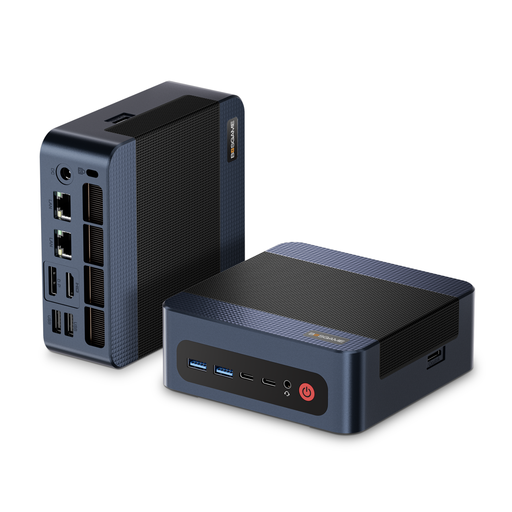
BOSGAME M4 Plus, Ryzen 9 7940HS, 32 GB RAM, 1 TB SSD
For a Windows editing workstation, provided your software and footage suit the configuration you choose.
Windows 11 Pro; 32 GB DDR5 RAM; 1 TB PCIe 4.0 SSD; additional PCIe SSD slot; 2.5 Gbit/s Ethernet. For Premiere with 4K footage, Adobe recommends at least 32 GB RAM.
View at Joybuy
 No image available
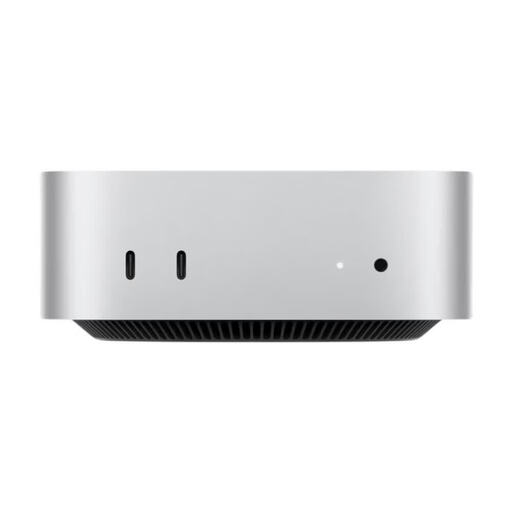
Apple Mac mini M6 (MHQM4_CTO_8, A3534), 32 GB Unified Memory, 1 TB SSD
An option for a local editing setup if macOS fits into your existing workflow.
M6 with 12-core CPU and 12-core GPU; 32 GB Unified Memory; 1 TB SSD; Thunderbolt 4 and 2.5 Gigabit Ethernet. Apple lists hardware-accelerated processing for H.264, HEVC and ProRes. Its 32 GB meets Adobe’s Premiere recommendation for 4K and higher.
View at Joybuy
 No image available
Apple Mac mini M6, 16 GB Unified Memory, 256 GB SSD
For an HD-focused Premiere workflow, check whether the 16 GB configuration meets your software and project requirements.
M6 with 12-core CPU and 12-core GPU; Thunderbolt 4 and 2.5 Gigabit Ethernet. Adobe recommends 16 GB RAM for Premiere with HD media, but at least 32 GB for 4K or higher.
View at Joybuy
No image available
Apple Mac mini M6, 16 GB Unified Memory, 512 GB SSD
For a local editing setup if your software requirements are compatible with the 16 GB configuration.
M6 with 12-core CPU and 12-core GPU; Thunderbolt 4 and 2.5 Gigabit Ethernet. For Premiere, Adobe recommends 16 GB for HD and at least 32 GB for 4K or higher.
View at Joybuy
No image available
Apple Mac mini M6, 24 GB Unified Memory, 512 GB SSD
Before choosing this configuration for 4K projects, check it against your footage and editing software.
M6 with 12-core CPU and 12-core GPU; Thunderbolt 4 and 2.5 Gigabit Ethernet. Its 24 GB exceeds Adobe’s recommendation for Premiere HD, but falls short of the recommendation of at least 32 GB for 4K or higher.
View at Joybuy
Frequently asked questions
Is 16 GB RAM enough for editing interviews?
It depends on your footage and software. For Premiere, Adobe recommends 16 GB for HD media and at least 32 GB for 4K or higher. This is not a universal requirement for other programmes.
How do I set up a shared Premiere editing workstation?
For a team using Premiere Productions, Adobe recommends shared storage and describes settings for project locking and shared scratch disks. First, check whether several people will actually be working in the same workflow. A single local editing workstation does not need this setup just because you are working with interview footage.
Is a shared drive enough for a backup?
No. The German Federal Office for Information Security recommends regular external backups; shared working storage serves a different purpose. Plan and test your recovery process before using the workstation for production.
What are my rights if my mini PC is faulty?
According to information from the European Union, when you buy as a consumer from a trader in the EU, you are generally entitled to a legal guarantee of at least two years from receipt of the goods, with the seller responsible. This is separate from a voluntary manufacturer’s warranty. Business purchases do not automatically come with the same consumer rights.
Can identifiable interview recordings be stored anywhere on a shared computer or in the cloud?
No. If an organisation processes personal data, it must identify an appropriate legal basis and put in place technical and organisational safeguards that match the risks. The European Data Protection Board outlines these requirements. What applies to a particular interview project depends, among other things, on its purpose, the people involved and the service used.


